Make Realistic Fake Blood Without a Cleanup Surprise

Mix a glossy prop-only fake blood batch, choose safer products for skin and costumes, and test cleanup before Halloween night.
Whether you own an iPad, a Mac, or even all three devices, regardless of what you think of Apple's intelligence, there's one important reason you should turn off Apple's AI features as soon as possible, just to... free up memory.
Apple brought the first features to compatible iPhones, iPads, and Macs in October with a point update to iOS 18/iPadOS 18 and macOS Sequoia, followed by an update in December that brought a more complete set of AI features, and the latest update adds much-needed improvements.
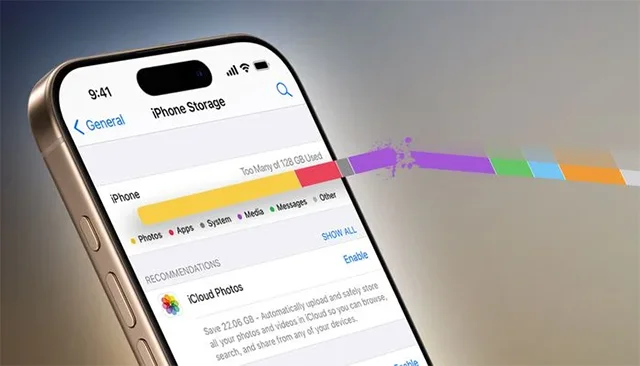
Despite the slew of updates, Apple Intelligence is still in beta, and user opinion is divided on how useful the AI toolkit currently is. But for some, when weighing the relative merits of these features, the deciding factor will be the impact on storage space. According to Apple’s support page, Apple Intelligence currently requires 7GB of storage across iPhone, iPad, and Mac. If you add up all devices, that’s a pretty significant 21GB.
How to turn off Apple Intelligence
Step 1: To completely disable Apple Intelligence, simply toggle the relevant switch on each supported device running the latest software.
Step 2: Compatible devices include any iPhone 16, iPhone 15 Pro, and iPhone 15 Pro Max models, any iPad with A17 Pro or M1, and Mac models with M1 or later.
Turn off Apple Intelligence on iPhone and iPad On iPhone and iPad, you can find this option in Settings ➝ Apple Intelligence & Siri. Turn off the switch next to Apple Intelligence.
Why does turning off Apple Intelligence free up memory?
Apple Intelligence uses a framework called MobileAsset to manage and deliver machine learning models and related resources to your devices. This framework dynamically downloads and updates the necessary components, ensuring your devices have access to the latest capabilities without requiring a full system update.
Fortunately, when you turn off Apple Intelligence, the system recognizes that the associated resources are no longer being used. The MobileAsset Framework will delete unused resources as it needs more space, optimizing and freeing up your internal storage in the process. Here are the steps you need to take to ensure this happens.
Mix a glossy prop-only fake blood batch, choose safer products for skin and costumes, and test cleanup before Halloween night.
Create a gentle Halloween look with pastel colors, friendly ghosts, easy no-carve accents, and practical safety tips for your home.
Create a spooky office cubicle with Halloween desk decor ideas that keep your workspace usable, tidy, and mindful of workplace safety.
Plan a recognizable Halloween 2026 look with pop culture costumes inspired by Spider-Man, Supergirl, Toy Story 5, Moana, Mario, and Wednesday.
Sort leftover Halloween candy safely, share or repurpose sealed treats, and choose food use or compost for pumpkins based on their condition.
Compare workplace Halloween costume choices by respect, dress code, mobility, and safety—and learn when a subtle accessory or a policy check is the better option.
Find a couples costume that fits your style, budget, and comfort level, from Addams Family classics to original inside-joke duos.
Need a last-minute high school Halloween costume? Compare 10 easy closet-based ideas by prep time, comfort, school-day practicality, and simple safety checks.
Use a simple 2026 Halloween decorating timeline for indoor décor, outdoor displays, and fresh pumpkins, with practical adjustments for weather and events.
Mix five vivid, approachable Halloween cocktails with measured recipes, simple prep tips, and an alcohol-free option for your party guests.








