How to add tracking exclusion sites on Edge

Tracking prevention in Microsoft Edge protects users from online tracking by limiting trackers' ability to access browser-based storage and networks. In addition to setting up default tracking prevention in the browser, you can also create exceptions for certain trusted websites. Here's how to add external websites to the tracking prevention in Edge.

Add tracking exclusion sites from Edge settings

Step 1:

You click on the 3 dots icon and select Settings in the displayed menu. Next, we click on Privacy, search and services .
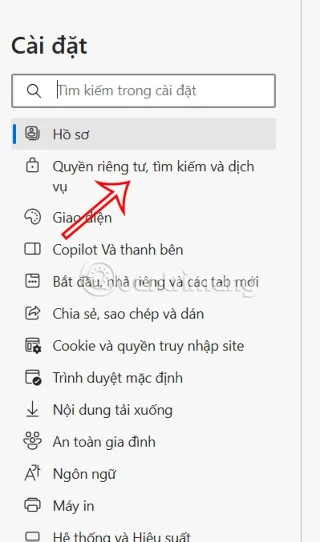
How to add tracking exclusion sites on Edge

Step 2:

Look to the side at the Prevent Tracking section , scroll down and click Exceptions to perform .
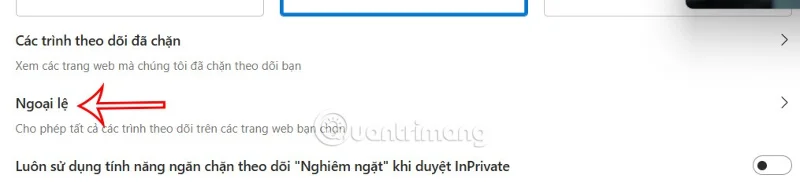
How to add tracking exclusion sites on Edge

Step 3:

Switch to the new interface, the user clicks on Add a website to add an exception website.

How to add tracking exclusion sites on Edge

We will paste the anti-tracking exception website into this interface and click Add .
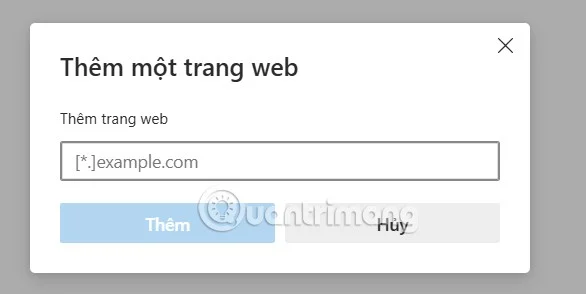
How to add tracking exclusion sites on Edge

Step 4:

If you want to delete, click on the 3 dots icon and select delete , or select Delete all with a list of multiple added websites.
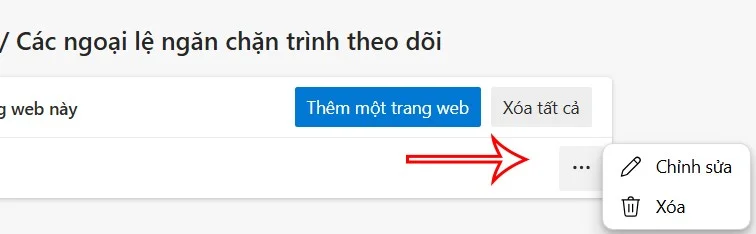
How to add tracking exclusion sites on Edge

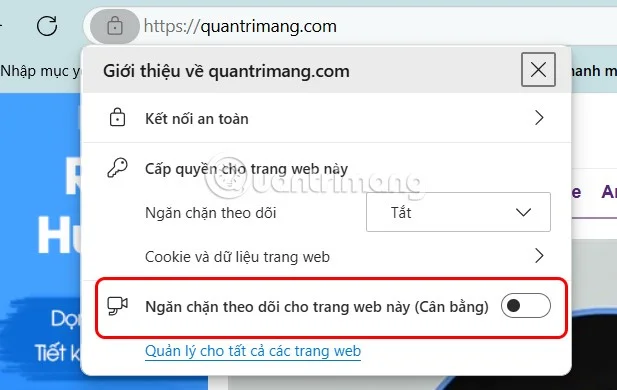
How to Add Tracking Exceptions from the Edge Address Bar

You access a website as usual, then click on the lock icon and you will see the option to add or remove tracking exception websites on Edge .

After changing, you need to restart the browser to apply.
How to add tracking exclusion sites on Edge

Leave a Comment

How to Fix Microsoft Teams Network Error Offline

How to Fix Microsoft Teams Network Error Offline

Stuck with Microsoft Teams "Network Error" offline? Discover proven, step-by-step solutions to fix Microsoft Teams network error offline quickly. Get back online fast—no tech skills needed!

Solving Microsoft Teams Error 4oggx

Solving Microsoft Teams Error 4oggx

Struggling with Microsoft Teams Error 4oggx? Discover proven fixes to resolve sign-in failures, crashes, and connectivity issues fast. Get back to productive calls without frustration!

How to Fix Microsoft Teams Remove Account Data Error

How to Fix Microsoft Teams Remove Account Data Error

Encountering the frustrating Microsoft Teams "Remove Account" Data Error? Discover quick, reliable fixes like clearing cache, resetting the app, and more to get back to seamless collaboration without losing data. Updated with the latest solutions.

Troubleshooting Microsoft Teams Layout Error Sidebar

Troubleshooting Microsoft Teams Layout Error Sidebar

Tired of the frustrating Microsoft Teams "Layout Error" Sidebar? Follow our proven, step-by-step troubleshooting guide with the latest fixes to get your Teams sidebar working smoothly again. No tech skills needed!

Troubleshooting Microsoft Teams Offline Error in 2026

Troubleshooting Microsoft Teams Offline Error in 2026

Stuck with Microsoft Teams offline error in 2026? Discover proven troubleshooting steps, common causes, and quick fixes to restore your connection fast. No tech skills required!

How to Fix Microsoft Teams Error M Memory

How to Fix Microsoft Teams Error M Memory

Tired of Microsoft Teams crashing with "Error M" memory issues? Follow our step-by-step guide to fix Error M in Teams, clear cache, update software, and boost performance—no tech skills required!

Step-by-Step: Setting Up Microsoft Teams Town Hall Events

Step-by-Step: Setting Up Microsoft Teams Town Hall Events

Discover the easiest step-by-step guide to setting up Microsoft Teams Town Hall events. Host massive virtual gatherings effortlessly with pro tips for seamless execution. Perfect for leaders and organizers!

How to Fix Microsoft Teams Download Error for PC

How to Fix Microsoft Teams Download Error for PC

Struggling with Microsoft Teams "Download Error" on PC? Discover proven, step-by-step fixes to resolve download failed issues quickly. Get back to seamless collaboration in minutes—no tech skills needed!

Troubleshooting Microsoft Teams Error L License

Troubleshooting Microsoft Teams Error L License

Stuck with Microsoft Teams "Error L" License error? Follow this step-by-step troubleshooting guide to resolve licensing issues quickly, restore access, and boost productivity without IT hassle. Updated with latest fixes.

Troubleshooting Microsoft Teams Video Call Freezing

Troubleshooting Microsoft Teams Video Call Freezing

Tired of Microsoft Teams video call freezing mid-meeting? Follow this proven troubleshooting Microsoft Teams video call freezing guide with quick fixes, advanced tips, and real solutions to restore smooth video instantly.

How to Fix Microsoft Teams Download Failed Due to Unexpected Error

How to Fix Microsoft Teams Download Failed Due to Unexpected Error

Frustrated by Microsoft Teams 'Download Failed Due to Unexpected Error'? Discover proven, step-by-step solutions to fix this common issue quickly and get back to seamless collaboration. Updated with the latest fixes for peak performance.

Why Did My Microsoft Teams Recording Fail? Common Reasons

Why Did My Microsoft Teams Recording Fail? Common Reasons

Frustrated because your Microsoft Teams recording failed? Uncover the top common reasons like permissions issues, storage limits, and network glitches, plus step-by-step fixes to prevent future failures and record flawlessly every time.

Solving Microsoft Teams Error B Connection

Solving Microsoft Teams Error B Connection

Struggling with Microsoft Teams "Error B" connection? Discover step-by-step fixes for smooth connectivity. Clear cache, check networks, and more in this ultimate guide to resolving Error B instantly.

How to Fix Microsoft Teams Application Is In A Bad State Error

How to Fix Microsoft Teams Application Is In A Bad State Error

Tired of the frustrating Microsoft Teams "Application Is In A Bad State" error crashing your meetings? Discover proven, step-by-step fixes to resolve it quickly and restore smooth teamwork. Updated with the latest solutions.

How to Check Microsoft Teams Version History and Build Number

How to Check Microsoft Teams Version History and Build Number

Discover simple steps to check your Microsoft Teams version history and build number on desktop, web, and mobile. Stay updated with the latest features and fixes effortlessly. Perfect for IT pros and everyday users.









