Make Realistic Fake Blood Without a Cleanup Surprise

Mix a glossy prop-only fake blood batch, choose safer products for skin and costumes, and test cleanup before Halloween night.
LaLa Land: The Secret Continent game code will help players receive many rewards such as money, gold coins and animal eggs, enhancement items to increase character strength in this mobile game . Many players will receive additional useful items for new players. Refer to the list of LaLa Land: The Secret Continent codes below and enter the code to redeem gifts.
Table of Contents
| Code | Bonus | Code status |
NOVIPLAND |
Enter this code to receive eggs, gold or silver coins, and power-up items. | Still in use |
NEWOPENWORLD |
Enter this code to receive eggs, gold or silver coins, and power-up items. | Still in use |
PETVIP |
Enter this code to receive eggs, gold or silver coins, and power-up items. | Still in use |
LALANOVIP |
Enter this code to receive eggs, gold or silver coins, and power-up items. | Still in use |
LALAFLEX |
Enter this code to receive eggs, gold or silver coins, and power-up items. | Still in use |
LALACODE |
Enter this code to receive eggs, gold or silver coins, and power-up items. | Still in use |
GACHAPET |
Enter this code to receive eggs, gold or silver coins, and power-up items. | Still in use |
There are currently no expired LaLa Land Secret Continent codes, enter all the codes in the code table above to redeem your rewards.
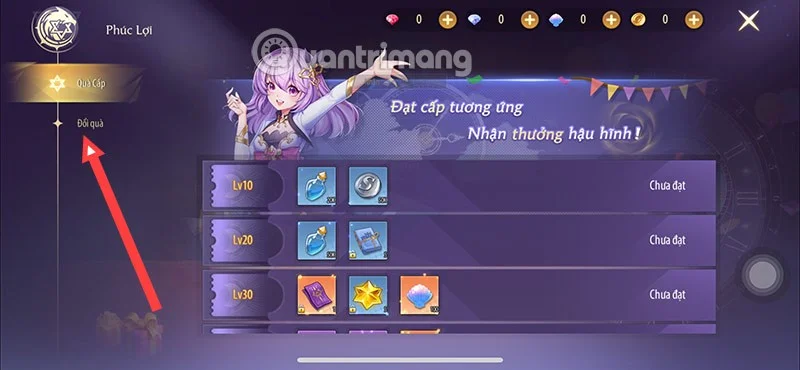
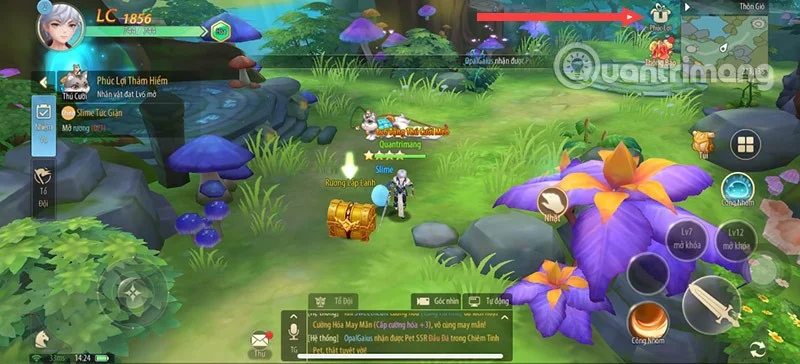
Step 1: First complete some quests at the beginning of the game, until you unlock the Benefits feature in the upper right corner of the screen next to the map.
Step 2: Then select Redeem Gift.
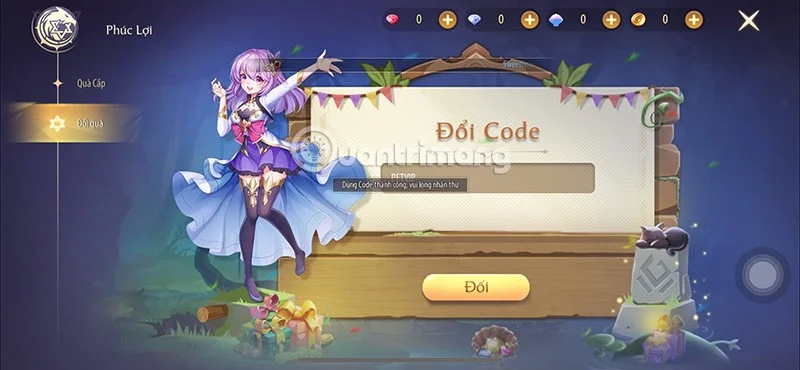
Step 3: Enter all valid codes in the code table above into the code entry box and select Redeem to redeem the corresponding code.
Step 4: If the code is still valid, you will see the message "Code exchange successful, received in Mail".
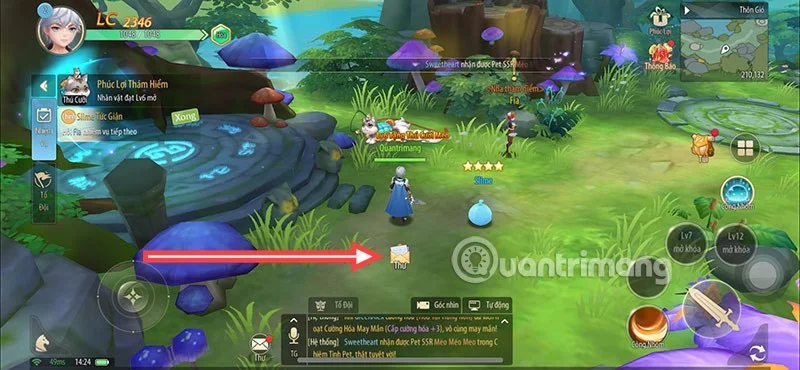
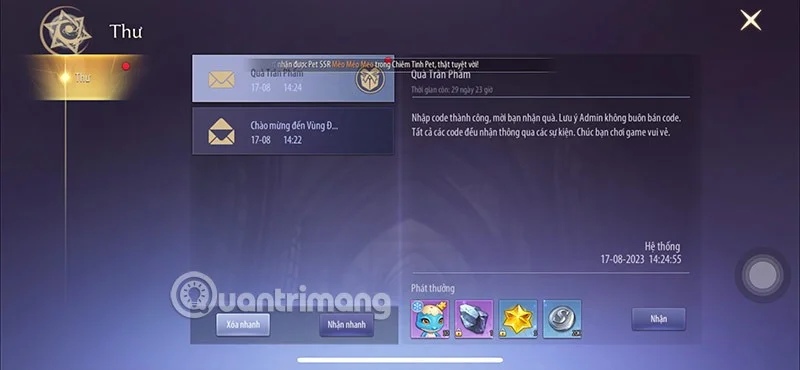
Step 5: Return to the main screen, you will see the Mail icon displayed in the middle of the screen, or you can also select the Mail icon next to the chat box.
Step 6: In the Mail section, you will see the mail sent from the game system. In addition to the giftcode mail, you will receive notification mails about events, new servers, game errors, compensation... that the game publisher sends to all gamers. Click Receive Quickly to receive all the gifts exchanged from the giftcode in the game.
Code LaLa Land Secret Continent is a discount code released by the game publisher LaLa Land Secret Continent. This code can be used to receive in-game rewards, such as gold, silver, enhancement stones, recruitment cards, pets, etc.
These rewards are perfect for beginners, thanks to these rewards, players can start the game more easily. This makes gamers not feel bored when they start playing.
To receive more LaLa Land Secret Continent codes, select the shortcut CTRL+D on the bookmark bar if you are using Google Chrome or Coc Coc browser to save this page on the bookmark bar. Then check back every day to receive new codes.
Or follow the official pages of the game publisher LaLa Land - The Secret Continent. Here you will receive not only giftcodes given to players by the game publisher. But also have the opportunity to earn many other giftcodes based on events held on holidays or when the game reaches a large number of players, opens more servers, updates new content...
The code you entered may have expired. Usually, the newbie code will have a longer time than the codes that the game publisher releases to players during events or to celebrate a certain holiday, or in an event to celebrate a new milestone of the game. So enter all the codes to redeem the reward while they are still valid.
In addition, the code also has letters and numbers, and they are all capitalized. If you write them in lowercase, you will not be able to change the code. So every character in the code must be written correctly, keeping lowercase, uppercase and numbers.
Mix a glossy prop-only fake blood batch, choose safer products for skin and costumes, and test cleanup before Halloween night.
Create a gentle Halloween look with pastel colors, friendly ghosts, easy no-carve accents, and practical safety tips for your home.
Create a spooky office cubicle with Halloween desk decor ideas that keep your workspace usable, tidy, and mindful of workplace safety.
Plan a recognizable Halloween 2026 look with pop culture costumes inspired by Spider-Man, Supergirl, Toy Story 5, Moana, Mario, and Wednesday.
Sort leftover Halloween candy safely, share or repurpose sealed treats, and choose food use or compost for pumpkins based on their condition.
Compare workplace Halloween costume choices by respect, dress code, mobility, and safety—and learn when a subtle accessory or a policy check is the better option.
Find a couples costume that fits your style, budget, and comfort level, from Addams Family classics to original inside-joke duos.
Need a last-minute high school Halloween costume? Compare 10 easy closet-based ideas by prep time, comfort, school-day practicality, and simple safety checks.
Use a simple 2026 Halloween decorating timeline for indoor décor, outdoor displays, and fresh pumpkins, with practical adjustments for weather and events.
Mix five vivid, approachable Halloween cocktails with measured recipes, simple prep tips, and an alcohol-free option for your party guests.








