Make Realistic Fake Blood Without a Cleanup Surprise

Mix a glossy prop-only fake blood batch, choose safer products for skin and costumes, and test cleanup before Halloween night.
To start participating in Lien Quan Mobile, you need to give yourself a name to create uniqueness and difference from other players. So what if you no longer like your account name, how can you change it to a more unique and special name?
Table of Contents
Note: For the game Lien Quan Mobile, when you want to change your name, you will need a Name Change Card . The first time you change your name, you will spend 1 Name Change Card, the next times the number of cards needed to change your name will be more.
To change your name, follow the steps below:
Step 1: At the main interface of the game, click on your avatar icon in the top right corner of the screen.
Step 2: In the Champion Information interface , click on the small gear icon . A toolbar appears, click on Edit name.
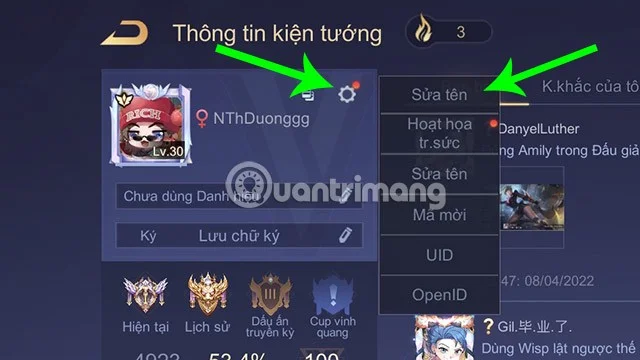
Step 3: A new window will appear allowing you to enter your new name. You will also know the number of name change cards you need to use right in this window.
Click OK after choosing a satisfactory name to complete the renaming process.

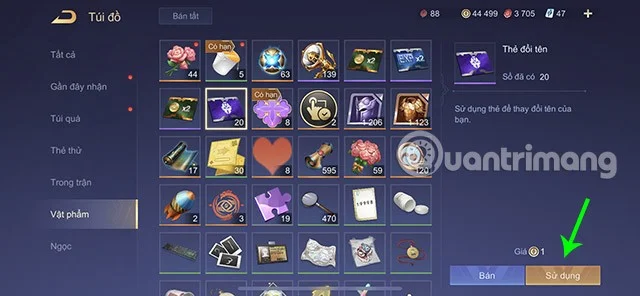
You can also change your name more quickly by going to the Wardrobe > Click on the Rename Card > Use and proceed to change your name as in Step 3.
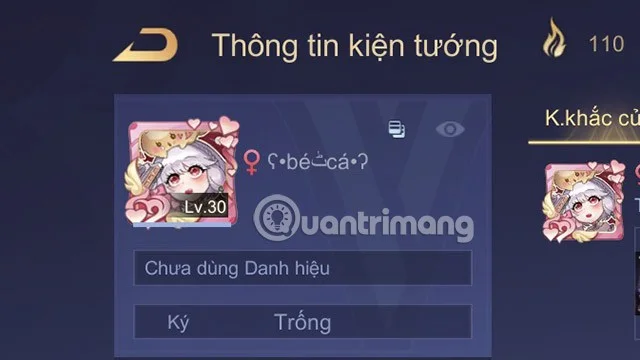
In addition to changing the normal name, you can also insert special characters to create uniqueness and distinction for the name in the game.
☹ ☺ ☻ ت ヅ ツ ッ シ ^o^ ^.^ ᵔᴥᵔ ﭢ ✿◕ ‿ ◕✿ ❀◕ ‿ ◕❀ ❁◕ ‿ ◕❁ (◡‿◡✿) (✿◠‿◠) ≥^.^≤ (>‿◠)✌ ≧✯◡✯≦✌ ≧◠◡◠≦✌ ≧'◡'≦ =☽ ≧◔◡◔≦ ≧◉◡◉≦ ≧✯◡✯≦ ≧❂◡❂≦ ≧^◡^≦ ≧°◡°≦ (°⌣°) ٩(^‿^)۶ ٩ (͡๏̮͡๏)۶ =^.^= (•‿•) (^L^) (>‿♥) ♥‿♥ ◙‿◙ (▰˘◡˘▰) < (^^,)=""> ».« ಠ_ృ ಥ_ಥ
v_v ►_◄ ►.◄ >.< ಠ_ರೃ="" ಠ╭╮ಠ="" מּ_מּ="" ಸ_ಸ="" ಠ,ಥ="" ໖_໖="" ծ_ăn="">
●_● (╥﹏╥) ( ´_⊃`) (►.◄) (ு८ு) (ಠ_ರೃ) (◕︵◕) ^( '-' )^ ఠ_ఠ
ಠ~ಠ ರ_ರ {•̃̾_•̃̾} 【•】 _【•】v( '.' )v ».« >.< ॓_॔="" (-"-)="" (="">.<) \m/(="">.<)\m>
⊙▃⊙ Oo v(ಥ ̯ ಥ)v (ㄒoㄒ) \˚ㄥ˚\ õ.O (OO) (⊙.◎) ๏_๏ |˚–˚| 'Ω'
ಠoಠ ☼.☼ ♥╭╮♥ Ôヮô ◘_◘ ਉ_ਉ $_$ ◄.► ~,~ ಠ▃ಠ ತಎತ ˚⌇˚
॓.॔ ‹•.•› ಸ_ಸ ~_~ ˘˛˘ 句_句 (°∀°) ヽ(`Д´)ノ ‹(•¿•)› (•̪●) (╥╥)
(✖╭╮✖) ⊙︿⊙ ⊙﹏⊙ ●︿● ●﹏● {(>_<)} o(╥﹏╥)o="" ('・ω・´)="" இ_இ="" (•="" ε="">
(●´ω`●) १|˚–˚|५ @(ᵕ.ᵕ)@ (*≗*) (─‿‿─) 凸(¬‿¬)凸 ¯\(©¿©) /¯
◤(¬‿¬)◥ (∪ ◡ ∪) (*^ -^*) (●*∩_∩*●) ◖♪_♪|◗ •(⌚_⌚)• !⑈ˆ~ˆ!⑈ ō_ō' ‹(•¿•)›
(\/) (°,,°) (\/) ╚(•⌂•)╝ (-'๏_๏'-) Ƹ̴ọ̿̿/'̿'̿ ̿ ┌∩┐(◣_◢)┌∩┐
← ↑ → ↓ ↔ ↕ ↖ ↗ ↘ ↙ ↤ ↥ ↦ ↧ ↰ ↱ ↲ ↳ ↴ ↵
↮ ↛ ↚ ⇤ ⇥ ↣ ↢ ↨ ↸ ↹ ↡ ↠ ↟ ↞ ⇞ ⇟ ⇱ ⇲
⇄ ⇅ ⇆ ⇇ ⇈ ⇉ ⇊ ⇚ ⇶
↼ ↽ ↾ ↿ ⇀ ⇁ ⇂ ⇃
⇐ ⇑ ⇓ ⇒ ⇔ ⇕ ⇍ ⇎ ⇏ ⇖ ⇗ ⇘ ⇙ ➾
↝ ↜ ↩ ↪ ↫ ↬ ⇴ ↭ ⇝ ↯ ↷ ↺ ↻ ⇜ ↶ ⃕
⇦ ⇩ ⇧ ⇨ ⇫ ⇳ ⇰ ⇯ ⇮ ⇭ ⇬ ⇫ ⇪ ➱ ➯ ➪ ➩
➔ ➙ ➘ ➚ ➛ ➜ ➞ ➟ ➠ ➡ ➨ ➺
➢ ➣ ➤ ➥ ➦ ➶ ➵ ➳ ➴ ➲ ➽ ➭ ➬ ➼ ➻ ➫ ➹ ➸ ➷ ➧
You can refer to other special characters that can be inserted into the Lien Quan account name that Quantrimang suggests:
As mentioned above, to be able to change your name you will need a Name Change Card. Currently, there are many different ways for you to own this special card.
The first way to own a Name Change Card is to buy it at the Items Shop . Each Name Change Card is sold for 90 Quan Huy (about 45,000 VND).
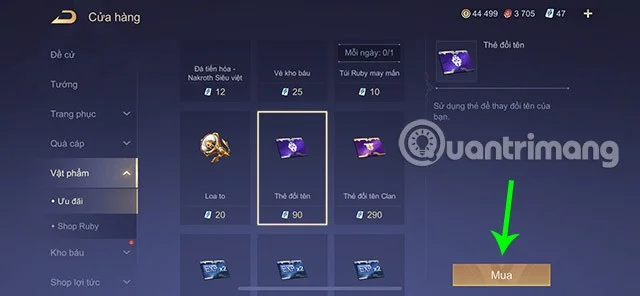
You will need to purchase the required number of Name Change Cards to be able to change your name. If you are not in a hurry to change your name, you can wait to receive free Name Change Cards through the following methods.
Through the Mission Book missions, players can receive various rewards including Name Change Cards.
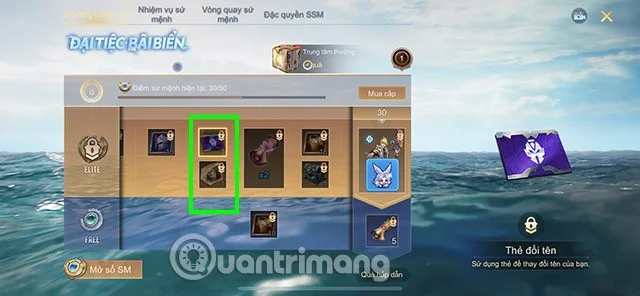
For each batch of Mission Books, you can get an average of 3 to 4 free Name Change Cards.
In addition, players can also refer to some other events of Lien Quan Mobile such as:
Above is how to change your name in Lien Quan Mobile as well as how to own a Name Change Card that Quantrimang wants to send to you. Hopefully you will be able to change your name to the most interesting and unique one.
Mix a glossy prop-only fake blood batch, choose safer products for skin and costumes, and test cleanup before Halloween night.
Create a gentle Halloween look with pastel colors, friendly ghosts, easy no-carve accents, and practical safety tips for your home.
Create a spooky office cubicle with Halloween desk decor ideas that keep your workspace usable, tidy, and mindful of workplace safety.
Plan a recognizable Halloween 2026 look with pop culture costumes inspired by Spider-Man, Supergirl, Toy Story 5, Moana, Mario, and Wednesday.
Sort leftover Halloween candy safely, share or repurpose sealed treats, and choose food use or compost for pumpkins based on their condition.
Compare workplace Halloween costume choices by respect, dress code, mobility, and safety—and learn when a subtle accessory or a policy check is the better option.
Find a couples costume that fits your style, budget, and comfort level, from Addams Family classics to original inside-joke duos.
Need a last-minute high school Halloween costume? Compare 10 easy closet-based ideas by prep time, comfort, school-day practicality, and simple safety checks.
Use a simple 2026 Halloween decorating timeline for indoor décor, outdoor displays, and fresh pumpkins, with practical adjustments for weather and events.
Mix five vivid, approachable Halloween cocktails with measured recipes, simple prep tips, and an alcohol-free option for your party guests.








