2027 Tesla Model 3: What We Know and What Buyers Should Expect

See what is confirmed about the 2027 Tesla Model 3, what remains unknown, and how U.S. buyers can decide whether to buy now or wait.
PlayStation has now confirmed the PlayStation Plus Monthly Games for October 2026, but there is an important timing detail: as of October 1, the October lineup has been announced but is not yet available to claim. Sony’s official announcement says the October games become available on Tuesday, October 6 and remain available through Monday, November 2. Until then, September’s Monthly Games remain the active lineup through October 5.
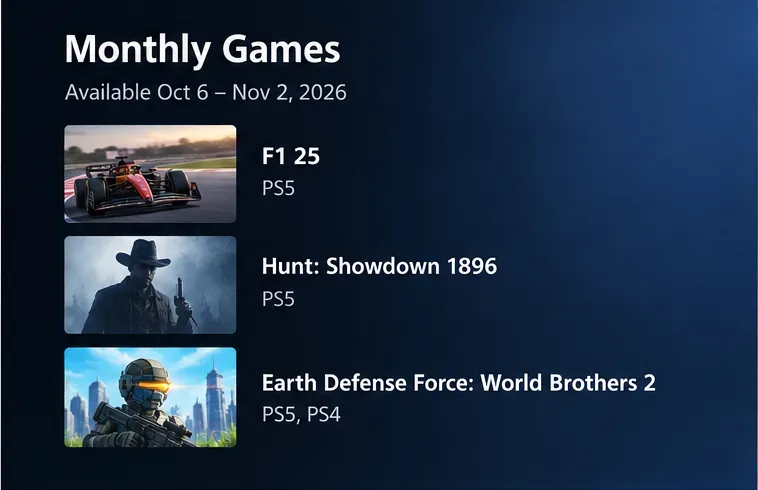
The October 2026 lineup is F1 25 for PS5, Hunt: Showdown 1896 for PS5, and Earth Defense Force: World Brothers 2 for PS5 and PS4. Sony also notes that Monthly Games lineups can vary by region, so the best final check is the PlayStation Store or PlayStation Plus hub for the account region you actually use. The official announcement is available on PlayStation.Blog.
A good result is not simply finding a social post or seeing one of the game names in search results. You should be able to verify four things: the game is part of the October Monthly Games lineup in your region, the availability window has started, your PlayStation Plus membership is active, and the Store or PlayStation Plus page is offering the game through your subscription rather than only showing its normal purchase price.
| What to verify | October 2026 status | What success looks like |
|---|---|---|
| Release window | October 6 through November 2, 2026 | The title appears in Monthly Games during that window |
| F1 25 | PS5 | Available as an October Monthly Game for the eligible account |
| Hunt: Showdown 1896 | PS5 | Available as an October Monthly Game for the eligible account |
| Earth Defense Force: World Brothers 2 | PS5, PS4 | Correct console version is shown for your hardware |
| Region | May vary | Your local PlayStation Store matches the lineup shown for your account |
If you are checking on October 1, 2, 3, 4, or 5 and still see September’s games, that is expected rather than a sign that the October lineup is missing. PlayStation’s September announcement says Sniper Elite: Resistance, MLB The Show 26, Wobbly Life, and Chained Echoes remain available until Monday, October 5.
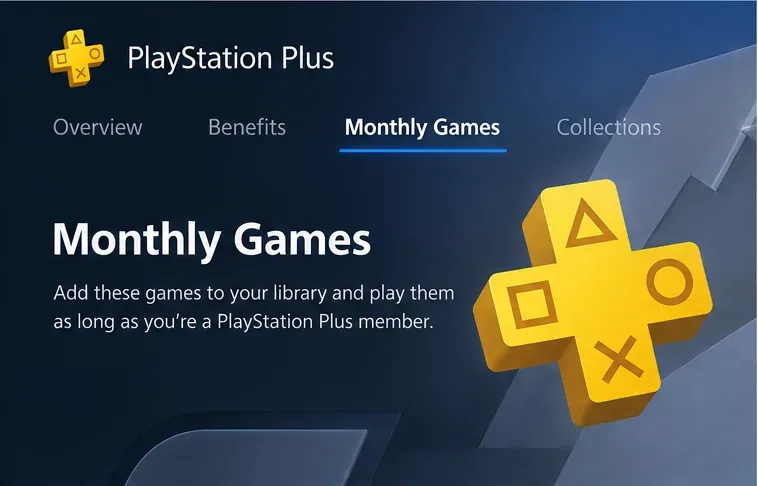
PlayStation Support currently gives a short path for PS5: from the Games home screen, scroll to PlayStation Plus, open it, move to the Benefits tab, and select Monthly Games. Choose a game and select Download. That support path is documented on the official PlayStation Plus games support page.
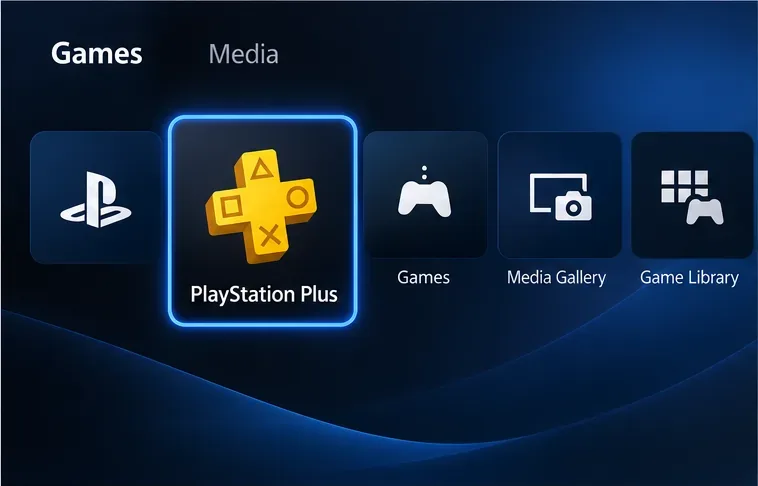
The first quality check is simple: make sure you are in the PlayStation Plus area, not only in a general Store search result. A normal product page may show a price even when a subscription version is available elsewhere, and different editions can also appear separately.
From October 6, the confirmed list should show F1 25 on PS5, Hunt: Showdown 1896 on PS5, and Earth Defense Force: World Brothers 2 on both PS5 and PS4, subject to regional availability. Sony describes F1 25 as the official game of the 2025 FIA Formula One World Championship, Hunt: Showdown 1896 as an extraction shooter centered on tracking bosses and escaping with bounties, and Earth Defense Force: World Brothers 2 as a voxel-styled EDF entry with online co-op and local split-screen support.
If one of these games is absent on October 6, do not immediately assume your subscription is broken. First check your account region, refresh the PlayStation Plus area, and confirm the official Store listing in that region. Sony explicitly says the lineup may differ by region. Also verify that you are signed into the same account that holds the PlayStation Plus membership.
On PS5, PlayStation Support instructs users to select Download from the Monthly Games entry. On PS4, the documented path is PlayStation Plus > Monthly Games, then Add to Library > Download. The practical success signal is that the title becomes associated with your account library and can be downloaded under your active PlayStation Plus membership.
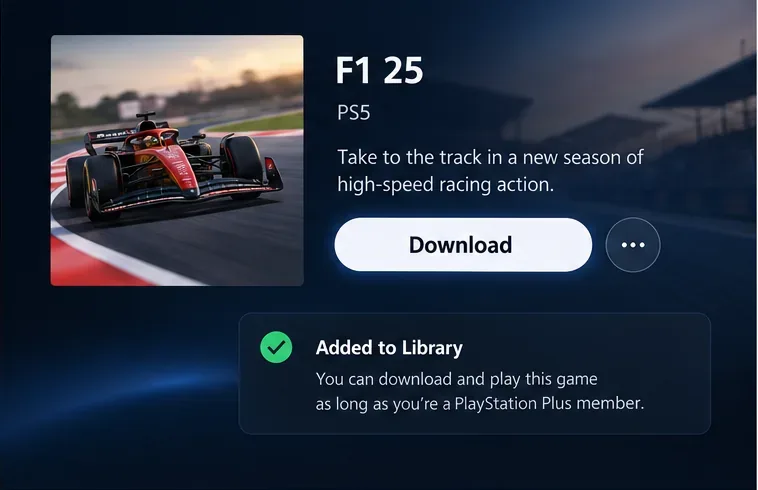
You do not need to install every Monthly Game immediately to make use of the monthly claim window. The important action is adding the eligible title to your library during the availability period. However, interface wording can differ between console generations and can change over time, so if the screen does not match the illustration exactly, follow PlayStation’s current support instructions instead of relying on appearance alone.
Yes, the PlayStation App can be useful when you are away from the console. PlayStation says the app can start remote downloads to a linked PS5 or PS4. Its current support page explains that you can open the app, go to the Store to find content, and use Game Library > Purchased to select a game and start a download. The console must be linked appropriately, and remote downloading depends on the console’s network and rest-mode settings. See the official PlayStation App support guide for current requirements.
This is useful as a second verification method, but it has limits. App content can vary by region, and a game’s presence in search is not by itself proof that the subscription entitlement has been applied. The stronger signal is the account-specific library or subscription state after the Monthly Games window has opened.
Work through the likely causes in order rather than repeatedly refreshing the same page:
If the expected entitlement still does not appear after the release window has started and your membership is active, switch from troubleshooting the storefront to PlayStation Support. That is the point where an account, licensing, or regional issue may need direct help rather than more local menu navigation.
This distinction matters because the two benefits use different availability models. Monthly Games are the rotating titles offered to PlayStation Plus members each calendar month. The Game Catalog is a separate benefit for PlayStation Plus Extra and Premium members, while the Classics Catalog is associated with Premium. A title appearing in the Game Catalog is not the same thing as claiming that month’s Monthly Game.
For October 2026, the quickest reliable process is therefore: verify the announcement on PlayStation.Blog, wait until October 6, open PlayStation Plus on your console, go to Monthly Games, confirm the correct title and platform, and add or download it from the subscription listing. If what you see does not match, check region, account, membership, and date before assuming the lineup changed.
Bottom line: the confirmed October 2026 Monthly Games are F1 25, Hunt: Showdown 1896, and Earth Defense Force: World Brothers 2. The decisive date is October 6. Before then, seeing September’s lineup is normal; from October 6 through November 2, the PlayStation Plus Monthly Games section and your regional PlayStation Store should be the primary places to verify what your account can actually claim.
See what is confirmed about the 2027 Tesla Model 3, what remains unknown, and how U.S. buyers can decide whether to buy now or wait.
The Amazon Prime FTC settlement now pays eligible U.S. customers automatically. Review the updated eligibility rules, payment timeline, $200 cap, and scam warnings.
See the confirmed October 2026 PlayStation Plus Monthly Games, availability dates, and how to verify, claim, and download them on PS5, PS4, or PlayStation App.
Micron’s fiscal Q4 results and fiscal 2027 outlook put MU stock and AI memory demand in focus. See what the numbers signal—and what they do not.
An Extreme Heat Watch means dangerous heat is possible, but not certain. Learn how to plan cooling, adjust activities, check on others, and spot heat illness emergencies.
OpenAI dots are new always-on agents inside ChatGPT. Learn what they do, who can access them, how they differ from normal chats, and what to check first.
Game Informer is surging alongside its new GTA 6 cover story. Here’s what was confirmed, what remains uncertain, and which sources GTA 6 fans should trust.
Compare Bose QuietComfort, QuietComfort Ultra, Ultra Open, and Sport Open earbuds by noise cancellation, fit, battery life, workouts, calls, and value.
Plan around Chicago’s October 2026 closures: check CPL branch hours, museum exceptions, USPS service on October 12, City office closures, and online options.
Plan Chicago travel in October 2026 with confirmed CTA rail and bus changes, marathon and 5K road closures, parking restrictions, affected times, alternatives, and items still subject to change.