Review of lock&lock EJF691 10 liter air oven

Your food will no longer smell of smoke or burn when grilled thanks to the lock&lock EJF691 10 liter air oven. More specifically, the product heats food with hot air flow, without using oil, good for the health of the user.

Features of lock&lock EJF691 10 liter air oven

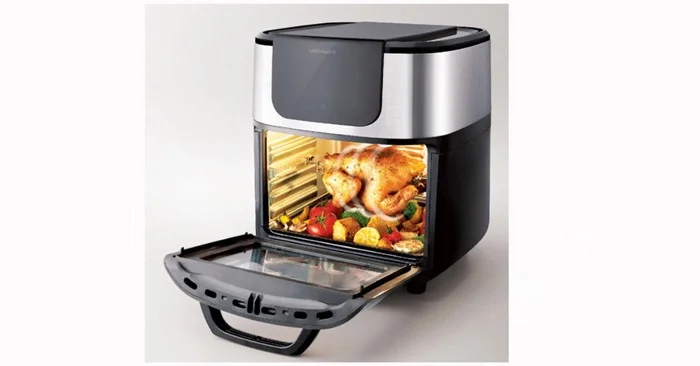
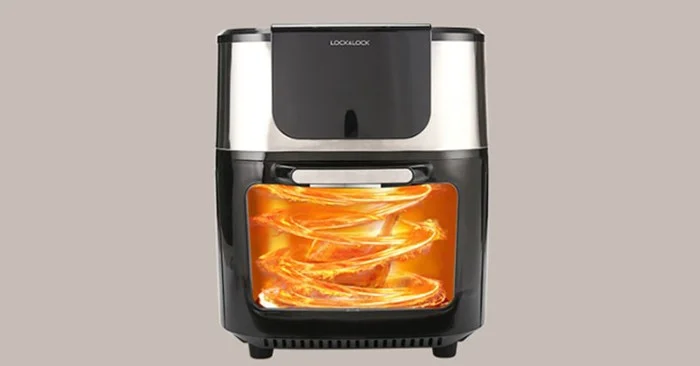
The lock&lock EJF691 10 liter air oven has a compact design, especially with a transparent window on the front that allows you to directly observe the food preparation process.

Review of lock&lock EJF691 10 liter air oven

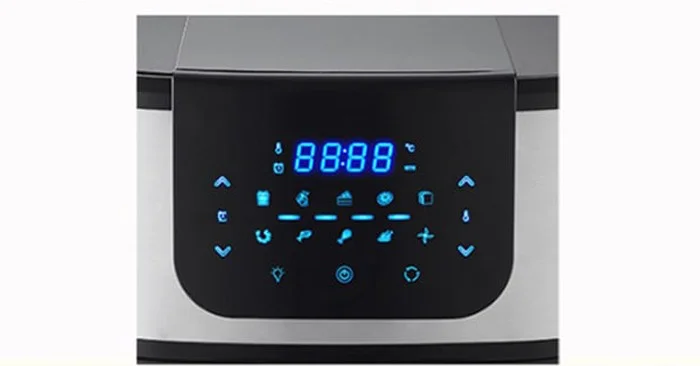
In addition, this product has a large touch screen display panel, simple and convenient operation. Symbols for 10 cooking functions, touch temperature increase and decrease all appear right on the screen.
Review of lock&lock EJF691 10 liter air oven

The 10 liter capacity oven is the perfect choice for small families, and can be used for all types of fish and vegetables.
Review of lock&lock EJF691 10 liter air oven

The product is cooked by hot air streams instead of hot oil, which is better for your health. You do not need to add oil, the heating elements are heated to circulate hot air in the oven, thereby cooking the food. In addition, the oven is also equipped with an odor and smoke filter, so that the food does not smell like smoke.
Review of lock&lock EJF691 10 liter air oven

Air fryer is a combination of many appliances and cooking tools such as oven, fryer, grill, frying pan and dryer. With a digital timer with built-in automatic shut-off mode, you can completely do other things without worrying about timing to turn off the oven, saving time.

The anti-slip base design at the bottom of the product avoids danger and the air vent on the surface helps dissipate heat promptly, prolonging the life of the machine.

Review of lock&lock EJF691 10 liter air oven

The oven comes with 5 accessories when purchased: rotating grill cage, whole chicken skewer, vacuum rack, oil tray and tools to remove grill, cage, and skewer.

Review of lock&lock EJF691 10 liter air oven

Technical specifications of lock&lock air oven EJF691

  • Brand origin: Korea
  • Origin: China
  • Model: EJF691
  • Material: PP, PA, ABS plastic, stainless steel
  • Capacity: 10 liters
  • Power: 1800W
  • Weight: 8.8kg
  • Size: 36.5cm x 32.2cm x 38.2cm

Notes when using lock&lock EJF691 10 liter air oven

Here are some notes when you use this oven:

  • Make sure the plug is properly inserted into the wall outlet.
  • Do not put any liquid into electrical parts to avoid electric shock.
  • Do not immerse the appliance, electrical components and heating element in water. Do not pour water over the appliance.
  • Do not cover the vent.
  • Do not overcrowd the oven, to prevent food from coming into contact with the appliance lid and heating elements.
  • Do not put oil in the rotating basket, it may cause fire and personal injury.
  • Do not put your hands into the device unless it has cooled completely, to avoid danger to life.
  • Do not place the device against a wall or on top of other devices.
  • This appliance is not suitable for use by persons (including children) with reduced physical or mental capabilities, or lack of experience and knowledge, unless they have been given supervision or instruction concerning use of the appliance in a safe manner.
  • Do not use the device for purposes other than those mentioned in the user manual.
  • Refer to the user manual for additional notes.

Hopefully with the detailed information above, the lock&lock EJF691 air oven will be a close friend to housewives.

Leave a Comment

How to Fix Microsoft Teams Network Error Offline

How to Fix Microsoft Teams Network Error Offline

Stuck with Microsoft Teams "Network Error" offline? Discover proven, step-by-step solutions to fix Microsoft Teams network error offline quickly. Get back online fast—no tech skills needed!

Solving Microsoft Teams Error 4oggx

Solving Microsoft Teams Error 4oggx

Struggling with Microsoft Teams Error 4oggx? Discover proven fixes to resolve sign-in failures, crashes, and connectivity issues fast. Get back to productive calls without frustration!

How to Fix Microsoft Teams Remove Account Data Error

How to Fix Microsoft Teams Remove Account Data Error

Encountering the frustrating Microsoft Teams "Remove Account" Data Error? Discover quick, reliable fixes like clearing cache, resetting the app, and more to get back to seamless collaboration without losing data. Updated with the latest solutions.

Troubleshooting Microsoft Teams Layout Error Sidebar

Troubleshooting Microsoft Teams Layout Error Sidebar

Tired of the frustrating Microsoft Teams "Layout Error" Sidebar? Follow our proven, step-by-step troubleshooting guide with the latest fixes to get your Teams sidebar working smoothly again. No tech skills needed!

Troubleshooting Microsoft Teams Offline Error in 2026

Troubleshooting Microsoft Teams Offline Error in 2026

Stuck with Microsoft Teams offline error in 2026? Discover proven troubleshooting steps, common causes, and quick fixes to restore your connection fast. No tech skills required!

How to Fix Microsoft Teams Error M Memory

How to Fix Microsoft Teams Error M Memory

Tired of Microsoft Teams crashing with "Error M" memory issues? Follow our step-by-step guide to fix Error M in Teams, clear cache, update software, and boost performance—no tech skills required!

Step-by-Step: Setting Up Microsoft Teams Town Hall Events

Step-by-Step: Setting Up Microsoft Teams Town Hall Events

Discover the easiest step-by-step guide to setting up Microsoft Teams Town Hall events. Host massive virtual gatherings effortlessly with pro tips for seamless execution. Perfect for leaders and organizers!

How to Fix Microsoft Teams Download Error for PC

How to Fix Microsoft Teams Download Error for PC

Struggling with Microsoft Teams "Download Error" on PC? Discover proven, step-by-step fixes to resolve download failed issues quickly. Get back to seamless collaboration in minutes—no tech skills needed!

Troubleshooting Microsoft Teams Error L License

Troubleshooting Microsoft Teams Error L License

Stuck with Microsoft Teams "Error L" License error? Follow this step-by-step troubleshooting guide to resolve licensing issues quickly, restore access, and boost productivity without IT hassle. Updated with latest fixes.

Troubleshooting Microsoft Teams Video Call Freezing

Troubleshooting Microsoft Teams Video Call Freezing

Tired of Microsoft Teams video call freezing mid-meeting? Follow this proven troubleshooting Microsoft Teams video call freezing guide with quick fixes, advanced tips, and real solutions to restore smooth video instantly.

How to Fix Microsoft Teams Download Failed Due to Unexpected Error

How to Fix Microsoft Teams Download Failed Due to Unexpected Error

Frustrated by Microsoft Teams 'Download Failed Due to Unexpected Error'? Discover proven, step-by-step solutions to fix this common issue quickly and get back to seamless collaboration. Updated with the latest fixes for peak performance.

Why Did My Microsoft Teams Recording Fail? Common Reasons

Why Did My Microsoft Teams Recording Fail? Common Reasons

Frustrated because your Microsoft Teams recording failed? Uncover the top common reasons like permissions issues, storage limits, and network glitches, plus step-by-step fixes to prevent future failures and record flawlessly every time.

Solving Microsoft Teams Error B Connection

Solving Microsoft Teams Error B Connection

Struggling with Microsoft Teams "Error B" connection? Discover step-by-step fixes for smooth connectivity. Clear cache, check networks, and more in this ultimate guide to resolving Error B instantly.

How to Fix Microsoft Teams Application Is In A Bad State Error

How to Fix Microsoft Teams Application Is In A Bad State Error

Tired of the frustrating Microsoft Teams "Application Is In A Bad State" error crashing your meetings? Discover proven, step-by-step fixes to resolve it quickly and restore smooth teamwork. Updated with the latest solutions.

How to Check Microsoft Teams Version History and Build Number

How to Check Microsoft Teams Version History and Build Number

Discover simple steps to check your Microsoft Teams version history and build number on desktop, web, and mobile. Stay updated with the latest features and fixes effortlessly. Perfect for IT pros and everyday users.









