Make Realistic Fake Blood Without a Cleanup Surprise

Mix a glossy prop-only fake blood batch, choose safer products for skin and costumes, and test cleanup before Halloween night.
This season 14 TFT Street Demon is probably one of the most populous clans with up to 8 generals. Therefore, combining with other generals is quite flexible, and if you feel that the main force you have been aiming for from the beginning is not going anywhere, you can choose another general. Or Street Demon generals can also appear in other squads, if you need suggestions when aiming for this squad, please scroll down below and take a look.
Build a Street Demon team in TFT season 14, QDP TFT squad
Allies in colored squares gain bonus power, with some special squares gaining an additional 50%. Street Demons double all bonuses, with the following levels:
Early Game (Level 2-4)
Start with Dr. Mundo (tank), Zyra (support/magic damage), Ekko (support/magic damage), and another magic damage dealer. The goal is to have at least 3 QDP to trigger the initial bonus (+6% health, 6 AP, 6% AD).
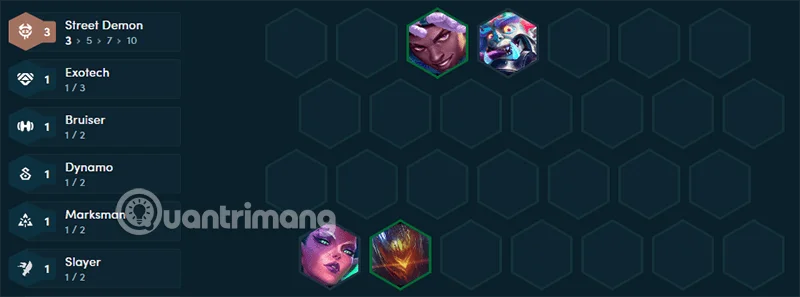
Dr. Mundo should get a Blood Vest, Thornmail, or Gargoyle Stoneplate to increase his resistance right now, and can be thrown to Neeko later. Zyra needs items like Jeweled Gloves, Spear of Shojin, and Nashor's Tooth to increase her magic damage. Place your QDP units in the colored slots if possible, prioritizing protecting your tank in the front row. Get to 4 on round 2-1.
Mid Game (Level 4-6)
Get to 6 in round 3-2, add Jinx or Rengar to reach 5 QDP. Jinx is an AD carry, Rengar is a frontline raider. Jinx needs Infinity Edge, Last Whisper or Rageblade. Rengar is good with Rageblade, Bloodthirster, and Titan's Power. Continue to put QDP in the colored slots, start looking for high-level champions like Brand or Neeko. If you want to roll for Jinx, level up to 7 and slowroll her there, when you get Jinx to 3 stars, you can go to 8.
You can consider the team to combine the Advisor with Yuumi and Ziggs in the late game, because the Advisor this season is quite flexible in providing both Resistance and Damage. You don't need to activate Marksman, AMP or Specialist for the main damage dealers for the team.
Late Game (Level 7-9)
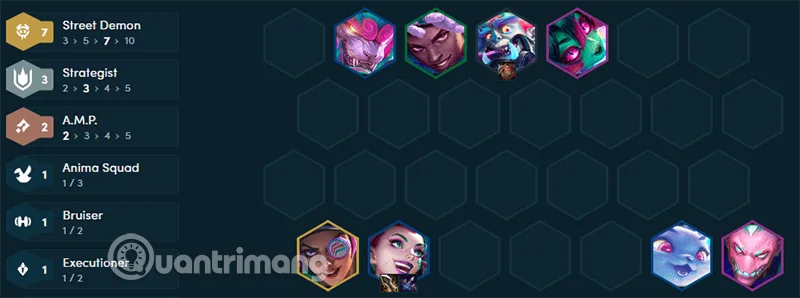
Aim for 7 or 10 Street Demons with Brand (main magic damage), Neeko (main tank/support), and Samira as your main AD carry. Prioritize 2 or 3 star upgrades for key champions.

Brand needs Riddler's Cap, Nashor's Tooth, Spear of Shojin, and Gem Gauntlet. Samira has items like Rageblade, Infinity Edge, Blue Bow, and Hand of Justice. If you can get 10 Street Demons, you don't have to worry about placement. You can put Street Demon Marks on 5-cost champions.
Items for Street Demon champions DTCL season 14
| General | Role | Suggested Equipment |
|---|---|---|
| Dr. Mundo | Tank | Warmog's Armor, Cloak of Fire, Gargoyle Stoneplate |
| Zyra | Support/Magic Damage | Sorcerer's Hat, Gem Gloves, Angel's Staff |
| Ekko | Support/Magic Damage | Sorcerer's Hat, Gargoyle, Warmog's Armor, Thornmail |
| Jinx | Carry AD | Infinity Edge, Hextech Gunblade, Blue Bow |
| Rengar | Assassin/Damage | Guinsoo's Rageblade, Hextech Gunblade, Bloodthirster, Hand of Justice, Colossal Power |
| Brand | Magic damage | Sorcerer's Hat, Gem Gloves, Angel's Staff |
| Neeko | Tank/Support | Warmog's Armor, Gargoyle Stoneplate, Cloak of Fire, Dragon's Claw, Redemption Necklace, Thornmail |
| Samira | Main Carry | Hextech Gunblade, Bloodthirster, Infinity Edge, Hand of Justice |
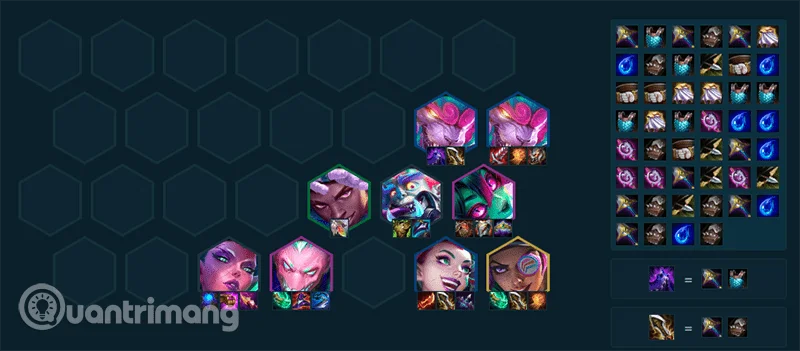
Team roles can all use items for each other, for example Jinx holds items for Samira, Zyra holds items for Brand, Ekko, Neeko and Mundo hold the same tank items, and the rest of the support items are for Rengar.
Mix a glossy prop-only fake blood batch, choose safer products for skin and costumes, and test cleanup before Halloween night.
Create a gentle Halloween look with pastel colors, friendly ghosts, easy no-carve accents, and practical safety tips for your home.
Create a spooky office cubicle with Halloween desk decor ideas that keep your workspace usable, tidy, and mindful of workplace safety.
Plan a recognizable Halloween 2026 look with pop culture costumes inspired by Spider-Man, Supergirl, Toy Story 5, Moana, Mario, and Wednesday.
Sort leftover Halloween candy safely, share or repurpose sealed treats, and choose food use or compost for pumpkins based on their condition.
Compare workplace Halloween costume choices by respect, dress code, mobility, and safety—and learn when a subtle accessory or a policy check is the better option.
Find a couples costume that fits your style, budget, and comfort level, from Addams Family classics to original inside-joke duos.
Need a last-minute high school Halloween costume? Compare 10 easy closet-based ideas by prep time, comfort, school-day practicality, and simple safety checks.
Use a simple 2026 Halloween decorating timeline for indoor décor, outdoor displays, and fresh pumpkins, with practical adjustments for weather and events.
Mix five vivid, approachable Halloween cocktails with measured recipes, simple prep tips, and an alcohol-free option for your party guests.








