Home
» Share
»
Time-Blocking Strategies for Maximum Focus: Choose the Right System for Your Workday
Time-Blocking Strategies for Maximum Focus: Choose the Right System for Your Workday
Time blocking sounds simple: decide in advance what you will work on and reserve a place for it on your calendar. The difficulty starts when real life arrives. A rigid schedule can protect focus, but it can also collapse after one urgent request. A loose schedule leaves room for surprises, but may provide too little protection for demanding work.
The most useful way to think about time blocking is not as one productivity system, but as a family of scheduling strategies. The right choice depends on how predictable your day is, how much uninterrupted concentration your work requires, and how often other people can legitimately interrupt you.
Research does not establish one universally optimal block length or one calendar layout. What it does support are several underlying ideas: interruptions can make task resumption harder, unfinished work can leave attention partly stuck on the previous task, and specifying when and where an action will happen can improve follow-through. That makes time blocking a practical way to apply those principles, not a scientifically guaranteed formula.
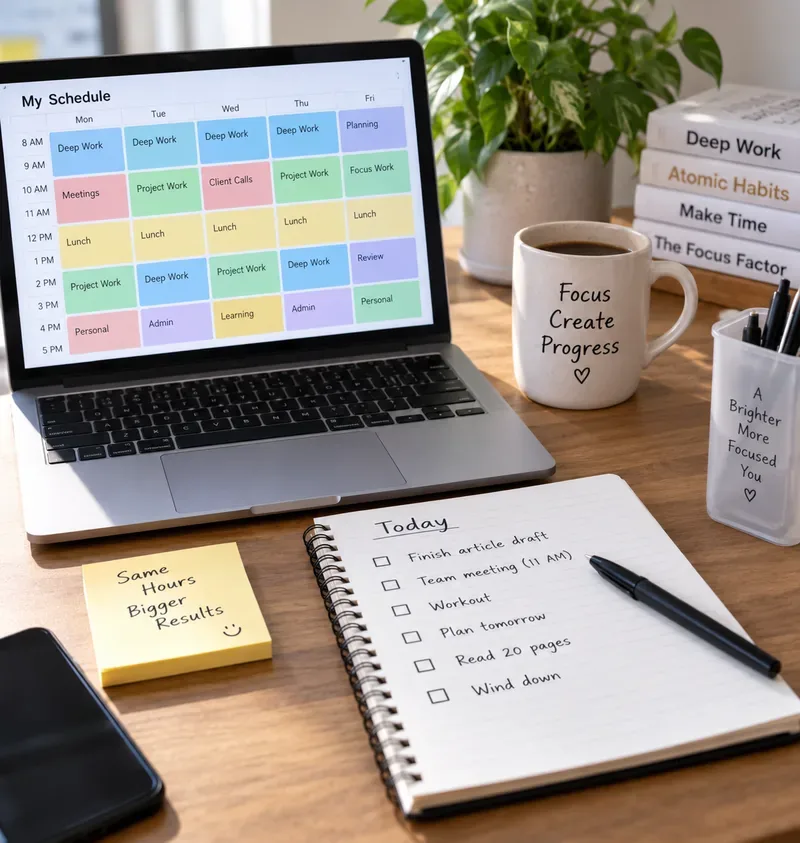
A weekly calendar separates deep work, project work, meetings, lunch, admin, and personal time while a paper checklist keeps the day’s priorities visible.
Start with the real problem: protecting attention, not filling every minute
A common mistake is to treat an empty calendar as wasted space. That usually produces a day packed with back-to-back blocks, leaving no room for transition time, overruns, or urgent work. The result looks organized at 8 a.m. and becomes fiction by noon.
The better goal is selective commitment. Reserve your highest-quality attention for the work that benefits most from concentration, then choose a lighter structure for everything else.
This matters because switching has a cognitive cost. Sophie Leroy’s experiments on attention residue found that when people moved from one unfinished task to another, some attention remained on the previous task and performance on the next task suffered. The original study is available through the Organizational Behavior and Human Decision Processes paper on attention residue.
Interruptions can also create a hidden tradeoff between speed and strain. In a University of California, Irvine study, people compensated for interruptions by working faster, but reported higher stress, frustration, time pressure, and effort. See the original UCI study on the cost of interrupted work. Time blocking is therefore most useful when it reduces unnecessary switching without pretending that all interruptions are avoidable.
Compare the main time-blocking strategies
Strategy
Best for
Main advantage
Main tradeoff
Fixed calendar blocks
Predictable days and deadline-driven work
Strong protection for planned tasks
Can become brittle when the day changes
Anchor blocks plus open space
Knowledge workers with mixed planned and reactive work
Protects a few priorities without over-scheduling
Requires judgment about what deserves protection
Task batching
Email, admin, reviews, approvals, calls
Reduces repeated context switching
Delayed response may not suit every role
Theme days or half-days
People managing several work categories
Creates long stretches in one context
Hard to use when meetings are externally controlled
Rolling or flexible blocks
Unpredictable schedules
Preserves priorities while allowing movement
Needs active rescheduling instead of passive planning
Office-hour or reactive windows
Managers, support roles, collaborative teams
Contains interruptions into known periods
Can frustrate others if access expectations are unclear
Option 1: fixed calendar blocks for predictable work
In the strictest form of time blocking, every important task gets a specific start and stop time. A morning might contain 8:30–10:00 analysis, 10:15–11:00 email, 11:00–12:00 meetings, and 1:00–2:30 writing.
This works best when tasks are reasonably estimable and interruptions are limited. It also helps when deadlines create a strong need to protect time before a due date.
The downside is estimation error. Creative, analytical, and technical work often expands or contracts unexpectedly. If every block depends on the previous one ending exactly on time, a single overrun can force repeated calendar edits. Use this method when predictability is high, not merely because a detailed calendar looks disciplined.
Choose it if:
Your schedule is mostly under your control.
You know roughly how long recurring tasks take.
Missing a planned session would meaningfully threaten a deadline.
Option 2: anchor blocks for a mixed workday
For many professionals, a better compromise is to protect only one to three non-negotiable blocks and leave the rest of the day more flexible. For example, protect 9:00–10:30 for design work and 2:00–3:00 for analysis, while leaving unstructured space for meetings, communication, and spillover.
This approach gives up some calendar precision in exchange for resilience. It is especially useful for managers, researchers, consultants, and people who need both concentrated work and availability.
The practical rule is to block what truly needs protection rather than what merely needs to get done. Routine tasks can live on a task list or in a batch window.
Option 3: task batching when switching is the real problem
If your day is fragmented by small tasks, time blocking does not need to mean long “deep work” sessions. It may be more valuable to batch similar work: process email twice a day, review documents in one window, make calls together, and handle approvals at a defined time.
The benefit is context consistency. Opening an inbox, answering one message, returning to a spreadsheet, checking chat, then reopening the spreadsheet creates repeated transitions. Batching does not eliminate communication; it changes its timing.
However, delayed response can be inappropriate in customer support, incident response, operations, healthcare, or any role where waiting creates real risk. In those jobs, batch only the work that can safely wait.
Option 4: theme days and half-days for multi-project work
Theme scheduling assigns broad categories to larger periods: Monday morning for planning, Tuesday for client work, Wednesday afternoon for product development, Friday afternoon for review and administration.
This is useful when your biggest focus cost comes from moving between projects with different tools, people, or mental models. The larger block reduces the number of times you must reload context.
The tradeoff is coordination. If customers, executives, or teammates control your meeting schedule, whole-day themes may be unrealistic. In that case, use half-day themes or recurring two- to three-hour clusters instead.
Option 5: rolling blocks for unpredictable schedules
A rolling block keeps the commitment but allows the clock time to move. You might decide that “90 minutes of proposal work” must happen today, but move it from 9:00 a.m. to 1:30 p.m. if an urgent meeting appears.
This is less strict than fixed calendar blocking, but more reliable than simply hoping to find time later. It works well when the sequence of the day is uncertain but the priority is not.
There is a useful connection here to implementation intentions: plans become more actionable when they specify the circumstances in which behavior will occur. A major meta-analysis of 94 independent tests found that implementation intentions—plans specifying when, where, and how goal-directed action will occur—improved goal attainment. The original review is available in Advances in Experimental Social Psychology. Time blocks are not identical to implementation intentions, but both replace vague intent with a concrete action context.
Option 6: reactive windows for managers and interruption-heavy roles
Some jobs are valuable precisely because they are interruptible. Managers answer blockers. Team leads make decisions. Operators respond to changing conditions. In those roles, trying to create an interruption-free day may conflict with the job.
A better design is to create explicit reactive windows. For example, keep 11:00–12:00 and 3:30–4:30 open for questions, approvals, quick calls, and escalation. Protect a smaller focus block elsewhere.
This is not an argument that interruptions are harmless. A 2021 systematic review and meta-analysis of laboratory studies found that interventions designed to reduce interruption costs could improve primary-task accuracy and reduce resumption lag, with effects varying by intervention type and task. See the original Applied Ergonomics review of interruption-management interventions. The practical lesson is that interruption management should match the work rather than rely on a single universal rule.
How long should a focus block be?
There is no evidence in the research cited here that establishes one optimal block length for everyone. Forty-five minutes, 60 minutes, 90 minutes, and two hours can all be reasonable depending on task complexity, fatigue, experience, and schedule constraints.
Choose length by task economics:
Short blocks, around 25–45 minutes: useful for uncomfortable tasks, light analysis, studying with frequent checkpoints, or days with limited control.
Medium blocks, around 45–90 minutes: practical for writing, coding, analysis, planning, and project work when you need enough time to settle into the task.
Long blocks, 90 minutes or more: useful when setup cost is high and interruptions are rare, but only if concentration remains productive.
Measure output rather than proving that you can sit still for a particular number of minutes. If the last third of every long block produces poor work, shorten it.
Buffers are not wasted time
A reliable schedule needs unused capacity. Add transition time after meetings, leave small gaps before fixed commitments, and keep at least one movable block for overruns or urgent work.
This is especially important when tasks have uncertain duration. A schedule with 70–80 percent of the day intentionally assigned may outperform one that is visually full because the remaining space absorbs reality. That percentage is a planning heuristic, not a universal research-backed target; adjust it to your work.
Choose the system based on your constraints
If your main problem is…
Start with…
Avoid…
Constant context switching
Task batching
Checking communication between every task
Important work getting postponed
One daily anchor block
Waiting for “free time”
Days that change without warning
Rolling blocks plus buffers
A minute-by-minute plan
Too many parallel projects
Theme days or half-days
Touching every project every day
High collaboration demands
Reactive windows plus one protected focus period
Being permanently unavailable
Poor task-duration estimates
Shorter blocks with review points
Planning the entire day at full capacity
A simple weekly review: keep what works, remove what does not
Time blocking should be adjusted using evidence from your own calendar. At the end of the week, review what actually happened rather than what you intended to happen.
Which protected blocks were completed without interruption?
Which tasks repeatedly needed more time than planned?
Which blocks were moved more than once?
Did batching reduce switching, or did it create unacceptable delays?
Did you leave enough open space for urgent work?
Which time of day produced your best concentrated work?
Did the schedule reduce stress, or merely make you feel late all day?
If a block is repeatedly ignored, the answer may not be “be more disciplined.” The block may be placed at the wrong time, too long, too vague, or incompatible with the demands of your role.
The best time-blocking strategy is the one that survives contact with your workday
Maximum focus does not come from creating the most detailed calendar. It comes from reducing unnecessary switching while preserving enough flexibility to handle real responsibilities.
Use fixed blocks when your day is predictable. Use anchor blocks when only a few tasks need strong protection. Batch small work when switching is the bigger problem. Use theme periods for multi-project roles, rolling blocks for volatile days, and reactive windows when availability is part of the job.
The most effective system is not the strictest one. It is the one that makes important work easier to start, gives concentrated tasks enough uninterrupted space, and still leaves your calendar honest about the uncertainty in your day.