Make Realistic Fake Blood Without a Cleanup Surprise

Mix a glossy prop-only fake blood batch, choose safer products for skin and costumes, and test cleanup before Halloween night.
Having the latest flagship phone used to be a necessity. Each new model introduced groundbreaking features that made older devices obsolete overnight. But after years of chasing upgrades, flagship phones are no longer worth the money.
4. Spending tens of millions of dong on a phone is no longer reasonable.
There was a time when investing in a flagship phone made sense. Take the iPhone 11 Pro from 2019, for example. It introduced Night Mode for vastly improved low-light photography, a versatile triple-camera system, and significantly better battery life. Compared to the iPhone X or iPhone 8, the upgrades were undeniable.
At the time, mid-range phones had major limitations. The Pixel 3a, for example, had a decent camera, but was hampered by a plastic build, an old processor, and only a single rear lens. If you wanted top-notch performance, design, and photography, the flagship was the only option.
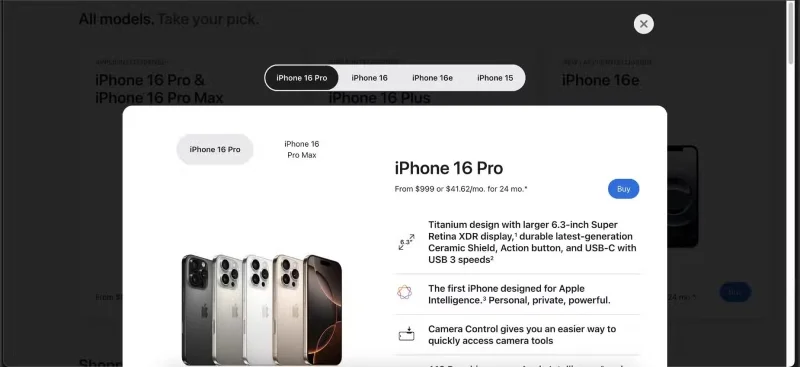
Fast forward to 2025 and the landscape has changed. The iPhone 16 Pro is Apple’s latest high-end device, but its upgrades are negligible. The camera improvements are subtle, the performance gains are barely noticeable, and battery life remains virtually unchanged from the iPhone 15 Pro .
Meanwhile, mid-range phones like the Samsung Galaxy A55 now have OLED screens, great cameras, and smooth performance—all for half the price. The gap between flagship and mid-range phones that used to be huge has narrowed considerably.
3. The upgrade cycle is a trap
For years, smartphone makers have made us believe that upgrading every year or two is necessary. Carriers promote this mindset with trade-in deals, and manufacturers amplify the hype with lavish launch events promising revolutionary improvements. But in reality, most of these updates are incremental, not groundbreaking.
Upgrading used to make sense. If you went from an iPhone 8 to an iPhone X, you got an OLED display, Face ID , and a beautiful new design. Even upgrading from an iPhone X to an 11 Pro meant significantly better battery life and a more versatile camera system.
These days, the differences between years are so small that it’s not uncommon to see iPhone 15 Pro users say they wouldn’t buy the 16 Pro. In fact, if the iPhone 16 Pro were placed next to the 14 Pro , most people wouldn’t be able to tell them apart. A slightly faster processor and a slightly better camera don’t justify spending a few hundred dollars.
2. Extra features that you rarely use
Flagship phones are packed with high-end features, but how many of them actually improve day-to-day use? Every year, manufacturers introduce flashy upgrades, but most people still use their phones for the same things — texting, social media, streaming, and taking photos.
Take 120Hz displays, for example. While scrolling is smoother, most users won’t notice the difference unless they’re actively looking for it. 8K video recording sounds impressive, but even professional filmmakers rarely use it.
LiDAR scanning and satellite connectivity can be useful in the right situations, but they don't impact everyday phone use.
Even in areas where flagship phones excel, the differences are starting to blur. The iPhone 16 Pro’s camera is among the best in the business, but in normal lighting conditions, the difference between its photos and those from mid-range phones is minimal. Unless you’re a professional photographer, a mid-range camera will be more than enough.
At some point, buying a flagship phone stops being about utility and becomes about paying for the prestige of owning the latest and greatest. If a phone can handle everything you need it to do without the extra bells and whistles, why pay twice as much for features you barely use?
1. Mid-range phones now offer everything you need
In the past, choosing a mid-range phone meant making significant trade-offs — slower performance, a poor camera, and cheap plastic casings. But not anymore. Today's mid-range phones offer flagship features at a fraction of the price.
The Samsung A55, for example, comes with an OLED display , a high-quality camera, and years of software support — all for less than half the price of the S25 Ultra . Features that were once exclusive to flagship phones, like water resistance and fast charging, are now commonplace in mid-range devices.
Battery life is another advantage that mid-range devices surprisingly give you. Without power-hungry high refresh rate screens or excessive background processes, mid-range phones tend to last longer on a single charge. Software support is also improving across the board, making it possible to keep a mid-range phone for 4 or 5 years without any issues.
At this point, the only real reason to buy a flagship phone is to get the absolute best. Mid-range phones now offer everything you need for much less, while expensive models keep adding features you rarely use. Unless something truly groundbreaking comes along, you shouldn’t buy a flagship phone anymore.
Mix a glossy prop-only fake blood batch, choose safer products for skin and costumes, and test cleanup before Halloween night.
Create a gentle Halloween look with pastel colors, friendly ghosts, easy no-carve accents, and practical safety tips for your home.
Create a spooky office cubicle with Halloween desk decor ideas that keep your workspace usable, tidy, and mindful of workplace safety.
Plan a recognizable Halloween 2026 look with pop culture costumes inspired by Spider-Man, Supergirl, Toy Story 5, Moana, Mario, and Wednesday.
Sort leftover Halloween candy safely, share or repurpose sealed treats, and choose food use or compost for pumpkins based on their condition.
Compare workplace Halloween costume choices by respect, dress code, mobility, and safety—and learn when a subtle accessory or a policy check is the better option.
Find a couples costume that fits your style, budget, and comfort level, from Addams Family classics to original inside-joke duos.
Need a last-minute high school Halloween costume? Compare 10 easy closet-based ideas by prep time, comfort, school-day practicality, and simple safety checks.
Use a simple 2026 Halloween decorating timeline for indoor décor, outdoor displays, and fresh pumpkins, with practical adjustments for weather and events.
Mix five vivid, approachable Halloween cocktails with measured recipes, simple prep tips, and an alcohol-free option for your party guests.








