Kawaii Halloween Decor Without Gore or Jump Scares

Create a gentle Halloween look with pastel colors, friendly ghosts, easy no-carve accents, and practical safety tips for your home.
Heaters are the most used household appliances in winter. However, not everyone knows how to place the heater in the right place in the house to achieve the best efficiency and ensure health safety. Below are the places where heaters should absolutely not be placed in the house, please refer to them.
Do not place in damp place
Electricity and water are two things that should never be placed together. The bathroom is the wettest place in your home, so heaters - except for the few bathroom heaters that are specifically designed for this environment - should be kept away from this area to avoid causing a fire or electrical shock.
Do not place near pets
Pets love warm areas and they often like to sit under, near or even on top of space heaters. This is dangerous and can burn your pet. Place the heater far enough away from where your pet plays and try not to leave them alone when the heater is on.
Do not place heaters behind furniture.
If you place furniture in front of the fireplace, the circulation of heat around your room will be hindered. Accordingly, you should arrange furniture neatly and carefully when placing the heater to ensure the heater dissipates heat best and does not consume more electricity than necessary.
Do not place the heater near fabrics.
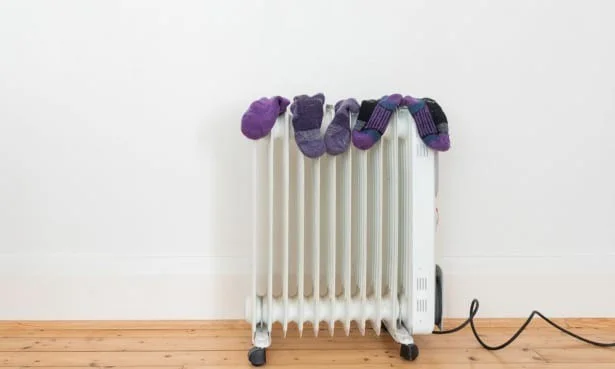
Placing a space heater near any type of fabric can cause a fire. In fact, space heater fires are most often caused by fabrics such as clothing, curtains, upholstery, and even mattresses. Space heaters should be placed approximately 1 meter away from any fabric or other flammable material.
Do not place the heater on furniture
Do not place your heater on a dresser, wooden table or other furniture. Although today's heaters are designed to ensure optimal safety for users, in case of a curious cat or an accidental touch that causes the heater to fall to the floor, it can cause burns or fire.
Do not place the heater on carpet.
Space heaters are not safe to place on the floor. They are only safe if the floor is laminate, tile, or vinyl. Space heaters should not be placed on carpets or rugs as they tend to retain heat and can catch fire if they get hot enough.
Furthermore, people often have the habit of running the heater cord under the carpet to eliminate the risk of tripping and to increase the aesthetics. However, hiding the cord under the carpet will also lead to a great fire hazard or cause other disastrous consequences.
Create a gentle Halloween look with pastel colors, friendly ghosts, easy no-carve accents, and practical safety tips for your home.
Create a spooky office cubicle with Halloween desk decor ideas that keep your workspace usable, tidy, and mindful of workplace safety.
Plan a recognizable Halloween 2026 look with pop culture costumes inspired by Spider-Man, Supergirl, Toy Story 5, Moana, Mario, and Wednesday.
Sort leftover Halloween candy safely, share or repurpose sealed treats, and choose food use or compost for pumpkins based on their condition.
Compare workplace Halloween costume choices by respect, dress code, mobility, and safety—and learn when a subtle accessory or a policy check is the better option.
Find a couples costume that fits your style, budget, and comfort level, from Addams Family classics to original inside-joke duos.
Need a last-minute high school Halloween costume? Compare 10 easy closet-based ideas by prep time, comfort, school-day practicality, and simple safety checks.
Use a simple 2026 Halloween decorating timeline for indoor décor, outdoor displays, and fresh pumpkins, with practical adjustments for weather and events.
Mix five vivid, approachable Halloween cocktails with measured recipes, simple prep tips, and an alcohol-free option for your party guests.
Find 15 office-friendly Halloween costume ideas for 2026, with practical checks for dress codes, respectful themes, comfort, and workplace safety.








