Kawaii Halloween Decor Without Gore or Jump Scares

Create a gentle Halloween look with pastel colors, friendly ghosts, easy no-carve accents, and practical safety tips for your home.
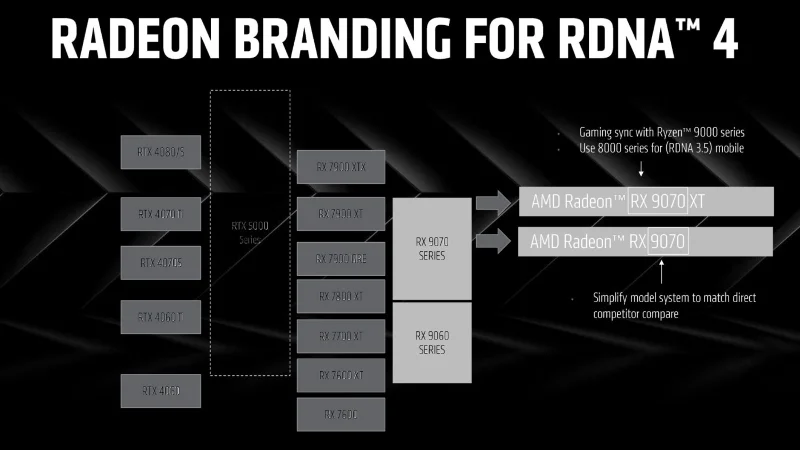
Unlike its desktop CPU division, AMD’s GPU business can’t seem to agree on how to name its commercial discrete cards. The company is once again planning to overhaul the way it organizes and names its new GPUs. At CES 2025, Team Red previewed its upcoming RDNA 4 discrete graphics cards, which come with some changes to their naming and segmentation.
Accordingly, AMD has decided to change the way it names its cards under the HD 7000 brand to the R7/R9 200 series, RX 400 series, RX 5000 series (RDNA 1) that it has maintained for a decade. After sticking to the RX 6000 (RDNA 2) and RX 7000 (RDNA3), AMD has adjusted the branding a bit. The company did not go into detail about the microarchitectural advances of the new RDNA 4 design, but the main highlight is the new naming scheme, in which the RX 9070 XT model leads the way, which will likely be the flagship product of this generation.
AMD added that it has made significant improvements to the compute units to increase both IPC (instructions per clock/cycle) and clock speed with new optimized compute units (CUs), with a primary focus on improving artificial intelligence performance with the 2nd generation AI accelerator, as well as improving ray tracing throughput with the 3rd generation ray accelerator. The display and media blocks on RDNA 4 are also upgraded with the new 2nd generation Radiance Display Engine.
RDNA 3 (RX 7000 series) introduced Generalized Matrix Multiplication (GEMM) processing capabilities, and AMD cards rely on this to provide hardware acceleration for matrix multiplication, one of the foundations of AI/ML, with the help of Wave Matrix Multiply Accumulate (WaveMMA or WMMA) instructions.

However, in terms of gaming, it would be a big question mark whether the RX 9070 XT can compete with Nvidia's upcoming RTX 5090 or even 5080. Recently leaked benchmark results suggest that we can only compare the performance of the RX 7900 XT or RTX 4070 Ti to the 9070 XT.
AMD is aiming for scale over performance as the company looks to expand its market share. AMD Senior Vice President and General Manager of the Computing and Graphics Group Jack Huynh confirmed this strategy in an interview with Tom's Hardware. Therefore, AMD is unlikely to compete directly with Nvidia in the high-end segment this time.
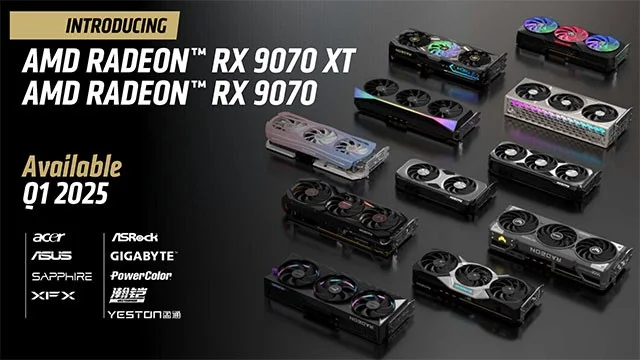
Finally, AMD says that the RX 9070 XT and RX 9070 AIB (add-in-board) variants will start shipping in Q1 2025. No pricing information has been released as of yet.
Along with the hardware, AMD also shared some information about the features and software. Radeon cards are finally getting AI-based image upscaling with FSR 4, and this feature is only available in the RDNA 4 generation. Speaking of AI, there are also some new AI features that will be integrated into the Adrenalin driver to support user workflows.
Create a gentle Halloween look with pastel colors, friendly ghosts, easy no-carve accents, and practical safety tips for your home.
Create a spooky office cubicle with Halloween desk decor ideas that keep your workspace usable, tidy, and mindful of workplace safety.
Plan a recognizable Halloween 2026 look with pop culture costumes inspired by Spider-Man, Supergirl, Toy Story 5, Moana, Mario, and Wednesday.
Sort leftover Halloween candy safely, share or repurpose sealed treats, and choose food use or compost for pumpkins based on their condition.
Compare workplace Halloween costume choices by respect, dress code, mobility, and safety—and learn when a subtle accessory or a policy check is the better option.
Find a couples costume that fits your style, budget, and comfort level, from Addams Family classics to original inside-joke duos.
Need a last-minute high school Halloween costume? Compare 10 easy closet-based ideas by prep time, comfort, school-day practicality, and simple safety checks.
Use a simple 2026 Halloween decorating timeline for indoor décor, outdoor displays, and fresh pumpkins, with practical adjustments for weather and events.
Mix five vivid, approachable Halloween cocktails with measured recipes, simple prep tips, and an alcohol-free option for your party guests.
Find 15 office-friendly Halloween costume ideas for 2026, with practical checks for dress codes, respectful themes, comfort, and workplace safety.








