Kawaii Halloween Decor Without Gore or Jump Scares

Create a gentle Halloween look with pastel colors, friendly ghosts, easy no-carve accents, and practical safety tips for your home.
What conditional statements does Golang have? How to use conditional statements in Go programming? Let's find out together!
Decision making in programming is similar to decision making in real life. In this process, a piece of code is executed when a given condition is met. They are also sometimes called Control flow statements. Golang uses control statements to control the flow of execution of a program based on certain conditions. They are used to make the flow of execution advance and branch based on changes in the state of the program.
Basic conditional statements in Golang programming
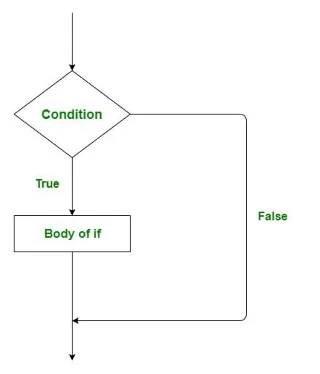
This is the simplest decision statement. It is used to decide whether a statement or block of statements will be executed or not, i.e. if a condition is true then a block of statements will be executed, otherwise not.
Syntax:
if condition {

   // Lệnh được thực thi nếu
   // điều kiện đúng
}
Flow Chart:
For example:
// Go program to illustrate the
// use of if statement
package main

import "fmt"

func main() {

// lấy một biến cục bộ
var v int = 700

// dùng lệnh if để
// kiểm tra điều kiện
if v < 1000="" {="" in="" điều="" kiện="" if="" sau="" điều="" kiện="" đánh="" giá="" đúng="" fmt.printf("v="" is="" less="" than="" 1000\n")="" }="" fmt.printf("value="" of="" v="" is="" :="" %d\n",="" v)="" }="">
Result:
v is less than 1000
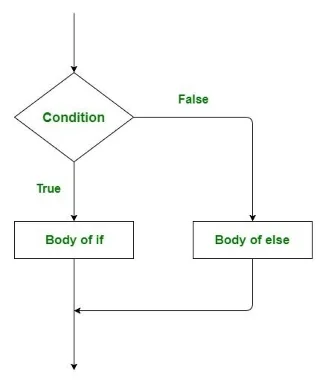
value of v is : 700The else statement alone tells us that if the condition is true then it will execute a block of code and if the condition is false then it will not execute. But what if we want to do something else when the condition is false. This is where the else statement comes in. We can use the else statement with the if statement to execute a block of code when the condition is false.
Syntax:
if condition {

    // Triển khai khối này nếu
    // điều kiện đúng
} else {

    // Triển khai khối này nếu
    // điều kiện sai
}
For example:
// Go program to illustrate the
// use of if...else statement
package main

import "fmt"

func main() {

// taking a local variable
var v int = 1200

// dùng lệnh if
// kiểm tra điều kiện
if v < 1000="" {="" in="" if="" sau="" điều="" kiện="" đánh="" giá="" là="" dúng="" fmt.printf("v="" is="" less="" than="" 1000\n")="" }="" else="" {="" in="" ra="" nội="" dung="" sau="" nếu="" điều="" kiện="" được="" đánh="" giá="" là="" đúng="" fmt.printf("v="" is="" greater="" than="" 1000\n")="" }="" }="">
Result:
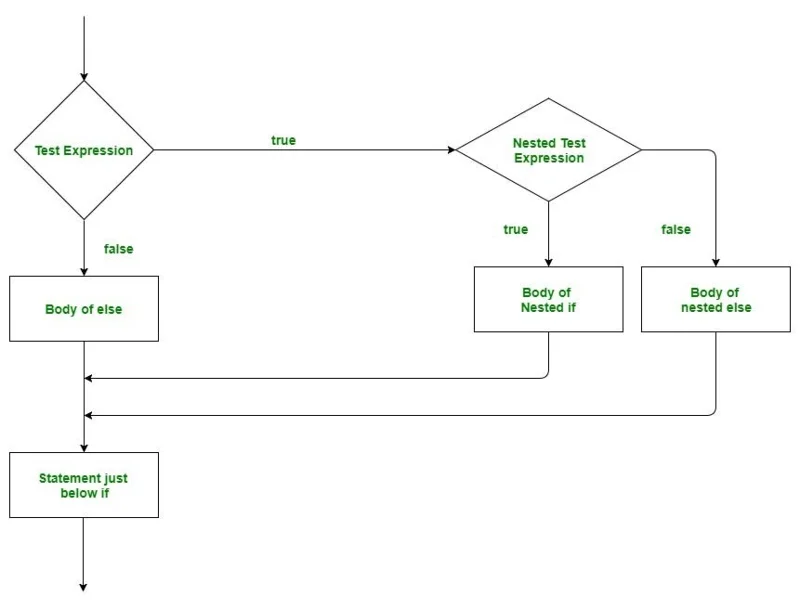
v is greater than 1000In Go Language, nested if is a conditional statement that is the target of another if or else. This Golang statement means there are two if statements nested inside each other as the name suggests.
Syntax:
if condition1 {

   // Triển khai khi condition1 đúng

   if condition2 {

      // Triển khai khi condition2 đúng
   }
}
For example:
// Minh họa chương trình Go dùng lệnh if lồng nhau
package main
import "fmt"

func main() {

// lấy 2 biến cục bộ
var v1 int = 400
var v2 int = 700

// dùng lệnh if
if( v1 == 400 ) {

	// điều kiện đúng thì kiểm tra nội dung sau
	if( v2 == 700 ) {

		// điều kiện đúng thì hiển thị nội dung sau
		fmt.Printf("Value of v1 is 400 and v2 is 700\n" );
	}
}

}
Result:
Value of v1 is 400 and v2 is 700Create a gentle Halloween look with pastel colors, friendly ghosts, easy no-carve accents, and practical safety tips for your home.
Create a spooky office cubicle with Halloween desk decor ideas that keep your workspace usable, tidy, and mindful of workplace safety.
Plan a recognizable Halloween 2026 look with pop culture costumes inspired by Spider-Man, Supergirl, Toy Story 5, Moana, Mario, and Wednesday.
Sort leftover Halloween candy safely, share or repurpose sealed treats, and choose food use or compost for pumpkins based on their condition.
Compare workplace Halloween costume choices by respect, dress code, mobility, and safety—and learn when a subtle accessory or a policy check is the better option.
Find a couples costume that fits your style, budget, and comfort level, from Addams Family classics to original inside-joke duos.
Need a last-minute high school Halloween costume? Compare 10 easy closet-based ideas by prep time, comfort, school-day practicality, and simple safety checks.
Use a simple 2026 Halloween decorating timeline for indoor décor, outdoor displays, and fresh pumpkins, with practical adjustments for weather and events.
Mix five vivid, approachable Halloween cocktails with measured recipes, simple prep tips, and an alcohol-free option for your party guests.
Find 15 office-friendly Halloween costume ideas for 2026, with practical checks for dress codes, respectful themes, comfort, and workplace safety.








