Google Launches Deep Research Feature on Gemini 2.5 Pro: Surpassing ChatGPT Deep Research

Last year, Google introduced a new feature in Gemini called Deep Research—an AI research assistant that can dig into complex topics and generate reports with citations. In the process, the algorithm can traverse hundreds of websites, analyze the information it collects, and create reports that can be converted into podcast-style conversations.

Last month, Google announced an upgrade to Deep Research with the Gemini 2.0 Flash Thinking beta, which improves planning, searching, reasoning, analysis, and reporting capabilities, resulting in higher-quality multi-page reports for users.

Today, Mountain View continues to announce the transition of Deep Research to Gemini 2.5 Pro Experimental – the company’s flagship model. Gemini Advanced users can now use this feature on the web, Android and iOS. With the new power, Deep Research is comprehensively upgraded in terms of planning, searching, reasoning, analysis and reporting.

Google Launches Deep Research Feature on Gemini 2.5 Pro: Surpassing ChatGPT Deep Research

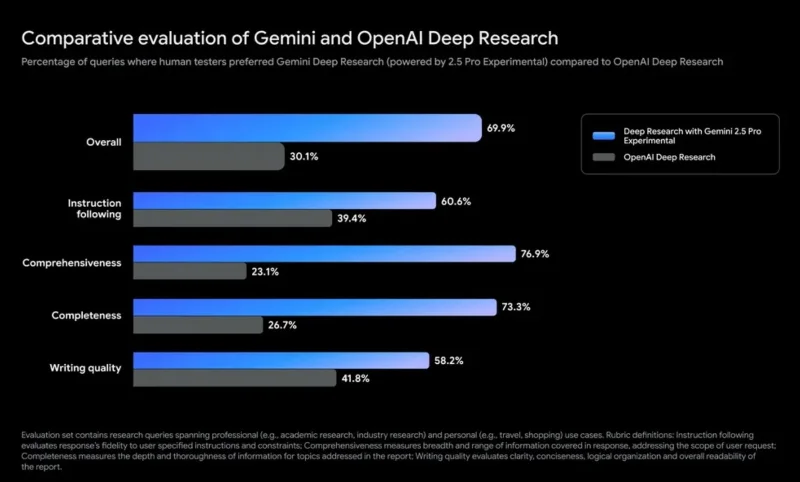
According to Google's internal testing, human evaluators preferred reports from Gemini Deep Research (based on Gemini 2.5 Pro) more than twice as much as those from OpenAI Deep Research. Users also found that this improved version provided significant improvements in analytical thinking and information synthesis, resulting in more in-depth research reports.

If you are a Gemini Advanced user, you can:

  1. Select the Gemini 2.5 Pro (experimental) model from the model selection list.
  2. Click “ Deep Research ” on the prompt bar to enable the feature.

This upgrade reflects Google's continued efforts to expand the capabilities of Gemini Advanced, providing more powerful tools for complex research tasks. You can also try Gemini Deep Research with the free Gemini 2.0 Flash model on your computer and phone in 150 countries.

Leave a Comment

What Young Riders Should Know About Moving Their Motorcycles Across Cities

What Young Riders Should Know About Moving Their Motorcycles Across Cities

Long-distance travel can involve heavy traffic, changing weather conditions, and rider fatigue. If you are also dealing with the responsibilities of moving home, such as packing belongings or coordinating accommodation, a long ride may add unnecessary pressure to an already busy schedule.

Solving Microsoft Teams Shortcut Error Not Opening

Solving Microsoft Teams Shortcut Error Not Opening

Tired of Microsoft Teams shortcut error preventing you from opening the app? Follow our expert, step-by-step guide with the latest fixes for instant resolution. Works on Windows, Mac & web – no tech skills needed!

Solving Microsoft Teams Task Management Sync Error

Solving Microsoft Teams Task Management Sync Error

Tired of Microsoft Teams Task Management Sync Error halting your workflow? Follow our proven, step-by-step fixes to resolve sync issues fast and restore seamless task collaboration. No tech expertise needed!

Troubleshooting Microsoft Teams Wiki Error Formatting

Troubleshooting Microsoft Teams Wiki Error Formatting

Struggling with Microsoft Teams Wiki Error Formatting? This step-by-step guide reveals proven fixes for common wiki tab issues, ensuring smooth editing and collaboration in Teams. Get back to productive wikis fast!

How to Fix Microsoft Teams Installation Error for Linux

How to Fix Microsoft Teams Installation Error for Linux

Struggling with Microsoft Teams installation error on Linux? Discover step-by-step fixes for Ubuntu, Fedora & more. Resolve dependency issues, crashes, and errors quickly with our ultimate guide. Get Teams running smoothly today!

Solving Microsoft Teams Error Page Not Loading

Solving Microsoft Teams Error Page Not Loading

Struggling with Microsoft Teams "Error Page" not loading? Get step-by-step fixes for desktop, web, and mobile. Solve Microsoft Teams Error Page issues quickly and resume seamless teamwork today.

Solving Microsoft Teams Error Screenshot Issues

Solving Microsoft Teams Error Screenshot Issues

Tired of Microsoft Teams "Error Screenshot" blocking your workflow? Get proven, step-by-step solutions to resolve screenshot errors in Teams instantly and boost productivity. No tech skills needed!

How to Fix Microsoft Teams Error U User

How to Fix Microsoft Teams Error U User

Tired of Microsoft Teams "Error U" User blocking your chats? Get proven, step-by-step fixes to clear cache, reset, and restore seamless collaboration instantly.

Where are Microsoft Teams Registry Keys Located on Windows 11?

Where are Microsoft Teams Registry Keys Located on Windows 11?

Unlock the precise locations of Microsoft Teams registry keys on Windows 11. Step-by-step guide to find, access, and safely tweak them for optimal performance and troubleshooting. Essential for IT pros and Teams enthusiasts.

How to Fix Microsoft Teams Training Error Video Lag

How to Fix Microsoft Teams Training Error Video Lag

Tired of Microsoft Teams "Training Error" Video Lag ruining your meetings? Follow our step-by-step guide with the latest fixes for smooth video calls—no more frustration!








