After the appearance of new generals like Yan, Helen , Terri is the next name to appear in the Lien Quan arena. Let's join Quantrimang to learn more about this general.
Table of Contents
Terri's move set
| Technique |
Detail |
| Twin Wheel Spirit |
Hitting multiple targets 3 times with basic attacks or spells will cause subsequent attacks to deal additional damage for 3 seconds. |
| Quang Minh Luan |
Teeri shoots at targets within range. Each shot deals damage and marks the target, slowing them. |
| Heart Piercing Wheel |
Teeri gains speed and gains 4/5/6 enhanced basic attacks that pierce through multiple targets. If she hits both targets, the slow on the first target is transferred to the next target. |
| The Wheel of Life |
Teeri throws her weapon in the designated direction. Every time it hits an enemy champion, it will fly back a distance and deal damage. When it flies back, the weapon will deal additional slashing damage based on the number of enemy champions hit. |

How to increase Terri's skills
With the above skill set, Quantrimang recommends that players should max out skill 2 first. Therefore, the appropriate order to increase Terri's skills will be as shown below.

Summoner Spells for Terri
As a marksman, players can use the Flash or Ghost spells on Terri to increase mobility and easily escape from combat.
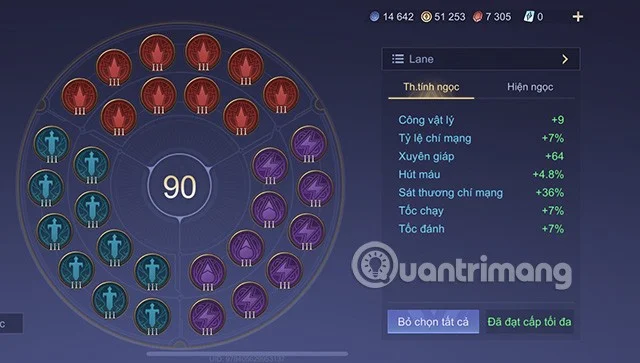
Suitable gem table for Terri season S1 2023
Setting up a gem table with high damage for Terri will be the most suitable. So players can proceed to build items according to the suggestions below.
- Red Gem: Critical Rate +0.7% ; Critical Damage +3.6%
- Purple Gem: 7 Gems (Attack Speed +1% Movement Speed +1%) and 3 Gems (Lifesteal +1.6%)
- Green Gem: Physical Attack +0.9; Armor Penetration +6.4

Badge for champion Terri season S1 2023
As for badges, the two most suitable badges for this marksman are the Origin City and the Light Tower. Specifically as follows:
- Main branch: Origin City: level 1 Frost Orb, level 2 Hunter, level 3 Alchemy.
- Sub-branch: Light Tower: level 1 Contrast, level 2 Secret.

How to build items for marksman Terri season S1 2023
For a marksman like Terri, the following items are considered the most suitable. Including:
- Nomad Boots: +25% Attack Speed. +60 Movement Speed.
- Holy Sword: +100 Physical Attack. +25% Critical, Critical Damage increased by 50%.
- Storm Twin Blades: +35% Attack Speed, +25% Critical Rate, +7% Movement Speed. Gale: Increases effect resistance by 35% for 2 seconds after a critical strike.
- God-Slaying Bow: +50 Physical Attack, +30% Attack Speed, +10% Critical Rate. God-Smashing: Basic attacks deal 50 physical damage (doubled for ranged champions). Penetration: Increases armor penetration by 20% (doubled for ranged champions).
- Fafnir's Sword: +60 Physical Attack, +30% Attack Speed, +10% Lifesteal. Dragon's Breath: Basic attacks deal additional physical damage equal to 8% of the target's current Health.
- Guardian Angel: +120 Armor. Revives you after 2 seconds at the place you were killed with 2000 health (+100 health per champion level).

Instructions on how to play Terri Lien Quan Mobile
Terri is a non-mobile champion, so to master this champion, players need to pay attention to the following.
In the early game, players should try to farm all the soldiers in their Dragon lane to increase their gold. Having enough necessary equipment will help players take full advantage of Terri's passive skill 2.
In combat, players need to choose the right position to maximize damage to enemy generals.
Players can use skill 1 to slow down the enemy, then activate skill 2 to change form and shoot continuously. Once the enemy is low on health, you can activate your ultimate to take them down.
You can also use your ultimate before entering the fight to bleed your opponent. Then use skill 1 to slow down and deal main damage through skill 2 and normal attacks.
Above is what Quantrimang wants to introduce to players about the general Terri. Hopefully it will help you more or less in the process of playing and experiencing this general.