Kawaii Halloween Decor Without Gore or Jump Scares

Create a gentle Halloween look with pastel colors, friendly ghosts, easy no-carve accents, and practical safety tips for your home.
The "connected ball" technology, designed with a motion-sensing microchip capable of tracking every touch at 500 times per second, will be used for the first time at Euro 2024 - the 2024 European football championship taking place from June 14 to July 14.
The "connected ball" technology, similar to the snickometer technology that has long been used in cricket, is being used at Euro, helping to identify cases of handball and offside.
Match balls are equipped with motion-sensing microchips that can track every touch at a rate of 500 times per second. This helps determine whether a player is behind the opponent's last defender at the time of kicking, or whether the ball touches someone's hand on its way into the goal.
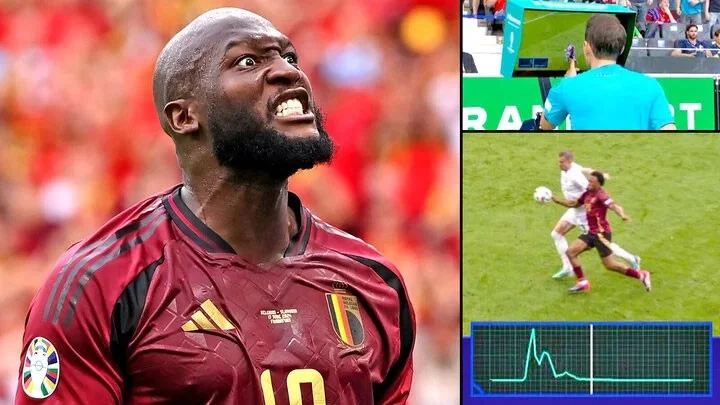
The high-tech ball is a collaboration between Munich-based Kinexon, FIFA and Adidas. Over five years, 1,500 high-tech balls have been produced for the 2022 men's World Cup and 1,500 for the 2023 women's World Cup. Kinexon will also do the same for the match balls for Euro 2024 for men and Euro 2025 for women.
Because of camera shutter speeds, motion blur, angle of view, and resolution, using a system based solely on images is more prone to errors, says Daniel Linke, head of product strategy and marketing at Kinexon. The chip in the Kinexon ball can detect when the ball has been touched at a rate of 500 times per second, while standard broadcast cameras (used by VARs) record at 50 frames per second.
Connected ball technology, allowing you to determine the exact moment of touch instantly. Within just one or two milliseconds, Nn synchronizes perfectly with the video signal. Every time a touch signal is sent from the ball chip, the camera system's algorithms continuously work to assess the offside situation.
At the 2022 World Cup in Qatar, this Microchip helped the VAR team make real-time decisions.
Now, when these images are used to make key decisions during a Euro 2024 match, they will be made available to viewers via giant screens inside the stadium and on television to increase transparency within the Union of European Football Associations (UEFA).
Create a gentle Halloween look with pastel colors, friendly ghosts, easy no-carve accents, and practical safety tips for your home.
Create a spooky office cubicle with Halloween desk decor ideas that keep your workspace usable, tidy, and mindful of workplace safety.
Plan a recognizable Halloween 2026 look with pop culture costumes inspired by Spider-Man, Supergirl, Toy Story 5, Moana, Mario, and Wednesday.
Sort leftover Halloween candy safely, share or repurpose sealed treats, and choose food use or compost for pumpkins based on their condition.
Compare workplace Halloween costume choices by respect, dress code, mobility, and safety—and learn when a subtle accessory or a policy check is the better option.
Find a couples costume that fits your style, budget, and comfort level, from Addams Family classics to original inside-joke duos.
Need a last-minute high school Halloween costume? Compare 10 easy closet-based ideas by prep time, comfort, school-day practicality, and simple safety checks.
Use a simple 2026 Halloween decorating timeline for indoor décor, outdoor displays, and fresh pumpkins, with practical adjustments for weather and events.
Mix five vivid, approachable Halloween cocktails with measured recipes, simple prep tips, and an alcohol-free option for your party guests.
Find 15 office-friendly Halloween costume ideas for 2026, with practical checks for dress codes, respectful themes, comfort, and workplace safety.








