How to turn off exporting saved passwords in Microsoft Edge

When using Microsoft Edge, you can export saved passwords from the browser to a CSV file for backup. This password file can be imported to another browser so you can log in to the website immediately without having to log in and save it again. However, users can completely turn off exporting saved passwords in Edge to protect personal information. Below are instructions for turning off exporting passwords in Microsoft Edge.

Instructions to turn off exporting saved passwords in Microsoft Edge

Step 1:

You enter the keyword regedit in the Run window and press Enter to access.
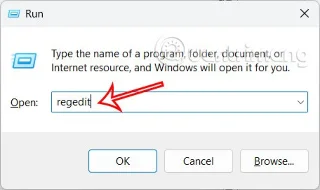
How to turn off exporting saved passwords in Microsoft Edge

Step 2:

Go to the Windows Registry interface, users access the folder path below.

Computer\HKEY_LOCAL_MACHINE\SOFTWARE\Policies\Microsoft\Edge
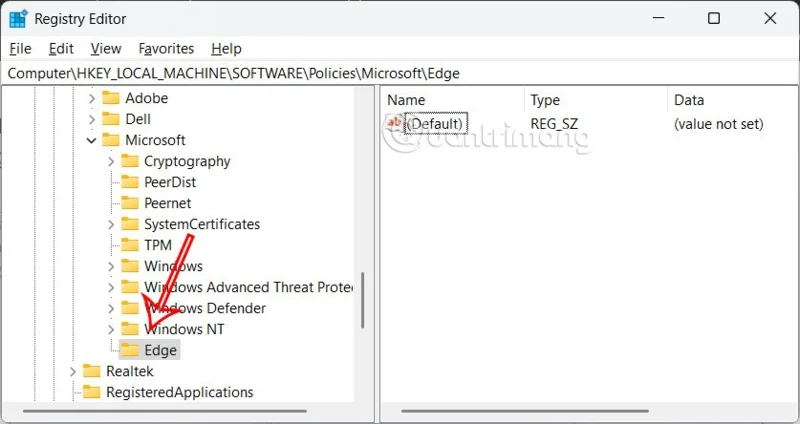
How to turn off exporting saved passwords in Microsoft Edge

Step 3:

Looking at the interface next to it, we double-click on the PasswordExportEnabled value and then enter 0 in Value date to turn off this value.
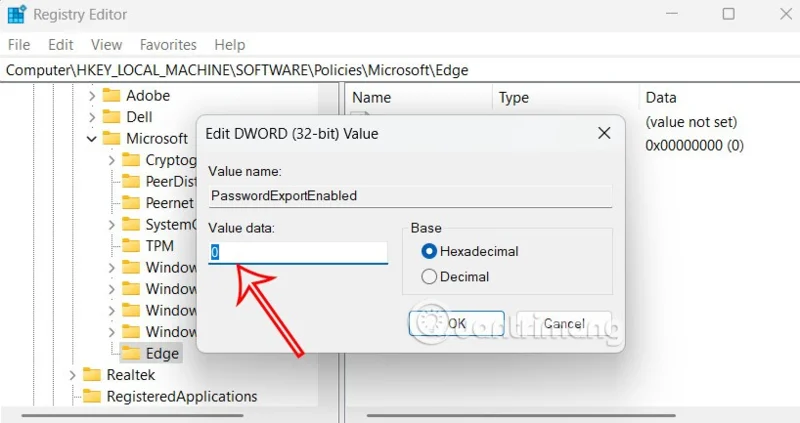
How to turn off exporting saved passwords in Microsoft Edge

This means users can no longer export passwords saved in Microsoft Edge.

In case you want to restore the password export feature saved in Microsoft Edge, we need to delete the PasswordExportEnabled value to be able to export Edge passwords to CSV file. Finally, restart the computer for the settings to be applied.

Leave a Comment

Troubleshooting Microsoft Teams Wiki Error Formatting

Troubleshooting Microsoft Teams Wiki Error Formatting

Struggling with Microsoft Teams Wiki Error Formatting? This step-by-step guide reveals proven fixes for common wiki tab issues, ensuring smooth editing and collaboration in Teams. Get back to productive wikis fast!

How to Fix Microsoft Teams Installation Error for Linux

How to Fix Microsoft Teams Installation Error for Linux

Struggling with Microsoft Teams installation error on Linux? Discover step-by-step fixes for Ubuntu, Fedora & more. Resolve dependency issues, crashes, and errors quickly with our ultimate guide. Get Teams running smoothly today!

Solving Microsoft Teams Error Page Not Loading

Solving Microsoft Teams Error Page Not Loading

Struggling with Microsoft Teams "Error Page" not loading? Get step-by-step fixes for desktop, web, and mobile. Solve Microsoft Teams Error Page issues quickly and resume seamless teamwork today.

Solving Microsoft Teams Error Screenshot Issues

Solving Microsoft Teams Error Screenshot Issues

Tired of Microsoft Teams "Error Screenshot" blocking your workflow? Get proven, step-by-step solutions to resolve screenshot errors in Teams instantly and boost productivity. No tech skills needed!

How to Fix Microsoft Teams Error U User

How to Fix Microsoft Teams Error U User

Tired of Microsoft Teams "Error U" User blocking your chats? Get proven, step-by-step fixes to clear cache, reset, and restore seamless collaboration instantly.

Where are Microsoft Teams Registry Keys Located on Windows 11?

Where are Microsoft Teams Registry Keys Located on Windows 11?

Unlock the precise locations of Microsoft Teams registry keys on Windows 11. Step-by-step guide to find, access, and safely tweak them for optimal performance and troubleshooting. Essential for IT pros and Teams enthusiasts.

How to Fix Microsoft Teams Training Error Video Lag

How to Fix Microsoft Teams Training Error Video Lag

Tired of Microsoft Teams "Training Error" Video Lag ruining your meetings? Follow our step-by-step guide with the latest fixes for smooth video calls—no more frustration!

How to Fix Microsoft Teams Error occurred During Sign-In

How to Fix Microsoft Teams Error occurred During Sign-In

Frustrated by Microsoft Teams "Error occurred" during sign-in? Discover proven, step-by-step fixes to get back online fast. Clear cache, reset app, and more for seamless login. Works on Windows, Mac & web.

Troubleshooting Microsoft Teams Call Error Disconnecting

Troubleshooting Microsoft Teams Call Error Disconnecting

Struggling with Microsoft Teams "Call Error" Disconnecting? Discover proven, step-by-step fixes for call drops, network issues, and more. Get back to seamless meetings fast with our expert troubleshooting guide.

How to Fix Microsoft Teams Error 2603: Login Loop Fix

How to Fix Microsoft Teams Error 2603: Login Loop Fix

Stuck in Microsoft Teams Error 2603 login loop? Get proven step-by-step fixes to resolve the issue fast and restore seamless teamwork. Clear cache, reset, reinstall – all covered!

How to Fix Microsoft Teams Voice Call Error

How to Fix Microsoft Teams Voice Call Error

Tired of Microsoft Teams voice call errors? Follow our step-by-step guide to troubleshoot no audio, echo, or call drops. Proven fixes for crystal-clear calls every time.

How to Fix Microsoft Teams Workflows Error Power Automate

How to Fix Microsoft Teams Workflows Error Power Automate

Struggling with Microsoft Teams "Workflows Error" in Power Automate? Discover proven, step-by-step fixes to resolve connection issues, permissions, and more. Get your workflows running smoothly today!

How to Fix Microsoft Teams Reddit Popular Error Fixes

How to Fix Microsoft Teams Reddit Popular Error Fixes

Tired of Microsoft Teams crashes, black screens, and sign-in loops? Unlock Reddit's most popular, proven fixes to resolve common Microsoft Teams errors quickly and get back to productive meetings. Step-by-step guides inside!

Troubleshooting Microsoft Teams Error 53003: Access Denied

Troubleshooting Microsoft Teams Error 53003: Access Denied

Tired of Microsoft Teams Error 53003 Access Denied blocking your meetings? Discover proven, step-by-step fixes to troubleshoot and resolve it quickly – no tech expertise needed!

How to Fix Microsoft Teams Media Error During Calls

How to Fix Microsoft Teams Media Error During Calls

Tired of Microsoft Teams media errors ruining your calls? Follow our expert, step-by-step guide to fix audio, video, and media issues quickly. Restore crystal-clear meetings today!









