The most commonly deficient nutrients in the diet
Diet is important to our health. Yet most of our meals are lacking in these six important nutrients.
OneUI 6 on Samsung Galaxy phones has added a copy paste feature to edit images more easily and conveniently, thereby creating many unique images without the need for other supporting applications. You can apply the image editing style to other photos, without having to do it again and again. The following article will guide you how to use the copy paste tool to edit photos on Samsung.
Instructions for copying and pasting photos on Samsung
Step 1:
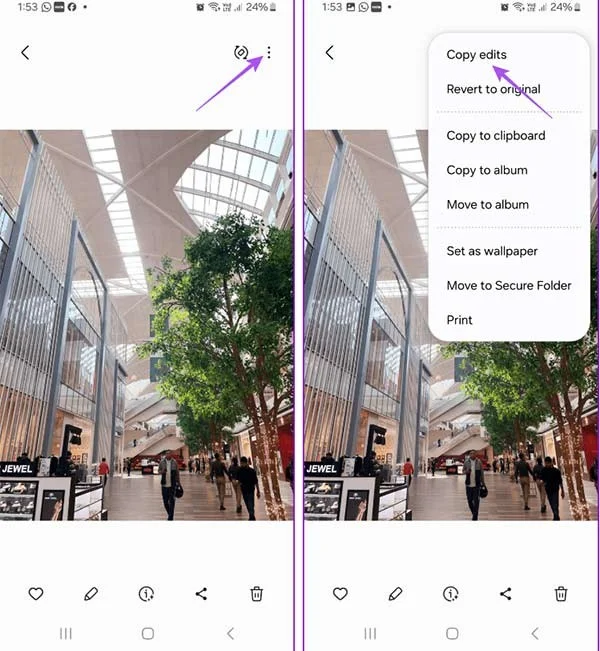
We open the album on the phone, then click on the image you want to edit . You edit the image as usual. Next, click on the 3-dot icon and select Copy Edits to copy the photo edits you have made.
Step 2:
Next, open the image you want to paste the newly copied edits into. Then click on the 3-dot icon and select Paste Edits to apply those edits to the current image.

How to copy paste edit for multiple photos on Samsung
Step 1:
You also edit the image as usual, then click the 3-dot icon and select Copy Edits to copy the editing operations.
Step 2:
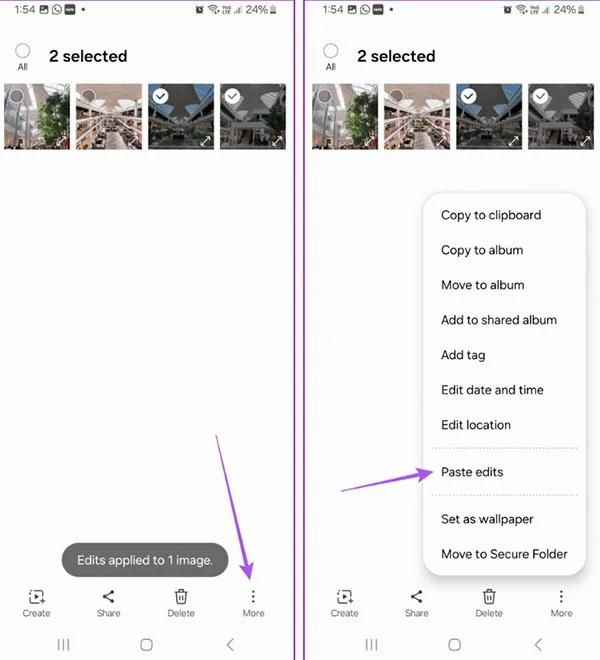
Go back to the album and click on the copied images you want to apply edits to . Next, click on the 3-dot More icon in the bottom right corner and select Paste Edits to apply edits to multiple photos.
The edits are immediately applied to the photos you selected.

How to recover edited original photos on Samsung
Step 1:
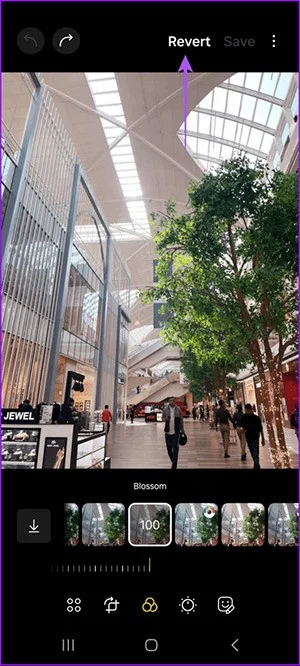
Click on the image you want to restore the original image to , then click Revert above.

Step 2:
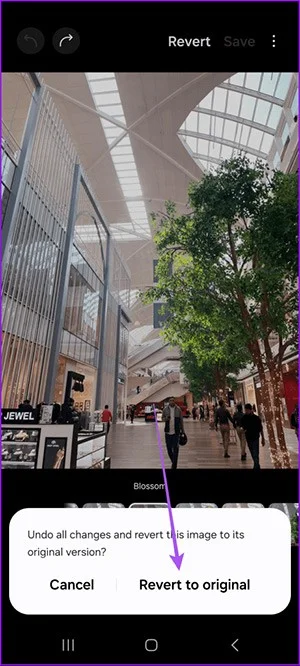
You will then be asked if you want to restore the original photo, click Revert to Original below to do so.

Step 3:
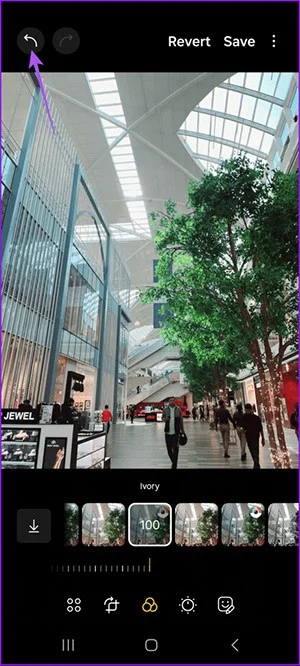
In case you just want to restore each editing operation , we click on the edit icon below.

Next, click on the arrow icon to restore the image before editing.

Diet is important to our health. Yet most of our meals are lacking in these six important nutrients.
At first glance, AirPods look just like any other true wireless earbuds. But that all changed when a few little-known features were discovered.
In this article, we will guide you how to regain access to your hard drive when it fails. Let's follow along!
Dental floss is a common tool for cleaning teeth, however, not everyone knows how to use it properly. Below are instructions on how to use dental floss to clean teeth effectively.
Building muscle takes time and the right training, but its something anyone can do. Heres how to build muscle, according to experts.
In addition to regular exercise and not smoking, diet is one of the best ways to protect your heart. Here are the best diets for heart health.
The third trimester is often the most difficult time to sleep during pregnancy. Here are some ways to treat insomnia in the third trimester.
There are many ways to lose weight without changing anything in your diet. Here are some scientifically proven automatic weight loss or calorie-burning methods that anyone can use.
Apple has introduced iOS 26 – a major update with a brand new frosted glass design, smarter experiences, and improvements to familiar apps.
Yoga can provide many health benefits, including better sleep. Because yoga can be relaxing and restorative, its a great way to beat insomnia after a busy day.
The flower of the other shore is a unique flower, carrying many unique meanings. So what is the flower of the other shore, is the flower of the other shore real, what is the meaning and legend of the flower of the other shore?
Craving for snacks but afraid of gaining weight? Dont worry, lets explore together many types of weight loss snacks that are high in fiber, low in calories without making you try to starve yourself.
Prioritizing a consistent sleep schedule and evening routine can help improve the quality of your sleep. Heres what you need to know to stop tossing and turning at night.
Adding a printer to Windows 10 is simple, although the process for wired devices will be different than for wireless devices.
You want to have a beautiful, shiny, healthy nail quickly. The simple tips for beautiful nails below will be useful for you.