
Kawaii Halloween Decor Without Gore or Jump Scares

Create a gentle Halloween look with pastel colors, friendly ghosts, easy no-carve accents, and practical safety tips for your home.
The problem with setting up a password using a clever idea or pattern is that other people can come up with the same pattern and set up their passwords that way. This is the case with Keyboard Walk Password, which seems strong at first but is actually very insecure.
So, what are Keyboard Walk Passwords and why shouldn't you use them?
What is Keyboard Walk Password?
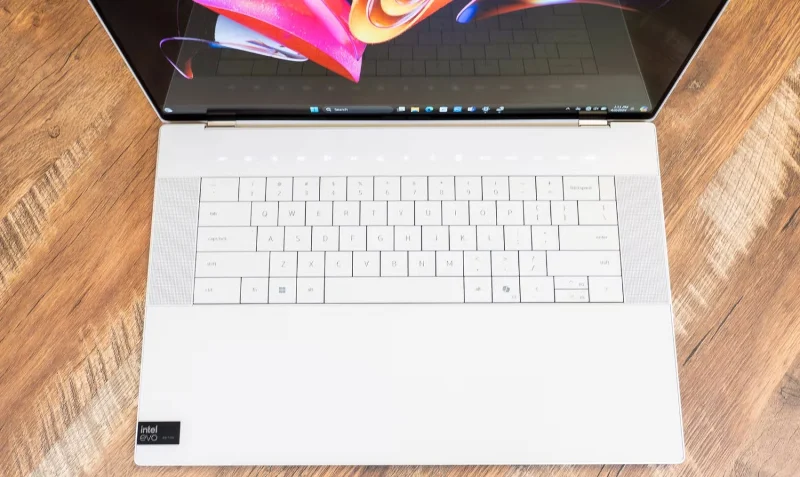
“Keyboard walking” is a type of password that is created by drawing a specific pattern on the keys on the keyboard instead of using a mnemonic word or symbol. The idea is that you remember the pattern you “draw” on the keyboard instead of what you type.
For example, if you run your finger along the top row of a QWERTY keyboard, you'll create the password "qwertyuiop." At first glance, it looks like a secure password — it doesn't contain common words, it's a jumble of characters, and it's easy to type to unlock your computer.
But in reality, "qwertyuiop" is one of the most common passwords, making it easy to guess and making it easier to access your account.
Why is Keyboard Walk Password weak?
Here's the problem with Keyboard Walk Passwords: Anytime a password is derived from a specific pattern or common thought that people tend to have, it's considered a common password. Hackers always keep an eye out for passwords that people commonly use and apply them when trying to break into someone's account.
Unfortunately, while drawing patterns on your keyboard may seem clever, other people have had the same idea, so there's a good chance that the pattern you come up with has already been thought of and used by hundreds of thousands of other users.
Examples of popular Keyboard Walk Passwords
Luckily, we have a way to see which Keyboard Walk Passwords are the most popular. That's because there are many passwords leaked from account databases that allow researchers to record and rank the popularity of each password.
According to Spec Ops report, here are the 10 most used Keyboard Walk Passwords:
If you trace the keys in each password with your finger, you can see the pattern each person used to create that password. Most of them are just straight lines on the keyboard, but some are circles. For example, “Drews” and “vbnhb” involve drawing a memorable circle on the keyboard.
How to secure your account with a strong and unique password
Keyboard Walk Passwords are easy to remember, but they also make it very easy for hackers to access your accounts. If you want to improve your online security but don't want to remember long, complicated passwords, there are two great alternatives to try.
Use strong but memorable passwords
Here's some good news: There are ways to create strong passwords that are still memorable. Sometimes you can take something you like, like a famous quote or personal information, and combine it with numbers and symbols to create a strong password.
Use a password manager
If you want to use secure passwords but can't remember them all, it's time to start using a password manager. These managers will remember your account passwords, meaning you can keep them as secure as possible without having to worry about remembering them later.
Keyboard Walk Passwords may be convenient, but they're easy for hackers to guess. Now you know how to improve your passwords, including using stronger, better passwords if you want.
Create a gentle Halloween look with pastel colors, friendly ghosts, easy no-carve accents, and practical safety tips for your home.
Create a spooky office cubicle with Halloween desk decor ideas that keep your workspace usable, tidy, and mindful of workplace safety.
Plan a recognizable Halloween 2026 look with pop culture costumes inspired by Spider-Man, Supergirl, Toy Story 5, Moana, Mario, and Wednesday.
Sort leftover Halloween candy safely, share or repurpose sealed treats, and choose food use or compost for pumpkins based on their condition.
Compare workplace Halloween costume choices by respect, dress code, mobility, and safety—and learn when a subtle accessory or a policy check is the better option.
Find a couples costume that fits your style, budget, and comfort level, from Addams Family classics to original inside-joke duos.
Need a last-minute high school Halloween costume? Compare 10 easy closet-based ideas by prep time, comfort, school-day practicality, and simple safety checks.
Use a simple 2026 Halloween decorating timeline for indoor décor, outdoor displays, and fresh pumpkins, with practical adjustments for weather and events.
Mix five vivid, approachable Halloween cocktails with measured recipes, simple prep tips, and an alcohol-free option for your party guests.
Find 15 office-friendly Halloween costume ideas for 2026, with practical checks for dress codes, respectful themes, comfort, and workplace safety.








