Instructions for using induction cookers and infrared cookers for new users

The trend of using induction cookers and infrared cookers is gradually becoming popular in every Vietnamese family today. Refer to this article of ours to know how to use induction cookers and infrared cookers properly!

How to use induction cooker, infrared cooker

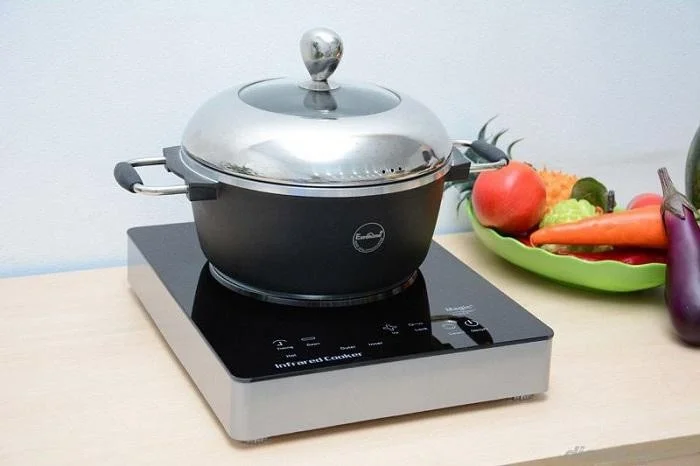
Step 1 : Place the pot right in the middle of the glass surface of the stove to limit the bottom of the pot from becoming unstable when boiling, and avoid impact that can cause the induction stove surface to crack or break.
Instructions for using induction cookers and infrared cookers for new users

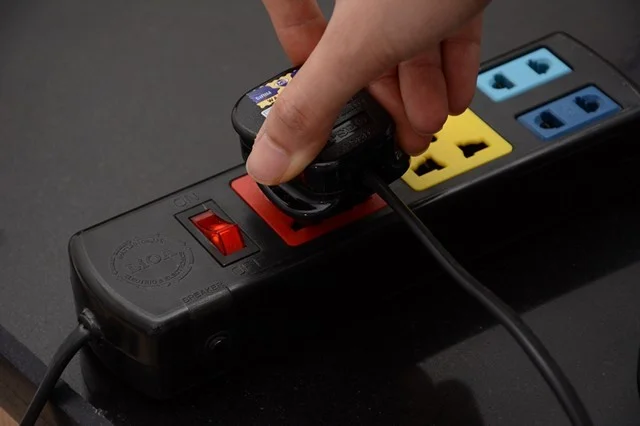
Step 2 : Plug in the power. When the “beep” sound and LED light appear, it means the stove is ready to operate.

Instructions for using induction cookers and infrared cookers for new users

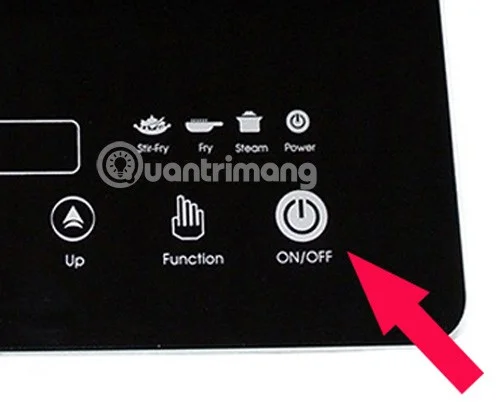
Step 3 : Press the ON/OFF button to turn on the stove.

Instructions for using induction cookers and infrared cookers for new users

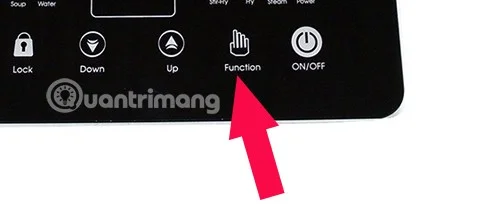
Step 4 : Select cooking function. Press FUNCTION to select preset cooking function.

Instructions for using induction cookers and infrared cookers for new users

Kitchen functions:

  • BBQ: To grill meat.
  • Stir Fire: Stir-fry.
  • Hot Pot/Chafing: Cooking hot pot.
  • Soup: Cook soup.
  • Boil: Boil water.

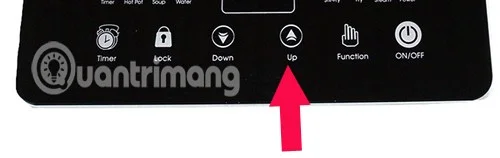
Step 5 : Adjust the temperature and power. If you want to increase the temperature, press the button that shows the "+" sign or the word UP. Conversely, if you want to decrease the temperature, press the button that shows the "-" sign or the word DOWN. Depending on each dish, you need to adjust the stove temperature accordingly.

Instructions for using induction cookers and infrared cookers for new users

Step 6 : Press the ON/OFF button to turn off the stove. You should wait for the stove's cooling fan to stop running before unplugging the power cord from the socket so that the stove stops working completely.

Rules for safe kitchen installation:

  • The input power source must have 3 wires: live wire, neutral wire and ground wire.
  • At the same time, the power source must be guaranteed from 190 - 230V.
  • The power cord must have a load capacity suitable for the load of the induction cooker.
  • Electrical connections must be secured with connectors or plugs and sockets to avoid short circuits.
  • CB 30A automatic circuit breaker, Φ 30 mm wire and grounded wire

Above is a guide on how to use induction cookers and infrared cookers for new users. Hopefully with the information we provide, you will know how to use them!
 

Leave a Comment

How to Fix Microsoft Edge Audio Out of Sync Error

How to Fix Microsoft Edge Audio Out of Sync Error

Tired of Microsoft Edge audio out of sync ruining your videos? Follow our expert, step-by-step guide with the latest fixes to eliminate audio lag and desync issues instantly. Restore smooth playback today!

Troubleshooting Edge Browser Slow Navigation on Windows 11

Troubleshooting Edge Browser Slow Navigation on Windows 11

Tired of sluggish Edge browser navigation on Windows 11? This ultimate troubleshooting guide delivers quick, effective fixes for slow loading, laggy tabs, and poor performance. Restore lightning-fast browsing today!

Solving Microsoft Edge Side-by-Side Configuration Error

Solving Microsoft Edge Side-by-Side Configuration Error

Stuck with Microsoft Edge "Side-by-Side Configuration" Error? Follow our proven, step-by-step fixes to resolve it fast and restore smooth browsing. No tech skills needed!

Troubleshooting Microsoft Edge Webcam Privacy Error

Troubleshooting Microsoft Edge Webcam Privacy Error

Struggling with Microsoft Edge Webcam Privacy Error? Follow our proven step-by-step guide to troubleshoot and fix it quickly. Regain webcam access in minutes with simple, effective solutions.

Best Extensions for Microsoft Edge Productivity in 2026

Best Extensions for Microsoft Edge Productivity in 2026

Unlock peak efficiency with the Best Extensions for Microsoft Edge Productivity in 2026. From tab mastery to AI-powered tasks, these top picks will transform your browsing into a productivity powerhouse. Install now and save hours daily!

How to Fix Microsoft Edge Out of Memory While Browsing

How to Fix Microsoft Edge Out of Memory While Browsing

Tired of Microsoft Edge "Out of Memory" crashes? Get proven, step-by-step solutions to fix Microsoft Edge out of memory while browsing. Boost speed and stability today!

How to Use Microsoft Edge for Remote Work and Education

How to Use Microsoft Edge for Remote Work and Education

Master how to use Microsoft Edge for remote work and education. Discover workspaces, collections, Immersive Reader, and productivity tips to boost efficiency and focus.

How to Use Microsoft Edge Sandbox for Safe Browsing

How to Use Microsoft Edge Sandbox for Safe Browsing

Discover how to harness Microsoft Edge Sandbox for safe browsing. Step-by-step guide to enable, optimize, and maximize security against threats while browsing effortlessly. Stay protected today!

Solving Microsoft Edge Profile Error on Every Launch

Solving Microsoft Edge Profile Error on Every Launch

Struggling with Microsoft Edge Profile Error every time you launch? Discover proven, step-by-step fixes to resolve the issue instantly. No more frustration – get back to browsing smoothly!

How to Fix Microsoft Edge Access Denied on Specific Sites

How to Fix Microsoft Edge Access Denied on Specific Sites

Struggling with Microsoft Edge "Access Denied" on specific sites? Discover proven, step-by-step fixes for Microsoft Edge Access Denied errors. Clear cache, tweak settings, and regain access fast—no tech skills needed!

How to Use Microsoft Edge Built-in VPN for Secure Browsing

How to Use Microsoft Edge Built-in VPN for Secure Browsing

Step-by-step guide: Learn how to use Microsoft Edge built-in VPN for secure browsing. Boost privacy, bypass restrictions, and stay protected effortlessly. Enable now!

How to Fix Microsoft Edge High CPU Usage and System Lag

How to Fix Microsoft Edge High CPU Usage and System Lag

Tired of Microsoft Edge high CPU usage causing system lag? Get proven, step-by-step fixes to optimize your browser, reduce lag, and boost performance fast. Latest solutions inside!

Troubleshooting Microsoft Edge Youtube Black Screen Fix

Troubleshooting Microsoft Edge Youtube Black Screen Fix

Struggling with YouTube black screen on Microsoft Edge? Discover proven troubleshooting Microsoft Edge "Youtube Black Screen" fix steps: clear cache, disable hardware acceleration, and more for seamless video playback. Quick, easy solutions inside!

Solving Microsoft Edge ERR_CONNECTION_REFUSED Error

Solving Microsoft Edge ERR_CONNECTION_REFUSED Error

Tired of Microsoft Edge ERR_CONNECTION_REFUSED blocking your browsing? Discover step-by-step fixes, from quick resets to advanced tweaks, that work on the latest Windows versions. Get online fast!

Troubleshooting Microsoft Edge Extensions Slowing Down Browser

Troubleshooting Microsoft Edge Extensions Slowing Down Browser

Is troubleshooting Microsoft Edge "extensions slowing down browser" your nightmare? Follow this step-by-step guide to identify, disable, and optimize extensions for blazing-fast performance. Restore Edge speed today!