Kawaii Halloween Decor Without Gore or Jump Scares

Create a gentle Halloween look with pastel colors, friendly ghosts, easy no-carve accents, and practical safety tips for your home.
Naraka Bladepoint increases rewards for players through giftcodes. Like many other Online Games , you will get more free rewards easily with giftcodes.
Naraka Bladepoint Giftcode is often noticed because it brings many rewards to players when playing. It includes Reward Chests, Soul Stones, Costumes, Weapons and Money for players. Below are the latest Naraka Bladepoint codes and instructions for entering the code.
Table of Contents
| Code | Rewards received when redeeming code | Time of use |
NARAKACON2022 |
Enter this code to redeem for 1000 Gold and 1000 Soul Stones | Still in use |
NARAKA1M |
Enter this code to redeem for 1000 Gold and 1000 Soul Stones | Still in use |
NARAKA2M |
Enter this code to redeem for 1000 Gold and 1001 Soul Stones | Still in use |
NARAKA3M |
Enter this code to redeem for 1000 Gold and 1002 Soul Stones | Still in use |
NARAKA4M |
Enter this code to redeem for 1000 Gold and 1003 Soul Stones | Still in use |
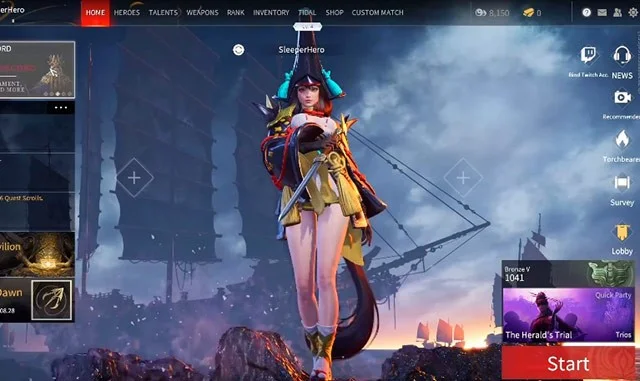
Step 1: In the main lobby interface, select and press the Esc button.
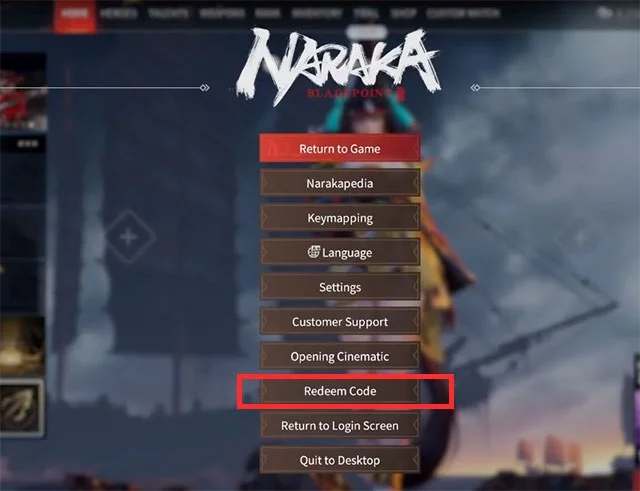
Step 2: At the Settings feature interface, select Redeem code near the bottom of the feature list.
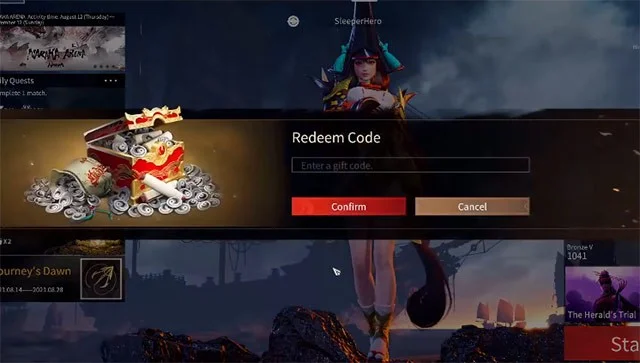
Step 3: Enter all the codes in the code table above into the Enter a gift code box . Then select Confirm below to redeem the code.
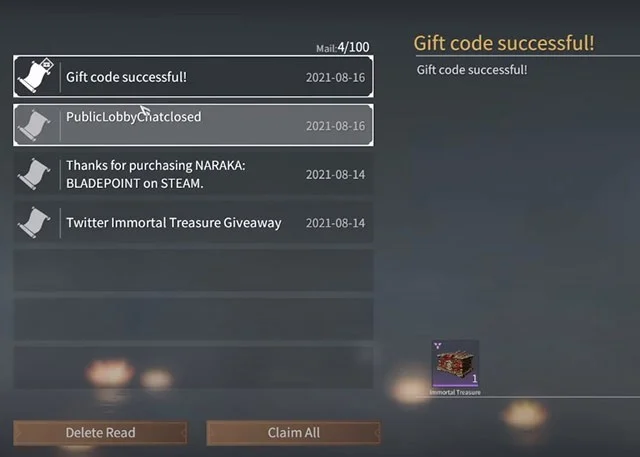
Step 4: If the code is still valid, select the Mail icon. If your Mail is empty and you redeem the code, a new email will be sent and the mailbox will have a red mark as shown below.
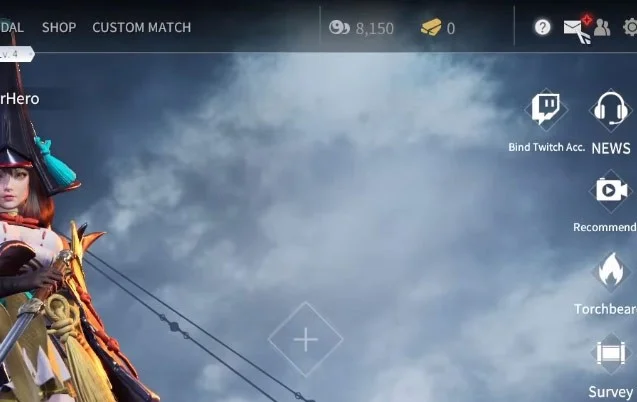
The giftcode letter will be written on the outside as Gift code successful, select the letter you redeemed from the giftcode and you will see the reward displayed on the right side of the letter list. You can select Claim All. There are also letters announcing game content updates, game maintenance, events...
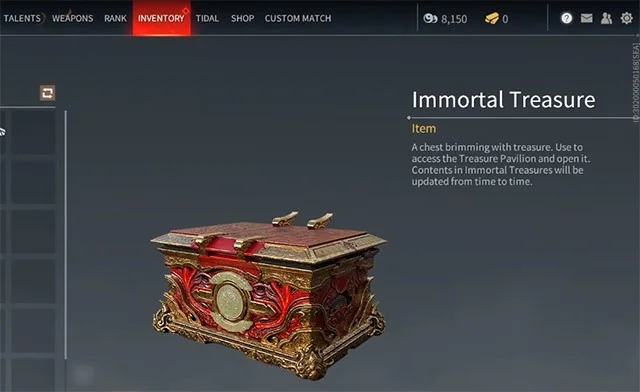
After receiving the gift from the giftcode, please check again in the Inventory section.
Besides the Giftcode received from the publisher or through events you want to participate in, Torchbearer code is also a way for you to receive rewards, Torchbearer code will be for new players.
By redeeming these Torchbearer codes, players can receive good support rewards for their new time in the game. Torchbearer codes can be obtained from your friends who play Naraka, provided that they have reached level 10. To receive Torchbearer codes, do the following:
In addition to getting the first code at level 10, you can also earn rewards at other levels with Torchbearer codes. Players whose accounts are linked to your accounts will also receive some free rewards. The rewards will be divided into the following levels:
To get more Naraka Bladepoint codes, just save this Quantrimang website and open it again every day to check. If you are using Google Chrome or Coc Coc, save it by pressing CTRL+D to save the page on the bookmark bar.
Or, you follow 24 Entertainment on other Social Networking applications such as Facebook , Threads , Twitter, Discord... They will release the latest information for players as well as game giftcodes.
Naraka Code is often added by the developer to the game when the game updates new content, or during holidays, or when the developer launches events for you to participate in and get your own code and redeem rewards.
Because the code you entered may not be correct, Naraka code usually has letters and numbers, sometimes accompanied by special characters. So you need to enter the correct and complete characters in the game to redeem the reward.
Another reason could be that the code has expired, the developer often releases one or more codes and they will have an expiration date. If it is long, it will be a few months, if it is short, it will be only a few weeks or a few days, so when you get a new code, enter it immediately to redeem it.
Before redeeming the code, remember that your character can only redeem the code once. So enter all the codes at once to redeem the reward. As for the Torchbearer code, you can only enter it if your friend is on the same platform as you, meaning if you play Naraka on PC, your friend will also have to play on PC to be able to redeem the Torchbearer code. The same applies to PC players.
Create a gentle Halloween look with pastel colors, friendly ghosts, easy no-carve accents, and practical safety tips for your home.
Create a spooky office cubicle with Halloween desk decor ideas that keep your workspace usable, tidy, and mindful of workplace safety.
Plan a recognizable Halloween 2026 look with pop culture costumes inspired by Spider-Man, Supergirl, Toy Story 5, Moana, Mario, and Wednesday.
Sort leftover Halloween candy safely, share or repurpose sealed treats, and choose food use or compost for pumpkins based on their condition.
Compare workplace Halloween costume choices by respect, dress code, mobility, and safety—and learn when a subtle accessory or a policy check is the better option.
Find a couples costume that fits your style, budget, and comfort level, from Addams Family classics to original inside-joke duos.
Need a last-minute high school Halloween costume? Compare 10 easy closet-based ideas by prep time, comfort, school-day practicality, and simple safety checks.
Use a simple 2026 Halloween decorating timeline for indoor décor, outdoor displays, and fresh pumpkins, with practical adjustments for weather and events.
Mix five vivid, approachable Halloween cocktails with measured recipes, simple prep tips, and an alcohol-free option for your party guests.
Find 15 office-friendly Halloween costume ideas for 2026, with practical checks for dress codes, respectful themes, comfort, and workplace safety.








