Kawaii Halloween Decor Without Gore or Jump Scares

Create a gentle Halloween look with pastel colors, friendly ghosts, easy no-carve accents, and practical safety tips for your home.
Nordpass, a company providing password management solutions, and Cybernews cybersecurity researchers recently released a report on the most commonly used passwords on the Internet.
Accordingly, easy-to-remember character strings such as "123456", "root", "admin"... are at the top of popular passwords.
Here are the top 5 easiest passwords to guess in the world according to NordPass based on 3 TB of data taken from the dark web and information leaks in 2022.
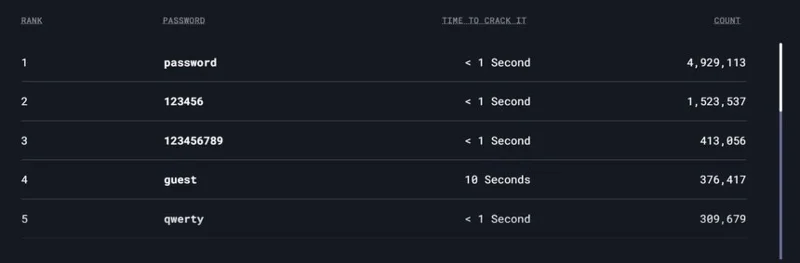
Additionally, Nordpass’ research found that more and more Samsung users are using “samsung” as their password. This is a worrying trend in at least 30 countries.
Research shows that in 2019, “samsung” was the 198th most commonly used password out of 200. But by 2022, its ranking had jumped to 78th place.
Avoid using a brand name like “samsung” as a password. Even using a lowercase S instead of an uppercase one doesn’t make a huge difference in security. According to Nordpass, it takes about 1 second to crack this password.
In short, you should not use the brand name of the device you are using, easy-to-remember character strings, numbers related to your date of birth, and phone number as your password.
NordPass CEO Jonas Karklys says passwords are the gateway to our digital lives. In today’s modern world, we spend more and more time online. As a result, people need to pay more attention to cybersecurity. However, it seems that passwords are getting weaker and people are still not using them properly.
To keep personal information safe, users should come up with a password that is difficult enough, random, combining letters, numbers and symbols. In addition, users should also note that each account should use a different password.
The 200 most common passwords in the world in 2021

In 2021, the list featured a few unusual but still terrible passwords like “iloveyou,” “dragon,” and “baseball.”
Most of the passwords on this list are very simple, relatively easy to crack in about a second.
Here is a list of the 20 worst passwords of 2021
1. 123456
2. 123456789
3. 12345
4. qwerty
5. password
6. 12345678
7. 111111
8. 123123
9. 1234567890
10. 1234567
11. qwerty123
12. 000000
13. 1q2w3e
14. aa12345678
15. abc123
16. password1
17. 1234
18. qwertyuiop
19. 123321
20. password123
To see the full details of the 200 worst passwords, please visit the link here .
Create a gentle Halloween look with pastel colors, friendly ghosts, easy no-carve accents, and practical safety tips for your home.
Create a spooky office cubicle with Halloween desk decor ideas that keep your workspace usable, tidy, and mindful of workplace safety.
Plan a recognizable Halloween 2026 look with pop culture costumes inspired by Spider-Man, Supergirl, Toy Story 5, Moana, Mario, and Wednesday.
Sort leftover Halloween candy safely, share or repurpose sealed treats, and choose food use or compost for pumpkins based on their condition.
Compare workplace Halloween costume choices by respect, dress code, mobility, and safety—and learn when a subtle accessory or a policy check is the better option.
Find a couples costume that fits your style, budget, and comfort level, from Addams Family classics to original inside-joke duos.
Need a last-minute high school Halloween costume? Compare 10 easy closet-based ideas by prep time, comfort, school-day practicality, and simple safety checks.
Use a simple 2026 Halloween decorating timeline for indoor décor, outdoor displays, and fresh pumpkins, with practical adjustments for weather and events.
Mix five vivid, approachable Halloween cocktails with measured recipes, simple prep tips, and an alcohol-free option for your party guests.
Find 15 office-friendly Halloween costume ideas for 2026, with practical checks for dress codes, respectful themes, comfort, and workplace safety.








