Microsoft sparks outrage by renaming Remote Desktop app on some platforms

Unlike Windows, macOS and iOS/iPadOS don’t have a built-in client for Microsoft’s Remote Desktop Services. So Microsoft cleverly created a separate app for the service, simply called Microsoft Remote Desktop. However, it looks like the company now has an interesting alternative to the simple and recognizable name. Unfortunately, this is a decision that may come with some criticism.

Mac users recently noticed that Microsoft placed a small banner inside the Remote Desktop app to warn them about the upcoming rebranding. According to the announcement, future updates will change the app name from Microsoft Remote Desktop to just Windows App. Here is what the banner says:

In an upcoming update for Remote Desktop the client will have a new name, Windows App!
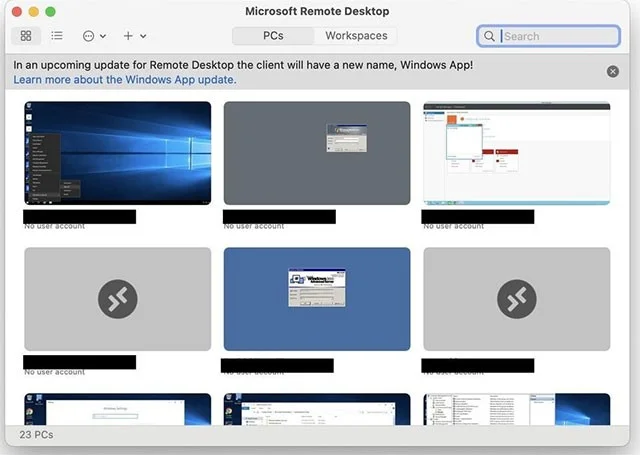
Microsoft sparks outrage by renaming Remote Desktop app on some platforms

There is also a link to the official Microsoft Learn website, where customers can find more information about what the “Windows App” can do on different platforms. In short, if you have a Mac, iPhone, or iPad, this Windows App will let you work with Azure Virtual Desktops, Windows 365, Microsoft Dev Box, Remote Desktop Services, and Remote PC.

The Windows App is currently in preview mode and you can download it for Mac from the Download Center. It is also available in the Microsoft Store for Windows 10 and 11.

This change from Microsoft has generated quite a bit of negative reactions from users. Some opinions say that the new name will cause confusion and difficulty when searching, working with applications or providing technical support for inexperienced customers.

Meanwhile, others argue that changing Microsoft Remote Desktop to a Windows App on non-Windows platforms actually makes sense since it's essentially a gateway to remote Windows systems or Windows in the cloud.

What do you think about Microsoft's decision? Leave a comment!

Leave a Comment

What Young Riders Should Know About Moving Their Motorcycles Across Cities

What Young Riders Should Know About Moving Their Motorcycles Across Cities

Long-distance travel can involve heavy traffic, changing weather conditions, and rider fatigue. If you are also dealing with the responsibilities of moving home, such as packing belongings or coordinating accommodation, a long ride may add unnecessary pressure to an already busy schedule.

Solving Microsoft Teams Shortcut Error Not Opening

Solving Microsoft Teams Shortcut Error Not Opening

Tired of Microsoft Teams shortcut error preventing you from opening the app? Follow our expert, step-by-step guide with the latest fixes for instant resolution. Works on Windows, Mac & web – no tech skills needed!

Solving Microsoft Teams Task Management Sync Error

Solving Microsoft Teams Task Management Sync Error

Tired of Microsoft Teams Task Management Sync Error halting your workflow? Follow our proven, step-by-step fixes to resolve sync issues fast and restore seamless task collaboration. No tech expertise needed!

Troubleshooting Microsoft Teams Wiki Error Formatting

Troubleshooting Microsoft Teams Wiki Error Formatting

Struggling with Microsoft Teams Wiki Error Formatting? This step-by-step guide reveals proven fixes for common wiki tab issues, ensuring smooth editing and collaboration in Teams. Get back to productive wikis fast!

How to Fix Microsoft Teams Installation Error for Linux

How to Fix Microsoft Teams Installation Error for Linux

Struggling with Microsoft Teams installation error on Linux? Discover step-by-step fixes for Ubuntu, Fedora & more. Resolve dependency issues, crashes, and errors quickly with our ultimate guide. Get Teams running smoothly today!

Solving Microsoft Teams Error Page Not Loading

Solving Microsoft Teams Error Page Not Loading

Struggling with Microsoft Teams "Error Page" not loading? Get step-by-step fixes for desktop, web, and mobile. Solve Microsoft Teams Error Page issues quickly and resume seamless teamwork today.

Solving Microsoft Teams Error Screenshot Issues

Solving Microsoft Teams Error Screenshot Issues

Tired of Microsoft Teams "Error Screenshot" blocking your workflow? Get proven, step-by-step solutions to resolve screenshot errors in Teams instantly and boost productivity. No tech skills needed!

How to Fix Microsoft Teams Error U User

How to Fix Microsoft Teams Error U User

Tired of Microsoft Teams "Error U" User blocking your chats? Get proven, step-by-step fixes to clear cache, reset, and restore seamless collaboration instantly.

Where are Microsoft Teams Registry Keys Located on Windows 11?

Where are Microsoft Teams Registry Keys Located on Windows 11?

Unlock the precise locations of Microsoft Teams registry keys on Windows 11. Step-by-step guide to find, access, and safely tweak them for optimal performance and troubleshooting. Essential for IT pros and Teams enthusiasts.

How to Fix Microsoft Teams Training Error Video Lag

How to Fix Microsoft Teams Training Error Video Lag

Tired of Microsoft Teams "Training Error" Video Lag ruining your meetings? Follow our step-by-step guide with the latest fixes for smooth video calls—no more frustration!








