Kawaii Halloween Decor Without Gore or Jump Scares

Create a gentle Halloween look with pastel colors, friendly ghosts, easy no-carve accents, and practical safety tips for your home.
OpenAI has announced that ChatGPT users will no longer need to log in to use its AI model's search engine feature. This feature of ChatGPT was originally developed to compete directly with Google and Bing, but was initially rolled out to paid ChatGPT subscribers last October, before being expanded to all users in December. Now, the feature is officially available to anyone who accesses ChatGPT without even needing a login account, meaning there are no barriers at all.
Late last year, OpenAI said it had improved the overall speed of the search experience based on user feedback. Previously, users had to click the exact web search icon to trigger the AI chatbot’s search capabilities. But now, ChatGPT can automatically decide whether to trigger a web search or rely solely on the AI to respond to the user on a case-by-case basis. However, users can still force ChatGPT to use the web search experience by clicking the web search icon.
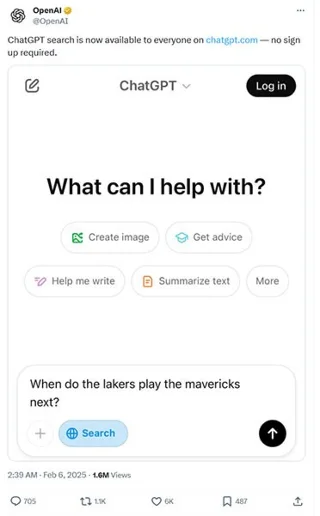
In addition to providing answers, one of the key features of ChatGPT search is that it can display a list of sources from which it was notified. This is intended to be transparent to users, helping them better understand the source and reliability of the information.
Additionally, the recent update to the search function in ChatGPT has brought an experience closer to the regular search engine that most people are familiar with, showing maps, images, and even descriptions of attractions and notable places in any given area.
According to the latest report from market analysis firm Semrush, ChatGPT has gradually threatened Google's leading position in terms of search traffic market share to third-party websites. Experts believe that ChatGPT Search is becoming an even more powerful tool for finding and interacting with information online.
Create a gentle Halloween look with pastel colors, friendly ghosts, easy no-carve accents, and practical safety tips for your home.
Create a spooky office cubicle with Halloween desk decor ideas that keep your workspace usable, tidy, and mindful of workplace safety.
Plan a recognizable Halloween 2026 look with pop culture costumes inspired by Spider-Man, Supergirl, Toy Story 5, Moana, Mario, and Wednesday.
Sort leftover Halloween candy safely, share or repurpose sealed treats, and choose food use or compost for pumpkins based on their condition.
Compare workplace Halloween costume choices by respect, dress code, mobility, and safety—and learn when a subtle accessory or a policy check is the better option.
Find a couples costume that fits your style, budget, and comfort level, from Addams Family classics to original inside-joke duos.
Need a last-minute high school Halloween costume? Compare 10 easy closet-based ideas by prep time, comfort, school-day practicality, and simple safety checks.
Use a simple 2026 Halloween decorating timeline for indoor décor, outdoor displays, and fresh pumpkins, with practical adjustments for weather and events.
Mix five vivid, approachable Halloween cocktails with measured recipes, simple prep tips, and an alcohol-free option for your party guests.
Find 15 office-friendly Halloween costume ideas for 2026, with practical checks for dress codes, respectful themes, comfort, and workplace safety.








