Home
» Today
»
Telstra Missed-Call Text Glitch Fixed: Settings and Troubleshooting — Nov. 4, 2026
Telstra Missed-Call Text Glitch Fixed: Settings and Troubleshooting — Nov. 4, 2026
Last checked: November 4, 2026, 9:20 PM in Perth (Australian Western Standard Time, AWST, UTC+08:00; 13:20 UTC). The time refers to this article's verification, not the start or resolution time of the network issue. Australia has multiple time zones; at the same instant, the date was November 5, 2026 in Sydney (Australian Eastern Daylight Time, AEDT, UTC+11:00).
Telstra says the MessageBank problem behind a burst of delayed missed-call text messages and voicemail alerts on Wednesday, November 4, 2026, has been fixed. Some Australian customers received several notifications together, including alerts that did not match a recent ringing phone or visible call history. Telstra attributed the incident to its MessageBank service rather than a confirmed compromise of customers' phones. The company said Triple Zero (000) calls, ordinary voice calls, and mobile data were not affected by this particular problem.
If your phone suddenly showed missed-call texts, the immediate step is to check the time and number against your call history and voicemail before calling back. A delayed network-generated alert is not proof that the named person called at the moment the SMS arrived. You can also inspect your Telstra MessageBank or Message2Txt settings using the instructions below. Changing notification preferences is optional and is not required to repair the now-resolved network fault.
Destaques
November 4 update: Telstra reported that a MessageBank issue delayed some missed-call and voicemail notifications and said the fault had been fixed.
What to check: Compare each SMS with your Phone app's recent calls, then check any actual voicemail through the relevant voicemail service.
Change alerts: Dial 101 to manage MessageBank hang-up messages, or text DCF Status to 144 to check Message2Txt.
Safety: A suspicious SMS link is a separate security concern. Do not tap unfamiliar links or provide account details in response to a missed-call text.
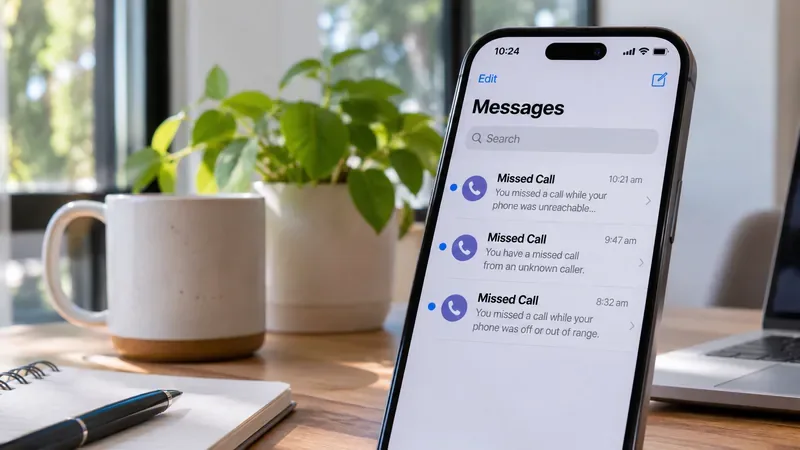
Illustration of a smartphone receiving multiple missed-call messages. The screen is a fictional example, not an actual Telstra alert or screenshot from the November 4 incident.
Why did Telstra send multiple missed-call texts on November 4?
In a November 4 public statement reported by Australian news outlets and associated with the official Telstra account, Telstra said an issue with MessageBank caused delayed missed-call and voicemail notifications to arrive together. The company apologized for the confusion and stated that the issue had been corrected. This explains why an alert could arrive long after the call it described, or appear when a customer had not just heard the phone ring.
That announcement does not establish that every notification represents a genuine completed call, or that every message appearing to come from Telstra is safe. Telstra had not published a verified affected-customer total or a detailed technical root-cause report in the official materials reviewed for this guide. Claims about a nationwide cyberattack or a particular handset brand causing the fault should not be treated as established facts.
How can you tell whether a missed-call SMS is real or delayed?
Open the Phone app and inspect recent calls. Look for the listed number and any missed calls around the supposed time. On Android phones using Phone by Google, call history distinguishes missed, incoming, and outgoing calls. See Google’s call-history instructions.
Check your voicemail separately. If you use Telstra MessageBank, call 101 from your Telstra mobile within Australia. If you use Apple Live Voicemail, open the Voicemail area of the iPhone Phone app instead.
Consider whether the message could have been delayed. An SMS receipt timestamp shows when the text reached you, not necessarily when someone originally attempted to call.
Verify a caller independently. If a recognizable person is named but you cannot confirm the call, contact them using the number already saved in your contacts rather than tapping an embedded link or blindly dialing an unfamiliar number.
Call history is a useful cross-check but cannot independently prove everything about network-side call forwarding or a delayed notification. If the discrepancy continues, record a few example receipt times and contact Telstra support.
Which Telstra setting controls missed-call text messages?
There is no single universal toggle for every missed-call text. Telstra distinguishes MessageBank hang-up messages, Message2Txt, and voicemail captured by the phone itself. The right setting depends on which service you actually use.
How do you turn MessageBank hang-up SMS notifications on or off?
A MessageBank hang-up message is an SMS Telstra may send when a caller reaches your voicemail greeting but disconnects without leaving a recorded message. Under Telstra's official mobile voicemail guide, you can adjust that preference as follows:
From your Telstra mobile, call 101.
After any new messages play, press ** to reach the MessageBank main menu.
Press 3 for Mailbox Setup, then 6 for the Hang-up Message service.
Follow the recorded prompts to turn hang-up texts on or off.
Turning off these alerts changes a feature preference; it does not undo texts already delivered or necessarily disable other types of voicemail notifications.
How do you check or switch off Telstra Message2Txt?
Message2Txt allows a caller to leave a short spoken message that Telstra converts into an SMS when the caller cannot reach you. Telstra documents three service commands sent by SMS to 144:
Send DCF Status to check the current status.
Send DCF Off to turn Message2Txt off.
Send DCF On to turn Message2Txt on.
Telstra notes that activating MessageBank turns Message2Txt off until MessageBank is deactivated. Also, Message2Txt is not the same as an ordinary handset missed-call notification. Do not switch off a service you rely on for important messages simply to clear one batch of delayed alerts.
How can you manage MessageBank in the My Telstra app?
For eligible Upfront Plans, open My Telstra > Services > your mobile service > Menu > Manage your MessageBank. Telstra says you can turn MessageBank on or off and update the setting there. For other plans, use the voicemail setup prompts or contact Telstra as directed on the official MessageBank support page. Disabling MessageBank can change what happens to unanswered calls; it should not be treated as a quick fix for a service-wide notification backlog.
What should iPhone users check if missed-call messages keep appearing?
On iPhones running supported versions of iOS, Apple Live Voicemail is separate from Telstra's network-based MessageBank. Telstra says Live Voicemail has been on by default since iOS 18. To inspect it, open Settings > Apps > Phone > Live Voicemail. You can turn it off there if you prefer calls to use your carrier voicemail arrangements; see the Apple Live Voicemail guide.
Open the Phone app to check call history, voicemail, and any filtered or silenced callers. If calls from unknown numbers appear not to ring, review the phone's call-screening and unknown-caller settings; recent iPhone software can filter calls into separate lists, as explained in Apple’s unknown-caller support article. These checks help explain handset behavior but do not mean an iPhone setting caused Telstra's November 4 MessageBank incident.
What should Android users check for missing or repeated alerts?
Android menus differ by brand, but start in the Phone app and review recent calls. Then open device Settings > Apps and inspect notification permissions for the Phone and SMS apps. Confirm that you have not muted notifications or enabled Do Not Disturb when you expected to hear incoming calls.
If calls or texts genuinely fail to arrive, Telstra recommends checking airplane mode, network coverage, software updates, and the possibility of a service outage. Restarting the device can refresh its connection. The Telstra mobile troubleshooting guide explains these steps and warns that resetting network settings removes saved Wi-Fi and other connection preferences. A reset is not the first remedy for a known, already-fixed provider notification problem.
What if Telstra missed-call texts are still delayed or missing?
Check that ordinary SMS and voice calls now work. If they do, but old missed-call texts arrive in a group, the backlog may explain the mismatch.
Make a simple test call from another trusted phone when convenient. Note whether the phone rings and whether a new missed call, voicemail, or text is recorded.
In My Telstra, go to Help > Get help with an issue and choose the relevant mobile problem, following Telstra’s official steps. Include examples of delays and whether you use MessageBank, Message2Txt, or Live Voicemail.
If your mailbox has stopped accepting new recordings, check its storage and the official voicemail troubleshooting page before deleting messages you need to keep.
Could a missed-call text be a scam?
Yes. The MessageBank incident does not make every missed-call SMS trustworthy. Treat any unexpected message asking you to open a website, provide a password, disclose a one-time code, or urgently pay a fee as suspicious. Navigate directly to My Telstra rather than using a link in the SMS. Telstra advises forwarding suspected scam texts to 7226 (SCAM) or reporting them via its official scam-reporting guidance. If you have disclosed account credentials, contact Telstra using its published support channels.
What should customers expect after the fix?
Because Telstra said the MessageBank fault was resolved on November 4, its statement supports treating the large batch of alerts as a past service issue, not evidence of a continuing universal outage. That does not guarantee there will be no additional late notifications for individual customers. Any fresh failure to receive calls or messages should be checked against the phone's settings, the specific service and current Telstra outage notices before drawing conclusions.
Source note: The incident summary reflects Telstra's November 4 statement about its MessageBank service, while service instructions were checked against Telstra's mobile voicemail documentation, mobile troubleshooting instructions, outage register, and SMS scam guidance. Apple and Google device instructions are linked above. No unverified customer counts, technical root cause, or security breach has been asserted.
FAQ: Telstra missed-call text messages
Why did I get a missed-call text when my phone never rang?
On November 4, 2026, Telstra attributed a batch of delayed missed-call and voicemail alerts to a MessageBank fault that it said was fixed. An SMS may arrive later than the underlying call; check your call history and voicemail before assuming it just happened.
How do I stop Telstra missed-call SMS notifications?
For MessageBank hang-up alerts, call 101 and use Mailbox Setup > Hang-up Message service. For Message2Txt, send DCF Off to 144. These affect different features, so identify which one you use first.
Was Telstra's November 4 issue a mobile network outage?
Telstra described it as a MessageBank notification issue and said normal voice calls, mobile data, and Triple Zero (000) were not impacted by this incident. Check the official outage page for any separate ongoing service problems.