Kawaii Halloween Decor Without Gore or Jump Scares

Create a gentle Halloween look with pastel colors, friendly ghosts, easy no-carve accents, and practical safety tips for your home.
What is Hologram?
The term hologram comes from the Greek words ‘holos’ meaning “thing” and ‘grama’ meaning “written message”. Holographic projection was pioneered in the 1940s by Hungarian physicist Dennis Gabor, who sought to improve the images from an electron microscope in his laboratory. Since then, it has evolved to become an extremely important element in a number of fields such as audiovisual or security. For example, with a hologram of a person, the audience can feel that they are in front of a real person. In addition, the use of movement created by holography, along with the use of sound, gives a more realistic feel.
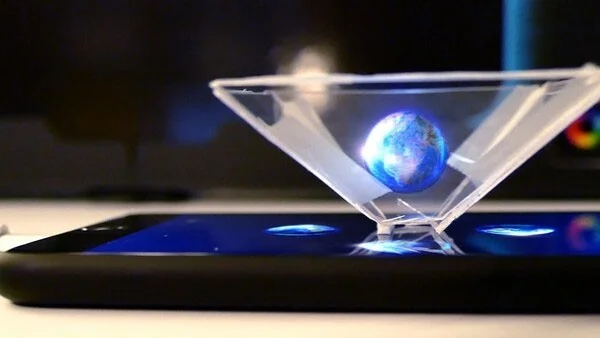
Hologram is a virtual three-dimensional image obtained through the use of light. This virtual image is created by the interference caused by the reference light rays and the light reflected by the object to be holographically imaged on a sensitive substrate. By applying the phenomenon of light reflection, the brain can visualize the object in its three-dimensional form.
How does Hologram work?
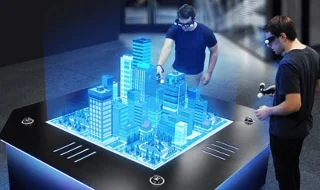
Holography or graphic vision is an advanced technique in optics, using light from laser devices to create lifelike images.
The first holograms are created by recording or creating on a photographic plate what is to be represented, be it an object or a person. Then, by segmenting a laser beam into two separate beams, using a pyramid of mirrors at different positions. This creates a beam that reflects the light and a beam that points at different angles to the object.
The first light beam formed outside the object will establish the hologram and on the substrate or the final hologram plate. In addition, when the light beams combine together, a 3D image will be created. Thanks to innovations such as augmented reality, holograms have grown and multiplied their areas of application, moving from useful tools for authentication and security, such as use in bank cards because they cannot be counterfeited, to other more developed applications, from healthcare to fashion.
What are holograms used for?
There are many different types of holograms, mainly static or animated. Due to their versatility, they have become important in areas such as commerce due to the huge visual impact they create.
In other fields such as healthcare, holograms are also a useful tool, because thanks to 3D holograms, doctors can analyze and evaluate clinical diagnoses without putting the patient at risk.
The same is true in the education sector, where these high-impact images help capture students' attention and allow them to learn more effectively on a variety of topics, as well as being entertained.
Implementing new technologies such as holograms implies a competitive position, improves brand image and adds value. This technique increases the recall of user experiences, an effective way to satisfy customers and increase revenue.
Furthermore, its use is very simple, since 3D holograms do not necessarily depend on the use of augmented reality glasses, and even when supplemented with other technologies such as artificial intelligence , much more developed experiences such as holographic telepresence can be achieved. In the future, it will even be possible, thanks to devices such as augmented reality glasses, to conduct realistic teleconferences, even if each participant is thousands of kilometers away.
How to create hologram
To create a hologram, you don't need to be a tech expert; thousands of amateurs perform this optical illusion every day. However, some basic and elementary holographic materials are needed, such as holographic film, a red laser pointer, a holographic processor, and safety glasses.
First, choose the object you want to take a hologram of. It should be solid and shiny so that the light is captured accurately. For holograms, the room should be dark or dimly lit. It is also important to choose a sturdy base to place the object on.
The laser pointer should then be placed on a solid surface and should not be moved. The laser pointer should be placed 30 to 60 cm away from the object, it is important to adjust the red beam until it is directed directly at the object and illuminates it as much as possible.
Once the laser pointer is positioned, it is time to take the picture by temporarily blocking the laser beam with another solid object, such as a book. The holographic film is then placed on this solid object and the obstacle is raised 2.5 to 5 cm above the base for about 10 seconds. It is necessary to move the frame slowly to avoid vibration of the base or sudden noise due to rubbing.
Finally, to achieve the optical illusion, mix the substances in the Holographic Processing Unit (HPU) and dip into the developing solution for the time specified in the kit. This process ends with drying the hologram and exposing it to direct light to examine the entire image.
Create a gentle Halloween look with pastel colors, friendly ghosts, easy no-carve accents, and practical safety tips for your home.
Create a spooky office cubicle with Halloween desk decor ideas that keep your workspace usable, tidy, and mindful of workplace safety.
Plan a recognizable Halloween 2026 look with pop culture costumes inspired by Spider-Man, Supergirl, Toy Story 5, Moana, Mario, and Wednesday.
Sort leftover Halloween candy safely, share or repurpose sealed treats, and choose food use or compost for pumpkins based on their condition.
Compare workplace Halloween costume choices by respect, dress code, mobility, and safety—and learn when a subtle accessory or a policy check is the better option.
Find a couples costume that fits your style, budget, and comfort level, from Addams Family classics to original inside-joke duos.
Need a last-minute high school Halloween costume? Compare 10 easy closet-based ideas by prep time, comfort, school-day practicality, and simple safety checks.
Use a simple 2026 Halloween decorating timeline for indoor décor, outdoor displays, and fresh pumpkins, with practical adjustments for weather and events.
Mix five vivid, approachable Halloween cocktails with measured recipes, simple prep tips, and an alcohol-free option for your party guests.
Find 15 office-friendly Halloween costume ideas for 2026, with practical checks for dress codes, respectful themes, comfort, and workplace safety.








