What is Gamma AI?

Gamma AI is considered the perfect solution to help you create impressive presentations but don't have much time. So, what is Gamma AI? Let's find out in the article below.

Table of Contents
What is Gamma AI?

1. What is Gamma AI?

Gamma AI is an intelligent online platform that helps users create professional presentations quickly and easily. Simply put, Gamma AI is a virtual slide designer and is always ready to serve you 24/7.

2. Outstanding features of Gamma AI

Create presentation slides automatically

Gamma AI PPT is considered a powerful assistant for office workers. When users enter content and choose a style, Gamma will automatically perform everything from organizing logical information, creating vivid illustrations to designing professional layouts.

High quality natural language processing

What is Gamma AI?

AI Gamma with natural language processing (NLP) brings a whole new creative experience.

Users can ask Gamma AI to generate content in a specific style, tone, and topic such as humorous, fun blog posts or serious science articles or humorous, fun blog posts, etc. to create valuable and personalized content.

Integrate various tools

Gamma AI PowerPoint has cross-platform connectivity that allows users to easily sync and share their presentations with various applications such as Microsoft Office 365, Google Slides or Google Docs.

This feature makes it easy to access, edit, and update your presentations anytime, anywhere.

Data collection and analysis

Gamma AI automatically collects data on views, shares, and other interactions on the content you create, helping you measure campaign performance, understand user behavior, and optimize content for better results.

Create professional images, charts, infographics
What is Gamma AI?

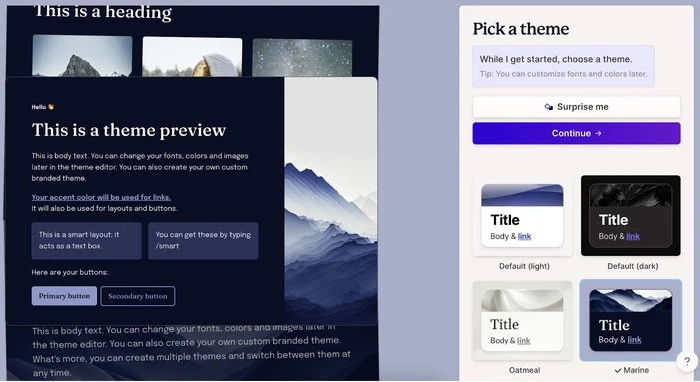
Gamma AI has the ability to automatically generate diverse images, charts, and infographics, helping you turn ideas into visual images quickly and professionally.

Support collaboration features

With Gamma AI PowerPoint, teamwork is now simpler and more efficient than ever.

Gamma AI's powerful sharing and collaboration features allow you to share documents, presentation slides with colleagues and edit and update together in real-time, making teamwork simpler and more efficient.

3. Advantages and disadvantages of Gamma AI

Advantages of Gamma AI

  • Gamma AI helps users save time and effort when creating complete slide sets.
  • Gamma AI generates relevant images, charts, and illustrations, making presentation content more vivid and intuitive, conveying content to viewers and listeners better.
  • Gamma AI has a variety of rich, trendy designs.

Disadvantages of Gamma AI

  • The accuracy and quality of the slide depends on the clarity and detail of the input information provided by the user.
  • Users may have to manually adjust details such as color, font, or layout.
  • The use of Gamma AI can raise concerns about information security and intellectual property rights, especially when sharing sensitive data.

4. How to use Gamma AI

For detailed instructions on how to use Gamma AI to create beautiful presentations that anyone can do, please see the article How to use Gamma AI to create beautiful presentations .

Leave a Comment

Troubleshooting Microsoft Teams Layout Error Sidebar

Troubleshooting Microsoft Teams Layout Error Sidebar

Tired of the frustrating Microsoft Teams "Layout Error" Sidebar? Follow our proven, step-by-step troubleshooting guide with the latest fixes to get your Teams sidebar working smoothly again. No tech skills needed!

Troubleshooting Microsoft Teams Offline Error in 2026

Troubleshooting Microsoft Teams Offline Error in 2026

Stuck with Microsoft Teams offline error in 2026? Discover proven troubleshooting steps, common causes, and quick fixes to restore your connection fast. No tech skills required!

How to Fix Microsoft Teams Error M Memory

How to Fix Microsoft Teams Error M Memory

Tired of Microsoft Teams crashing with "Error M" memory issues? Follow our step-by-step guide to fix Error M in Teams, clear cache, update software, and boost performance—no tech skills required!

Step-by-Step: Setting Up Microsoft Teams Town Hall Events

Step-by-Step: Setting Up Microsoft Teams Town Hall Events

Discover the easiest step-by-step guide to setting up Microsoft Teams Town Hall events. Host massive virtual gatherings effortlessly with pro tips for seamless execution. Perfect for leaders and organizers!

How to Fix Microsoft Teams Download Error for PC

How to Fix Microsoft Teams Download Error for PC

Struggling with Microsoft Teams "Download Error" on PC? Discover proven, step-by-step fixes to resolve download failed issues quickly. Get back to seamless collaboration in minutes—no tech skills needed!

Troubleshooting Microsoft Teams Error L License

Troubleshooting Microsoft Teams Error L License

Stuck with Microsoft Teams "Error L" License error? Follow this step-by-step troubleshooting guide to resolve licensing issues quickly, restore access, and boost productivity without IT hassle. Updated with latest fixes.

Troubleshooting Microsoft Teams Video Call Freezing

Troubleshooting Microsoft Teams Video Call Freezing

Tired of Microsoft Teams video call freezing mid-meeting? Follow this proven troubleshooting Microsoft Teams video call freezing guide with quick fixes, advanced tips, and real solutions to restore smooth video instantly.

How to Fix Microsoft Teams Download Failed Due to Unexpected Error

How to Fix Microsoft Teams Download Failed Due to Unexpected Error

Frustrated by Microsoft Teams 'Download Failed Due to Unexpected Error'? Discover proven, step-by-step solutions to fix this common issue quickly and get back to seamless collaboration. Updated with the latest fixes for peak performance.

Why Did My Microsoft Teams Recording Fail? Common Reasons

Why Did My Microsoft Teams Recording Fail? Common Reasons

Frustrated because your Microsoft Teams recording failed? Uncover the top common reasons like permissions issues, storage limits, and network glitches, plus step-by-step fixes to prevent future failures and record flawlessly every time.

Solving Microsoft Teams Error B Connection

Solving Microsoft Teams Error B Connection

Struggling with Microsoft Teams "Error B" connection? Discover step-by-step fixes for smooth connectivity. Clear cache, check networks, and more in this ultimate guide to resolving Error B instantly.

How to Fix Microsoft Teams Application Is In A Bad State Error

How to Fix Microsoft Teams Application Is In A Bad State Error

Tired of the frustrating Microsoft Teams "Application Is In A Bad State" error crashing your meetings? Discover proven, step-by-step fixes to resolve it quickly and restore smooth teamwork. Updated with the latest solutions.

How to Check Microsoft Teams Version History and Build Number

How to Check Microsoft Teams Version History and Build Number

Discover simple steps to check your Microsoft Teams version history and build number on desktop, web, and mobile. Stay updated with the latest features and fixes effortlessly. Perfect for IT pros and everyday users.

How to Fix Microsoft Teams Uninstall Error Stuck

How to Fix Microsoft Teams Uninstall Error Stuck

Tired of Microsoft Teams "Uninstall Error" Stuck? Discover proven, step-by-step fixes to completely remove Teams from your PC. Works on latest Windows versions – no tech skills needed!

Troubleshooting Microsoft Teams Where is My Team? Error

Troubleshooting Microsoft Teams Where is My Team? Error

Facing the frustrating Microsoft Teams "Where is My Team?" error? Discover step-by-step troubleshooting tips, common causes, and quick fixes to resolve it instantly and resume seamless collaboration. Updated with the latest solutions.

How to Fix Microsoft Teams VDI Error on Virtual Machines

How to Fix Microsoft Teams VDI Error on Virtual Machines

Tired of Microsoft Teams VDI errors crashing your virtual machine calls? Get step-by-step fixes for audio glitches, video freezes, and optimization issues on Citrix, VMware, or RDP setups. Boost productivity now!









