Zeri TFT build, Zeri DTCL squad season 14

Zeri in Teamfight Tactics season 14 is a 4-gold unit belonging to two prominent clans: LOL and High-Tech that supports attack speed. With the ability to create an untargetable clone and attack from a distance, Zeri is a powerful choice in the mid and late game. This article will guide you on how to optimally equip Zeri and build a suitable team to maximize her strength so that you can learn from the beginning more easily.

Build Zeri season 14, standard Zeri season 14 gear

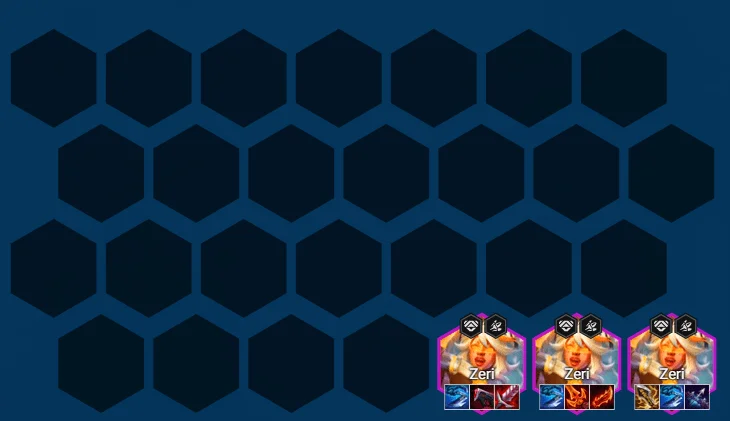
To maximize Zeri's potential as a late-game carry, you'll want to prioritize items that increase her physical damage (AD) and attack speed (AS). Since her clone also benefits from AD and AS, increasing these stats will optimize her overall damage output.
Zeri TFT build, Zeri DTCL squad season 14

Some of the items you should prepare for Zeri include Infinity Edge, Revolver's Bow, Giant Slayer, Rageblade, Deathblade, Bloodthirster, and High Tech support items. You can also use Hand of Justice to increase lifesteal and damage when casting skills.

Zeri Season 14 Lineup

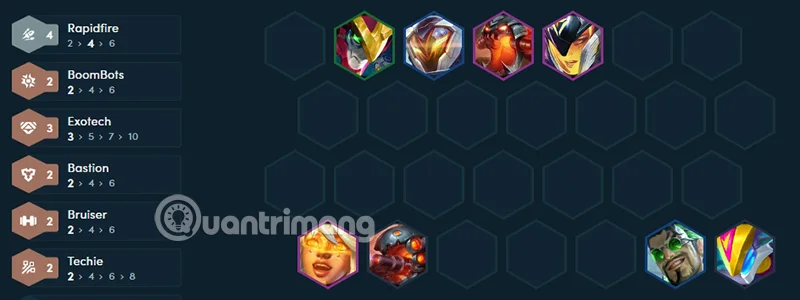
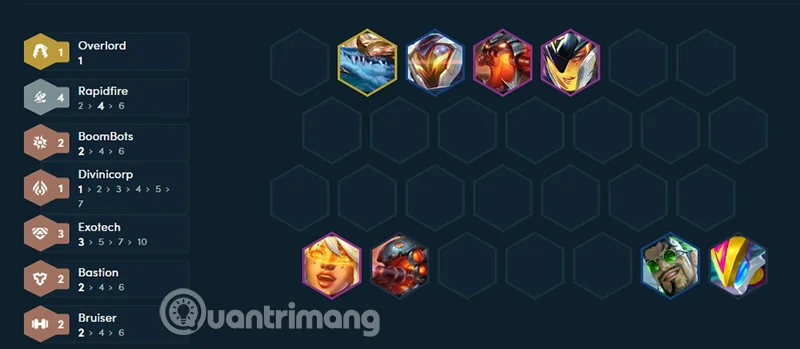
Zeri works well in comps that utilize both High Tech and Rapid Fire because they give her attack speed, combined with a solid frontline that gives Zeri time to deal damage. Here's a suggested comp:

Zeri TFT build, Zeri DTCL squad season 14

Front line:

  • Sejuani: Increases resistances, stuns, and activates Exotech.
  • Mordekaiser or Jax (depending on which you see more): Protect the backline and stun enemy champions so the backline can deal damage.

Next line:

  • Zeri: Main marksman, uses skills to deal continuous damage.
  • Varus: Added splash damage, stun, and higher High Tech milestone activation.
  • Draven: Increases AoE damage, supporting Zeri in large enemy fights.
  • Kindred: Provides damage and crowd control effects.

How to play Zeri TFT squad season 14

Early Game: Focus on building a foundation with cheap Hextech and Marksmen. Make sure you have a solid frontline to protect your backline Marksmen, and use Jhin to hold items for Zeri.

Zeri TFT build, Zeri DTCL squad season 14

Mid-game: Continue to collect items for Jhin and find Mordekaiser, try to level up to 7 to increase the chance of finding Zeri. Once you find Zeri, start throwing items from Jhin to Zeri to start optimizing damage. If you can get Jhin to 3 stars, you can consider removing items with Magic Magnet to remove items for Jhin, otherwise, find separate items for Zeri. At this point, you should decide whether to go High Tech or use Rapid Fire later.

Zeri TFT build, Zeri DTCL squad season 14

Late Game: Position Zeri in the safest position, usually the back row, so she can attack from a distance without being threatened. Take advantage of the attack speed from Rapid Fire to increase the effectiveness of the clone.

Zeri's Skills and Clans in TFT Season 14

Zeri TFT build, Zeri DTCL squad season 14

Skill: Hyperthread Rush

Energy: 0/40

Effect: Zeri dashes to a nearby location, leaving behind an untargetable clone. This clone attacks with Zeri's attack speed and physical damage, dealing 0.5%/0.5%/1.2% (based on star level) of damage and lasting for a duration based on AP. The clone will disappear if Zeri is killed.

Clan:

  • High Tech: Grants High Tech champions bonus health and attack speed based on the number of items equipped and the number of High Tech champions on the team.
  • Shotgun: Increases team attack speed by 10%, and Shotgun champions gain bonus attack speed, stacking up to 10 times per attack.

General index:

  • Cost: 4 gold
  • Health: 800 / 1440 / 2592
  • Energy: 40
  • Armor: 30
  • Magic Resistance: 30
  • DPS: 51 / 92 / 165
  • Damage: 68 / 122 / 220
  • Attack Speed: 0.75
  • Critical Rate: 25%
  • Attack Range: 5 cells

Leave a Comment

How to Fix Microsoft Teams Web Login Error

How to Fix Microsoft Teams Web Login Error

Stuck with Microsoft Teams Web Login Error? Get instant fixes for common issues like "Something went wrong" or login loops. Step-by-step guide to resolve Teams web login problems and stay productive. Updated with latest browser tweaks.

How to Fix Microsoft Teams Error 657rx Update Failed

How to Fix Microsoft Teams Error 657rx Update Failed

Struggling with Microsoft Teams Error 657rx Update Failed? Discover step-by-step fixes, from quick restarts to advanced troubleshooting, to get your Teams app updated and running smoothly in minutes. No tech skills required!

Solving Microsoft Teams VDI Error Lag

Solving Microsoft Teams VDI Error Lag

Tired of Microsoft Teams "VDI Error" Lag freezing your video calls? This ultimate guide delivers step-by-step fixes for VDI environments like Citrix and VMware. Optimize performance now for lag-free collaboration!

Solving Microsoft Teams Join Meeting Error via Direct Link

Solving Microsoft Teams Join Meeting Error via Direct Link

Struggling with Microsoft Teams "Join Meeting Error"? Discover proven steps to solve it via direct links. Quick fixes for seamless joining – no tech skills needed!

How to Test Your Microsoft Teams Audio and Camera Before a Call

How to Test Your Microsoft Teams Audio and Camera Before a Call

Discover simple steps to test your Microsoft Teams audio and camera before a call. Ensure crystal-clear sound and video for professional meetings every time with our easy guide. Perfect for desktop, mobile, and web users.

How to Fix Microsoft Teams Error 53003: Access Denied

How to Fix Microsoft Teams Error 53003: Access Denied

Struggling with Microsoft Teams Error 53003 Access Denied? Discover proven, step-by-step fixes to resolve it quickly. Clear cache, update Teams, bypass proxies & more for seamless collaboration. Works on Windows, Mac & web!

Step-by-Step: Uploading Custom Backgrounds to Microsoft Teams

Step-by-Step: Uploading Custom Backgrounds to Microsoft Teams

Master uploading custom backgrounds to Microsoft Teams with this easy step-by-step guide. Personalize your meetings effortlessly on desktop, web, or mobile for a professional edge.

Troubleshooting Microsoft Teams Error on Phone (iOS/Android)

Troubleshooting Microsoft Teams Error on Phone (iOS/Android)

Struggling with Microsoft Teams "Error on Phone" on iOS or Android? Discover step-by-step fixes for calls, permissions, network issues, and more. Get back to seamless teamwork fast!

How to Fix Microsoft Teams OneDrive Error During File Sharing

How to Fix Microsoft Teams OneDrive Error During File Sharing

Tired of Microsoft Teams OneDrive error blocking file sharing? Follow our expert step-by-step guide to fix sync issues, permissions errors, and more quickly. Get back to seamless collaboration today!

Solving Microsoft Teams Error Screen Flickering

Solving Microsoft Teams Error Screen Flickering

Struggling with Microsoft Teams screen flickering? Discover step-by-step solutions to fix this annoying error, from disabling hardware acceleration to driver updates. Get smooth video calls today!

Solving Microsoft Teams Network Error on Public Wi-Fi

Solving Microsoft Teams Network Error on Public Wi-Fi

Struggling with Microsoft Teams "Network Error" on public Wi-Fi? Get instant fixes like VPN tweaks, port checks, and cache clears to restore calls and meetings seamlessly. Step-by-step guide for quick relief.

How to Fix Microsoft Teams Wheres My Team Search Error

How to Fix Microsoft Teams Wheres My Team Search Error

Tired of the frustrating Microsoft Teams "Where\

Microsoft Teams for Students: How to Join Classes in 2026

Microsoft Teams for Students: How to Join Classes in 2026

Unlock seamless learning with Microsoft Teams for Students! Step-by-step guide to joining classes in 2026, troubleshooting tips, and pro hacks for ultimate success. Perfect for students everywhere.

Solving Microsoft Teams License Error 0x80048504

Solving Microsoft Teams License Error 0x80048504

Tired of Microsoft Teams License Error 0x80048504 blocking your meetings? Get instant fixes with proven steps to resolve it permanently. Clear cache, reset licenses, and more – works every time!

How to Fix Microsoft Teams Remove Account Error

How to Fix Microsoft Teams Remove Account Error

Struggling with Microsoft Teams "Remove Account" error? Discover step-by-step fixes to resolve it quickly. Clear cache, reset app, and more for seamless account management in the latest Teams version.