10 Features of MIUI 12 on Xiaomi You Should Try

Today, Xiaomi is known as one of the most recognized smartphone manufacturers, and its value-for-money offerings have made huge inroads in a number of markets around the world. But a little-known fact about the Chinese company is that its first product wasn’t a smartphone, but MIUI: the software that runs on most of Xiaomi’s phones today.

So, in case you have a Xiaomi phone running MIUI 12 or are just curious about what this software has to offer, here are 10 features you should definitely know about.

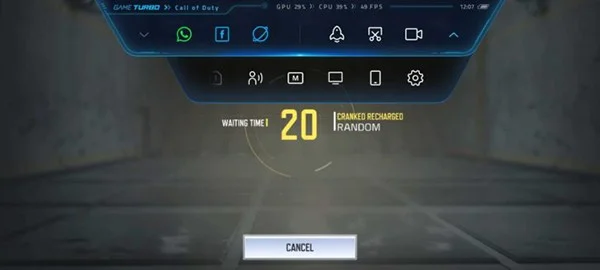
Turbo Game

MIUI’s Game Turbo can really improve your gaming experience. Not only does it let you optimize settings for each game beforehand, it also offers a ton of features that can be accessed while you’re playing. Some of the notable features include access to a browser, voice changer, screen recording, and casting. It also lets you free up resources by killing background processes with just one tap.
10 Features of MIUI 12 on Xiaomi You Should Try
Game Turbo feature

Image blur tool

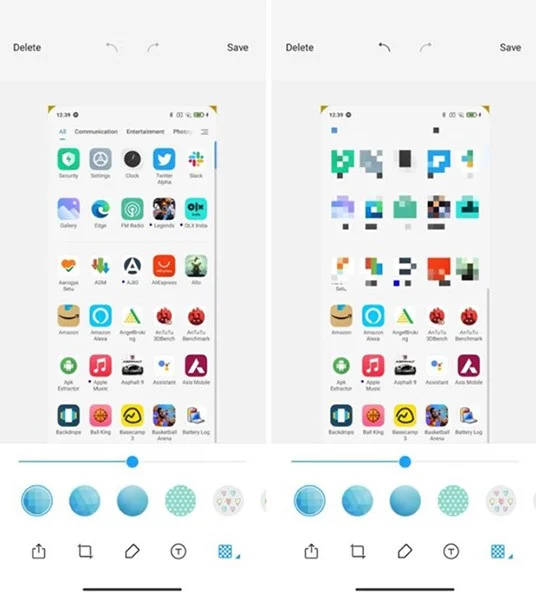
This is a more useful feature than you might think. We take a lot of screenshots every day, and not all of the information inside them is suitable for sharing. MIUI has a built-in blur tool that can be accessed when taking a screenshot. Not only can you choose a blur pattern, but you can also change the brush size.

10 Features of MIUI 12 on Xiaomi You Should Try
Photo blur tool

Audio Assistant

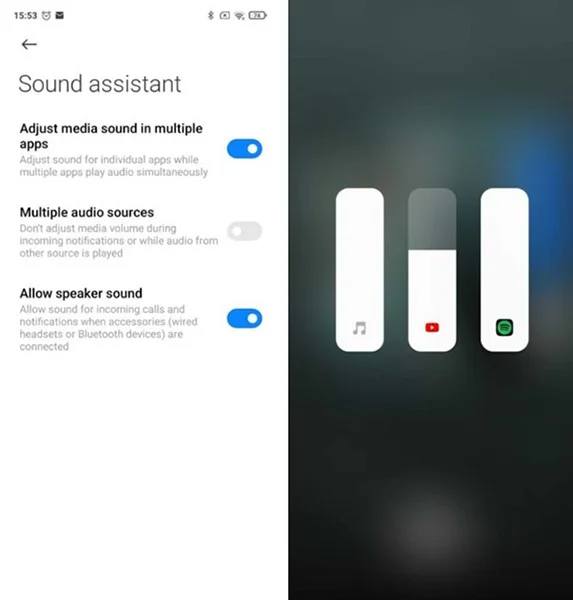
Android isn't particularly accommodating when it comes to media volume, in that it doesn't automatically adjust based on the app you're using. Thankfully, MIUI's audio assistant does this. For example, you can lower the volume on Facebook while still allowing music to play at a louder volume in the background. It's a really handy feature, and it's surprising more OEMs haven't thought of it.

10 Features of MIUI 12 on Xiaomi You Should Try
Audio assistant feature

Second Space Feature

Many of us don't use our phones exclusively for work, and this can make it easy to feel overwhelmed when trying to spend quality time with family or friends. With Second Space, MIUI 12 lets you create a completely separate area — literally a "second space" — on your phone to block out some of the noise. While you can import apps and data from your first space, Second Space is a blank slate that can be set up just for work apps. The best part about this feature is that you can set a passcode/fingerprint for each section and move to the desired tile, right from the lock screen.

Integrate Google Home in control center

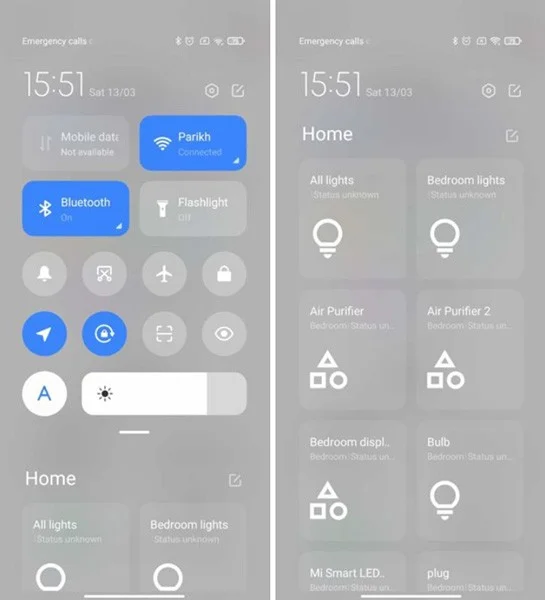
Controlling smart devices with Google Assistant is convenient, but sometimes it's even harder to quickly access them on your screen. And that's what MIUI offers - Google Home integration right in the control center. You can even customize the order of compatible devices and choose which ones to display.

10 Features of MIUI 12 on Xiaomi You Should Try
Google Home integrated in control center

Reading mode

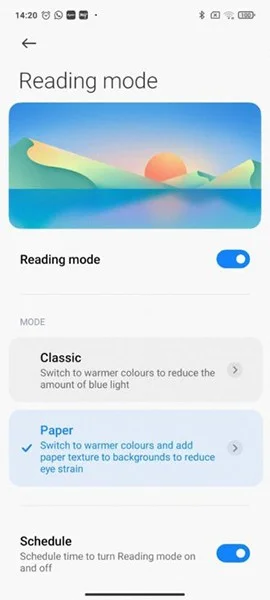
While Reading Mode doesn’t dramatically improve the experience, it does make reading a little easier by reducing blue light, using warmer colors, and adding a paper-like texture. You can even set it to switch automatically.

10 Features of MIUI 12 on Xiaomi You Should Try
Reading mode

Dual application

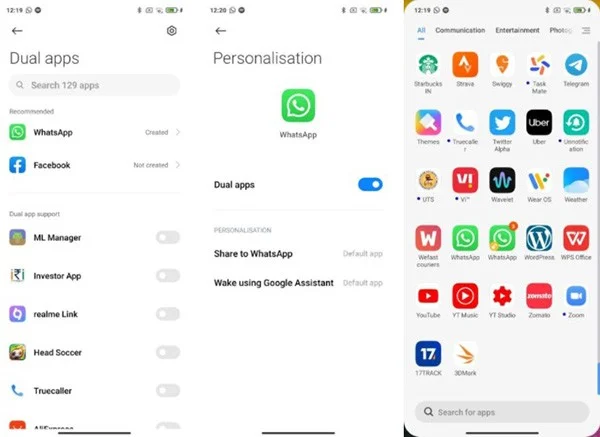
While there are plenty of third-party tools that let you run two instances of the same app, MIUI 12’s implementation is simple and works well. You can use this feature to create a clone of an app like WhatsApp that doesn’t support multiple accounts. Since the duplicate app is sandboxed, it doesn’t affect the original app in any way.

10 Features of MIUI 12 on Xiaomi You Should Try
Dual application

Video Toolbox

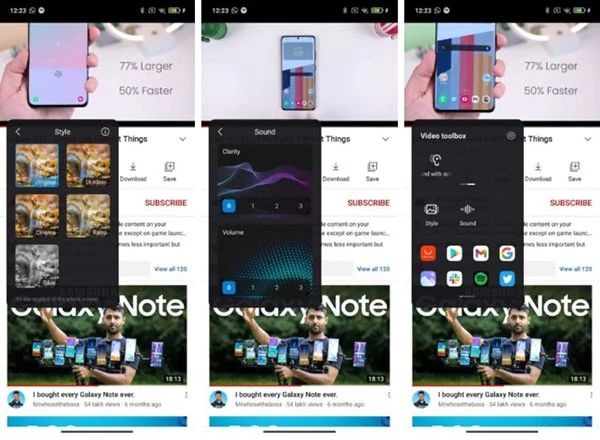
The Video Toolbox isn’t new in MIUI 12, but it’s one of the most underrated features in Xiaomi’s interface. While using apps like YouTube, you can use the toolbox to adjust the video and audio output. More importantly, it also lets you play audio from these apps when the screen is off. This feature is useful if you want to listen to YouTube videos without having to unlock the screen (mimicking the YouTube Premium feature).

10 Features of MIUI 12 on Xiaomi You Should Try
Video Toolbox

Floating windows

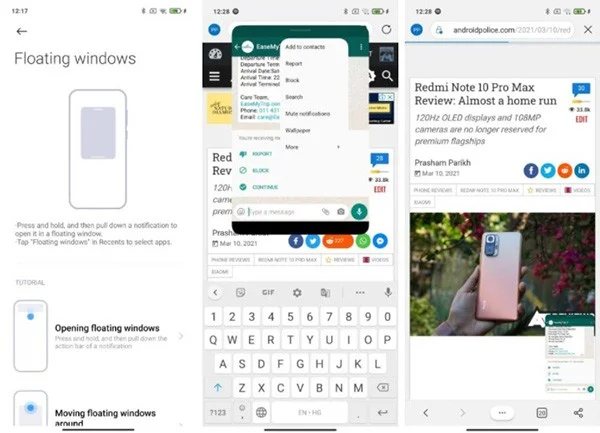
Android comes with unique multitasking features, but MIUI 12 takes it a step further with floating windows. You can quickly open apps in floating windows by pressing and holding the banner notification and swiping down. These floating windows can be minimized, expanded, and closed with simple gestures. There is no need to exit the app you are currently using to access another app.

10 Features of MIUI 12 on Xiaomi You Should Try
Floating windows

Share images without metadata

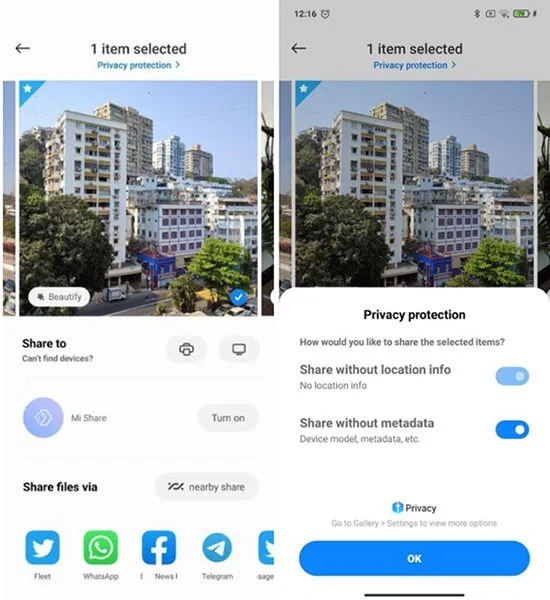
Technology moves so fast that we can all fall victim to a data breach. Most of us are not aware of this and provide a lot of information (like location) with the photos we share on social media. Luckily, MIUI 12 has a feature that allows you to share your photos without location and metadata. Really neat!

10 Features of MIUI 12 on Xiaomi You Should Try
Share photos without metadata

Leave a Comment

What is PAI on Mi Band 5? How to use PAI?

What is PAI on Mi Band 5? How to use PAI?

Since Mi Band 5, Xiaomi has added a PAI body index measurement feature. So what is this index? How to use it?

MIUI 12.5 Info: Release Date, Supported Devices, and New Features

MIUI 12.5 Info: Release Date, Supported Devices, and New Features

MIUI 12.5 will be based on Android 11 and also comes with additional features in Xiaomi smartphones.

Xiaomi to launch its own smartphone chip in early 2025?

Xiaomi to launch its own smartphone chip in early 2025?

Xiaomi's journey to develop its first custom chipset has been quite bumpy, starting with the Surge S1 series, which Xiaomi launched in the Mi 5c about seven years ago but didn't achieve much success.

How to install Game Turbo 3.0 on Xiaomi phone

How to install Game Turbo 3.0 on Xiaomi phone

If you are using any Xiaomi device based running MIUI 11 and MIUI 12, you can install Game Turbo 3.0 voice changer in any Xiaomi MIUI device.

Zhueque, Xiaomis keyless phone

Zhueque, Xiaomis keyless phone

Xiaomi is researching smartphones without physical buttons, replacing them with gesture controls, force touch or voice commands.

Upcoming Highlights at MWC 2025

Upcoming Highlights at MWC 2025

MWC 2025 is just around the corner and many leading tech companies are waiting to unveil new technologies. There is a lot to look forward to at this year's event!

Redmi Note 9T Review

Redmi Note 9T Review

Redmi Note 9T is a budget phone from Xiaomi and supports 5G. This seems like a simple smartphone but it has full functions and above-average performance.

What is Mi Home app? How to download and create an account using Mi Home

What is Mi Home app? How to download and create an account using Mi Home

Discover the Mi Home app essential for managing devices in the Xiaomi ecosystem. Learn about its features, download process, and how to create an account!

Xiaomi Announces HyperOS 2 Global Update Roadmap

Xiaomi Announces HyperOS 2 Global Update Roadmap

Xiaomi has started testing HyperOS 2.0. New information discovered by the XiaomiTime team shows that HyperOS 2.0 is officially being tested.

How to change font on Xiaomi

How to change font on Xiaomi

How to change font on Xiaomi, Want to create a new image for Xiaomi device? Just follow the instructions below to change the font style and size above

Instructions to check your phone number on Xiaomi

Instructions to check your phone number on Xiaomi

If you are a Xiaomi user, the following article will guide people to check their phone number on Xiaomi with a few simple steps.

Solving Microsoft Teams OneDrive Error File Sync

Solving Microsoft Teams OneDrive Error File Sync

Tired of Microsoft Teams OneDrive Error blocking file sync? Follow our step-by-step guide to solve Microsoft Teams "OneDrive Error" File Sync issues quickly. Proven fixes for smooth collaboration in Teams channels. Get your files syncing error-free today!

How to Fix Microsoft Teams Workflows and Power Automate Errors

How to Fix Microsoft Teams Workflows and Power Automate Errors

Tired of Microsoft Teams workflows and Power Automate errors halting your productivity? Get step-by-step solutions to common issues like authentication failures, timeouts, and flow errors. Fix them in minutes and automate effortlessly!

Troubleshooting Microsoft Teams Download Error on Macbook

Troubleshooting Microsoft Teams Download Error on Macbook

Facing Microsoft Teams "Download Error" on MacBook? Discover proven troubleshooting steps to resolve download failures quickly, from cache clears to reinstalls, and get back to smooth teamwork.

Troubleshooting Microsoft Teams Where is Teams Folder Error

Troubleshooting Microsoft Teams Where is Teams Folder Error

Tired of the frustrating Microsoft Teams "Where is Teams" Folder Error? Discover proven, step-by-step troubleshooting fixes to resolve it quickly and restore smooth teamwork. Latest methods included!

How to Fix Microsoft Teams JavaScript Error on Desktop App

How to Fix Microsoft Teams JavaScript Error on Desktop App

Frustrated by Microsoft Teams JavaScript Error on desktop app? Discover proven steps to fix it fast: clear cache, update, reset, and reinstall. Get back to seamless collaboration in minutes!

How to Fix Microsoft Teams Guest Login Error

How to Fix Microsoft Teams Guest Login Error

Struggling with Microsoft Teams "Guest Login" Error? Discover step-by-step fixes, from quick cache clears to admin settings, to resolve guest access issues fast and collaborate seamlessly. Updated with the latest tips!

How to Fix Microsoft Teams For PC Download Error

How to Fix Microsoft Teams For PC Download Error

Tired of the Microsoft Teams "For PC" download error blocking your work? Follow our proven, step-by-step guide to resolve it quickly and get Teams running smoothly on your PC today.

Solving Microsoft Teams Windows 7 Login Error

Solving Microsoft Teams Windows 7 Login Error

Struggling with Microsoft Teams "Windows 7" login error? Discover step-by-step fixes for this frustrating issue on Windows 10/11. Clear cache, edit registry, and more – get back to seamless collaboration today!

How to Fix Microsoft Teams Error Code 0x80070005 (2026 Guide)

How to Fix Microsoft Teams Error Code 0x80070005 (2026 Guide)

Tired of Microsoft Teams Error Code 0x80070005 blocking your meetings? Follow this 2026 guide with step-by-step fixes for access denied issues. Get Teams running smoothly in minutes!

How to Install the Microsoft Teams Add-in for Outlook 2026

How to Install the Microsoft Teams Add-in for Outlook 2026

Master the installation of the Microsoft Teams Add-in for Outlook 2026 effortlessly. Boost your productivity with seamless scheduling and meetings. Follow our proven, up-to-date steps for instant success!

How to Fix Microsoft Teams License Error 2026

How to Fix Microsoft Teams License Error 2026

Struggling with Microsoft Teams "License Error" 2026? Discover proven, step-by-step solutions to resolve it fast. Clear cache, check licenses, and get back to seamless collaboration—no IT help needed!

The Best Exercises for 50+

The Best Exercises for 50+

Whether youre in your 50s, 60s, or even 70s, its not too late to prioritize your health and put yourself first. Here are the best exercises for people 50 and older.

Solving Microsoft Teams Error Caa50024 on Windows 10/11

Solving Microsoft Teams Error Caa50024 on Windows 10/11

Struggling with Microsoft Teams Error Caa50024 on Windows 10/11? Follow our step-by-step fixes to resolve crashes and launch issues quickly. Latest proven solutions for seamless teamwork.

How to Fix Microsoft Teams Login Error AADSTS50011

How to Fix Microsoft Teams Login Error AADSTS50011

Stuck with Microsoft Teams login error AADSTS50011? Discover proven, step-by-step fixes to resolve the reply URL mismatch issue and log in seamlessly. No tech skills needed!

How to Fix Microsoft Teams Win 7 Compatibility Error

How to Fix Microsoft Teams Win 7 Compatibility Error

Tired of the frustrating Microsoft Teams "Win 7" Compatibility Error blocking your meetings? Get instant fixes with our step-by-step guide, including workarounds for older Windows versions. Resolve it now and stay connected!









