Desk Decorating Ideas for a Spooky Office Cubicle

Create a spooky office cubicle with Halloween desk decor ideas that keep your workspace usable, tidy, and mindful of workplace safety.
In early April 2025, Meta launched Llama 4 , the latest series of AI models designed to take the company to the next level. Each new Llama 4 model has significant improvements over its predecessors, and here are the standout new features to try out.
3. Mixture of Experts (MoE) Architecture
One of the most notable features of the Llama 4 models is the new MoE architecture, a first for the Llama series, which takes a different approach than previous models. Under the new architecture, only a small fraction of the model parameters are activated for each token, unlike in traditional dense transformer models like Llama 3 and below, where all parameters are activated for each task.
For example, the Llama 4 Maverick uses only 17 billion active parameters out of 400 billion, with 128 routed experts and one shared expert. The Llama 4 Scout, the smallest version in the series, has a total of 109 billion parameters, with only 17 billion active with 16 experts.
The largest of the three, Llama 4 Behemoth, uses 288 billion active parameters (with 16 specialists) for a total of nearly two trillion parameters. Thanks to this new architecture, only two specialists are assigned to each task.
Thanks to the architectural change, models in the Llama 4 series are more computationally efficient during training and inference. Activating only a small fraction of the parameters also reduces the cost of serving and latency. Thanks to the MoE architecture, Meta claims that Llama can run on a single Nvidia H100 GPU, an impressive feat considering the number of parameters. While no specific numbers are available, it is assumed that each query to ChatGPT uses multiple Nvidia GPUs, which creates a larger overhead in almost every measurable metric.
2. Native multi-modal processing capabilities
Another important update to the Llama 4 AI models is native multimodal processing, meaning the trio can understand text and images simultaneously.
This is thanks to the fusion done in the initial training phase, where text and visual tokens are integrated into a unified architecture. The models are trained using a large amount of unlabeled text, image and video data.

It doesn't get any better than this. If you recall, Meta's Llama 3.2 upgrade , released in September 2024, introduced a number of new models (10 in total), including five multimodal vision models and five text models. With this generation, the company no longer needs to release separate text and vision models thanks to native multimodal processing.
Additionally, Llama 4 uses an improved visual encoder that allows models to handle complex visual inference tasks and multi-image inputs, making them capable of handling applications that require advanced text and image understanding. Multimodal processing also enables LLama 4 models to be used across a wide range of applications.
1. Industry-leading contextual window
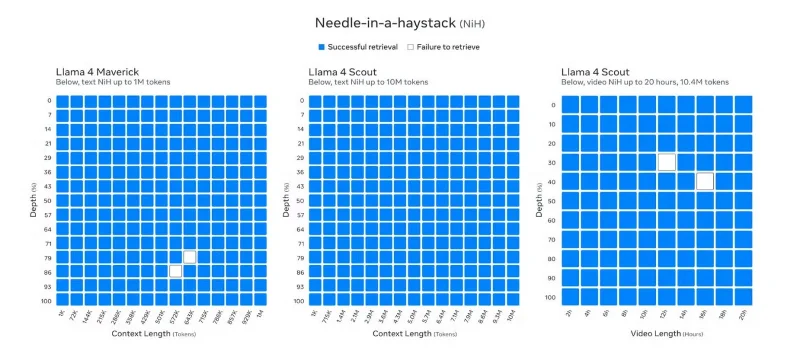
Llama 4 AI models boast an unprecedented context window of up to 10 million tokens. While Llama 4 Behemoth is still in training at the time of publication, Llama 4 Scout has set a new industry benchmark with its ability to support up to 10 million tokens in context length, allowing you to input text that is over 5 million words long.
This extended context length is a significant increase from Llama 3's 8k tokens when it first launched, and even the subsequent expansion to 128k after the Llama 3.2 upgrade. And it's not just Llama 4 Scout's 10 million context length that's interesting; even Llama 4 Maverick, with its one million context length, is an impressive feat.
Llama 3.2 is currently one of the best AI chatbots for extended conversations. However, Llama 4's expanded context window puts Llama ahead, surpassing Gemini's previous top 2 million token context window, Claude 3.7 Sonnet's 200K, and GPT-4.5's 128K.
With a large context window, the Llama 4 series can handle tasks that require large amounts of input. That large window is useful for tasks like analyzing long, multi-document documents, analyzing large code bases in detail, and reasoning on large data sets.
It also allows Llama 4 to have extended conversations, unlike previous Llama models and models from other AI companies. If one of the reasons why Gemini 2.5 Pro is the best reasoning model is its large context window, you can imagine how powerful a 5x or 10x context window is.
Meta’s Llama 3 series models were already some of the best LLMs on the market. But with the release of the Llama 4 series, Meta is taking things a step further by not only focusing on improved inference performance (thanks to a new industry-leading context window) but also ensuring the most efficient models possible by using a new MoE architecture during both training and inference.
Llama 4's native multimodal processing capabilities, efficient MoE architecture, and large context window position it as an open, high-performance, flexible weight-weighted AI model that can compete with or surpass leading models for inference, encoding, and many other tasks.
Create a spooky office cubicle with Halloween desk decor ideas that keep your workspace usable, tidy, and mindful of workplace safety.
Plan a recognizable Halloween 2026 look with pop culture costumes inspired by Spider-Man, Supergirl, Toy Story 5, Moana, Mario, and Wednesday.
Sort leftover Halloween candy safely, share or repurpose sealed treats, and choose food use or compost for pumpkins based on their condition.
Compare workplace Halloween costume choices by respect, dress code, mobility, and safety—and learn when a subtle accessory or a policy check is the better option.
Find a couples costume that fits your style, budget, and comfort level, from Addams Family classics to original inside-joke duos.
Need a last-minute high school Halloween costume? Compare 10 easy closet-based ideas by prep time, comfort, school-day practicality, and simple safety checks.
Use a simple 2026 Halloween decorating timeline for indoor décor, outdoor displays, and fresh pumpkins, with practical adjustments for weather and events.
Mix five vivid, approachable Halloween cocktails with measured recipes, simple prep tips, and an alcohol-free option for your party guests.
Find 15 office-friendly Halloween costume ideas for 2026, with practical checks for dress codes, respectful themes, comfort, and workplace safety.
Plan a fun elementary school Halloween party with easy crafts, games, inclusive treats, costume tips, and a sample 75-minute classroom schedule.








