You can read news, chat Zalo , chat Facebook , watch Youtube , ... With split screen feature on Samsung . In this article I will guide you how to split the screen on Samsung Galaxy S10 , Galaxy A30 and Galaxy A50 .
1. The benefits of split screen feature
- Quick operation.
- Easily work with 2 apps at the same time.
2. How to split screen on Samsung Galaxy S10, Galaxy A30 and Galaxy A50
Quick start Guide
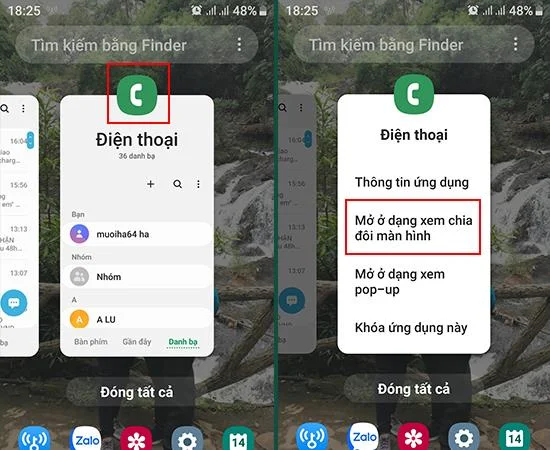
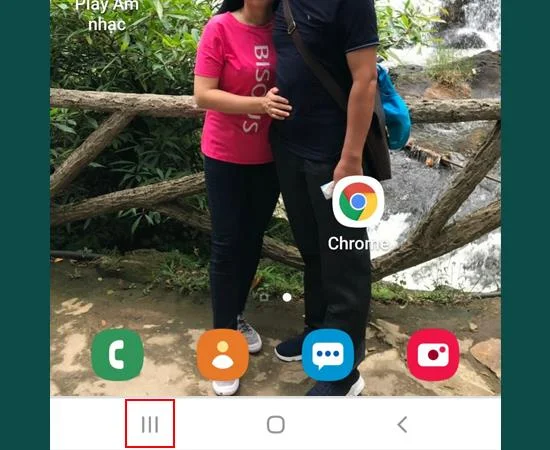
Click the multitasking key -> Tap the app icon you want to split -> Open in split screen -> Select another app you want to use in parallel.
- Step 1: Click the multitasking key.
- Step 2: Tap the icon of the app you want to split and select Open in split screen .
![3 steps to split screen on Samsung Galaxy S10 A30 A50]()
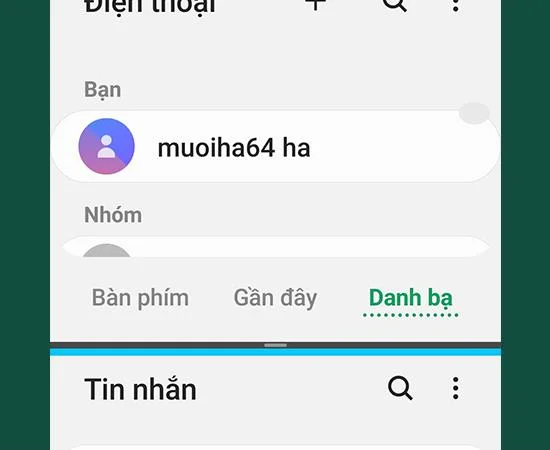
- Step 3: Finally, you can choose the second application you want to use in parallel.
![3 steps to split screen on Samsung Galaxy S10 A30 A50]()
With the above 3 simple steps, you can comfortably do 2 things at the same time: D Wish you success!
Maybe you are interested:
- 5 quick steps to enable virtual home button on Samsung Galaxy J3 Pro .
- How to fix Nokia 5.1 Plus cannot access Wifi fastest 2019 .
- The easiest guide to install CH Play for the computer .