
Pop Culture Costume Ideas That Will Dominate Halloween 2026

Plan a recognizable Halloween 2026 look with pop culture costumes inspired by Spider-Man, Supergirl, Toy Story 5, Moana, Mario, and Wednesday.
You probably know that password managers are great for storing your online logins. But did you know they have many other great uses?
1. Create a secure note
If none of the best note-taking apps appeal to you, consider storing them in a password manager. Many tools, including Bitwarden and 1Password , have features that let you create secure notes.
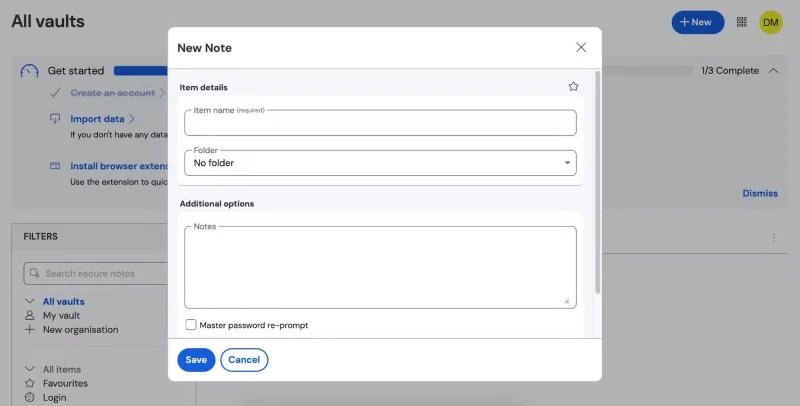
You can use these notes the same way you would any other note-taking app. Create a note and enter any information you want. With some password managers, like Bitwarden, you can add additional password protection. This is a good idea if you’re storing particularly sensitive information.
2. Store payment details
In addition to keeping your password information safe, many password managers also allow you to store your payment information. If you shop online a lot, this can be a great way to store your information securely and check out without too much delay.
To add your cards, include the same information you would when you buy something. You’ll need to store your name, card number, and security code. Depending on the password manager you choose, you may want to consider sorting this information into different folders — especially if you use multiple cards online.
3. Keep your ID safe
Sometimes when you make an online purchase or sign up for a new service, you'll need to provide identification, such as a passport or driver's license. For example, some services require you to verify your identity before you can use them. And if you're traveling internationally, it's always a good idea to have your passport information handy.
Many password managers have dedicated storage for IDs. You can add relevant numbers and any other important information, such as your home address. The process works much the same as storing your bank card information.
4. Authentication application
If you haven't already, you'll need to enable two-factor authentication (2FA) . The best form of 2FA is a one-time code from an authenticator app. Microsoft Authenticator and Google Authenticator are two of the best standalone authenticator apps, but many password managers have this feature.
You usually download a separate app for your password manager. For example, using the Bitwarden password manager means you also use Bitwarden Authenticator. These tools work just like any other authenticator app. Authenticator apps are a great way to enhance your security, so we always recommend using one.
Plan a recognizable Halloween 2026 look with pop culture costumes inspired by Spider-Man, Supergirl, Toy Story 5, Moana, Mario, and Wednesday.
Sort leftover Halloween candy safely, share or repurpose sealed treats, and choose food use or compost for pumpkins based on their condition.
Compare workplace Halloween costume choices by respect, dress code, mobility, and safety—and learn when a subtle accessory or a policy check is the better option.
Find a couples costume that fits your style, budget, and comfort level, from Addams Family classics to original inside-joke duos.
Need a last-minute high school Halloween costume? Compare 10 easy closet-based ideas by prep time, comfort, school-day practicality, and simple safety checks.
Use a simple 2026 Halloween decorating timeline for indoor décor, outdoor displays, and fresh pumpkins, with practical adjustments for weather and events.
Mix five vivid, approachable Halloween cocktails with measured recipes, simple prep tips, and an alcohol-free option for your party guests.
Find 15 office-friendly Halloween costume ideas for 2026, with practical checks for dress codes, respectful themes, comfort, and workplace safety.
Plan a fun elementary school Halloween party with easy crafts, games, inclusive treats, costume tips, and a sample 75-minute classroom schedule.
Compare realistic side hustles for 2026 by startup cost, fees, flexibility, and income control, with current tax and scam guidance from official sources.








