When your Wi-Fi network shows some errors and cannot login, the feature of deleting the Wi-Fi address on iPhone can help you fix this. Today WebTech360 will guide you on how to completely remove Wifi information on your phone.
1. Benefits of deleting Wifi addresses
- Completely remove Wifi information when an error occurs.
- Fix errors encountered when Wifi cannot be accessed.
2. Detailed instructions for deleting the Wifi address
Quick Guide:
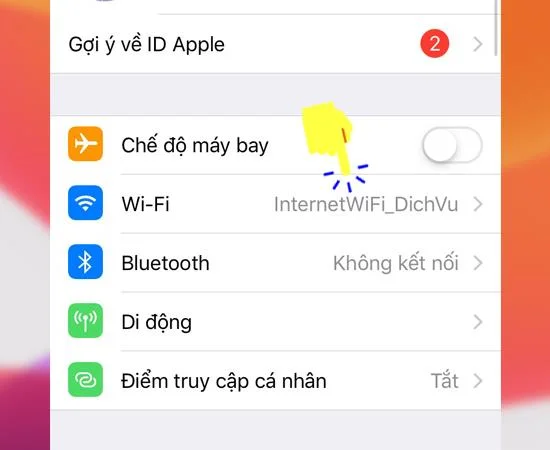
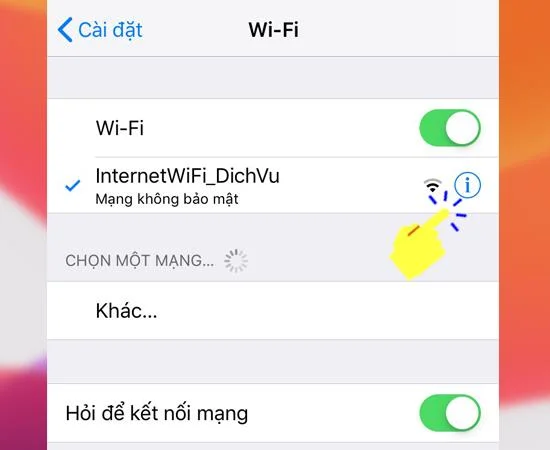
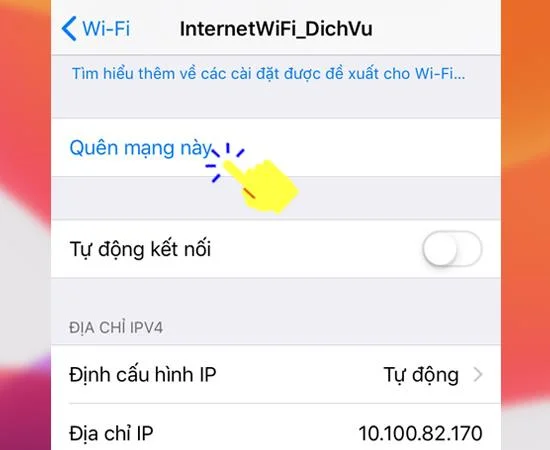
Go to Settings -> Wifi -> Click the icon (i) -> Forget this network .
Step 1: First go to Settings on the main screen.

Step 2: Next, choose Wifi.
![4 simple steps to delete wifi network saved on iPhone]()
Step 3: Then, click the icon (i) next to the Wifi address you want to delete.
![4 simple steps to delete wifi network saved on iPhone]()
Step 4: Finally, choose Forget this network .
![4 simple steps to delete wifi network saved on iPhone]()
So after a few simple steps you can delete the Wifi address on the iPhone to fix the Wifi error already. Hopefully with this article will help a lot for the process of using your phone. Good luck!
Maybe you are interested:
- 4 steps to turn off text prediction on iPhone 7 Plus is easiest
- 3 steps to turn off the sound to take pictures on the Japanese iPhone lock is the easiest
- 6 steps to backup data on iPhone to iCloud easiest
- 2 steps to create a free Apple ID account 2019