If the iPhone has an accessibility button (AssistiveTouch), on current Samsung devices, it is also equipped with a virtual Home button to support users more convenient to use. With WebTech360 learn how to enable this feature.
1. Benefits of the virtual Home key?
- Shorten operations such as screen capture , volume up or down , screen lock or replace the Home button to quickly return to the home screen .
- The necessary keys can be replaced when the key fails.
2. Supported products
Samsung devices that support Android 5.1.1 (Android Lollipop) and above.
3. Detailed instructions
Quick start Guide:
Settings -> Accessibility -> Interaction & Gesture -> Assistant Menu -> On
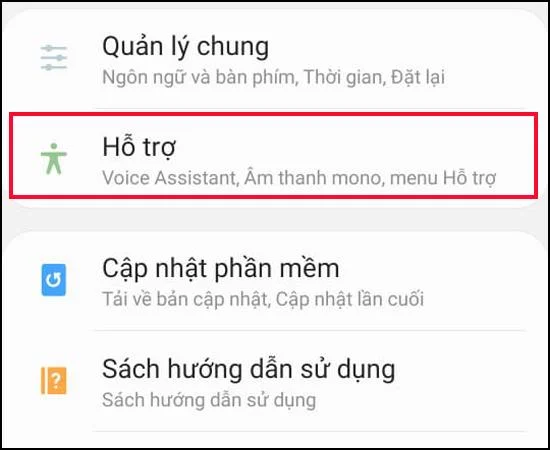
Step 1 : Go to Settings , here you choose Support
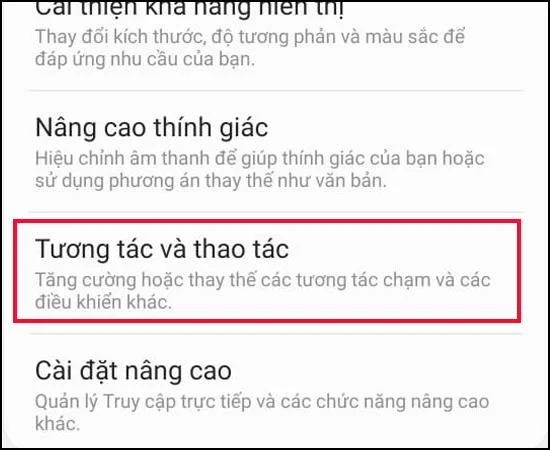
Step 2 : In the Support section , you will see Interaction and Operation , click to select
![4 simple steps to enable virtual Home key on Samsung phone]()
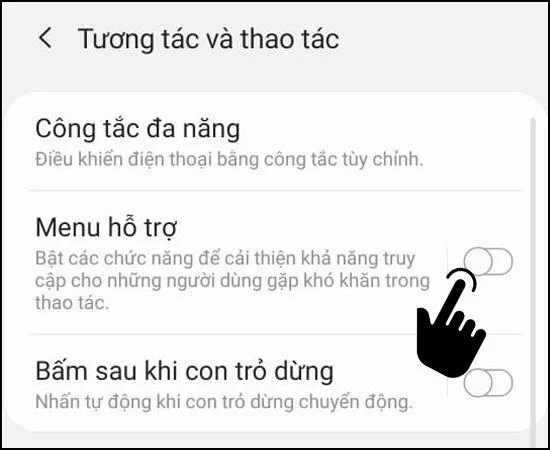
Step 3 : In the Support menu, there will be 1 switch, press to turn on .
![4 simple steps to enable virtual Home key on Samsung phone]()
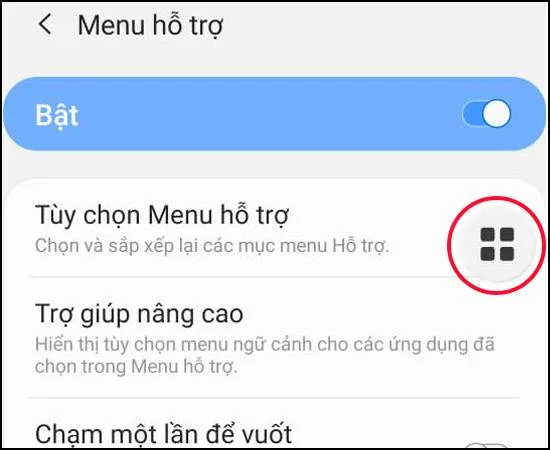
Step 4 : Once turned on, the virtual Home button will appear as shown below and you can customize it to your liking at the Menu Options section .
![4 simple steps to enable virtual Home key on Samsung phone]()
With 4 very simple steps, you have enabled the virtual Home button feature on your Samsung device. Good luck!
See more:
- How to play PUBG Mobile on PC with Tencent's emulator
- The fastest 3 steps to enable and disable mini chat on Messenger
- Fix the error that could not turn off the computer on Windows 10