Pop-up is a multi-window multitasking mode that lets you use both apps on the same screen without having to wonder which app to use first. Today I will guide you to install pop-up view on Samsung Galaxy J7 Pro .
1. The benefits of pop-up viewing.
Operate multiple apps on the same screen at the same time without having to switch apps.
2. Detailed installation instructions in the pop-up view.
Quick Guide:
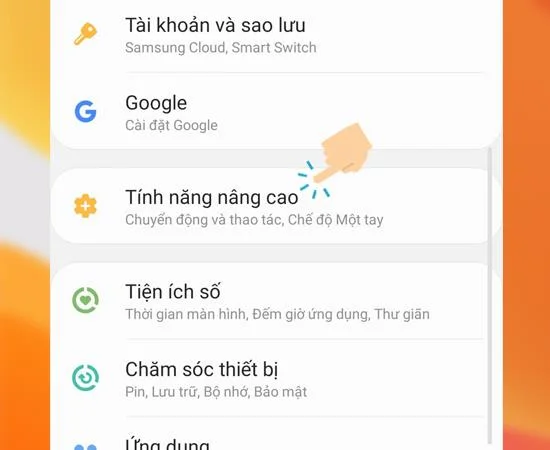
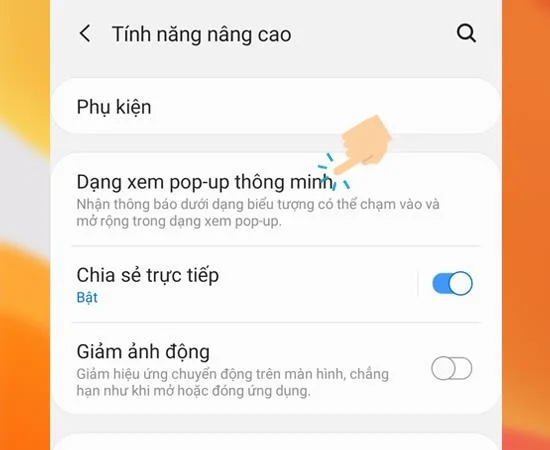
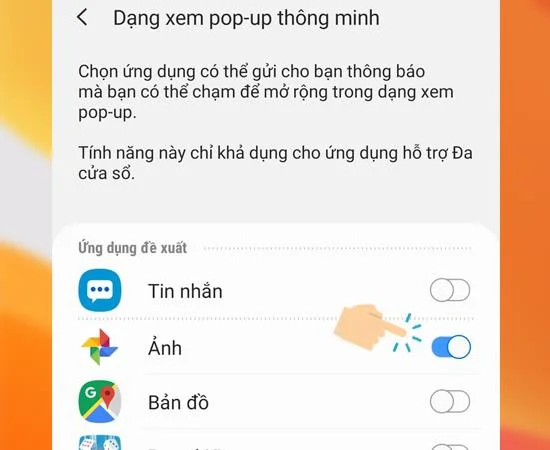
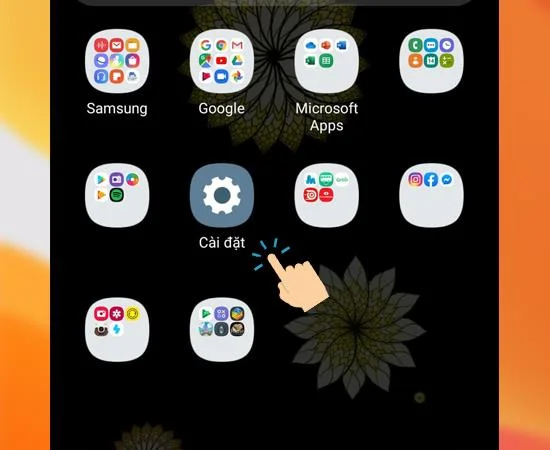
Go to Settings -> Select Advanced Features -> Info pop-up view -> Select the application you want to see the pop-up view.
Step 1: First go to Settings on the main screen.
Step 2: Next, choose Advanced Features .
![4 steps to enable Pop Up view on Samsung Galaxy J7 Pro]()
Step 3: Then choose Smart Pop-up View .
![4 steps to enable Pop Up view on Samsung Galaxy J7 Pro]()
Step 4: Select the apps you want to see in pop-up format.
![4 steps to enable Pop Up view on Samsung Galaxy J7 Pro]()
So after a few simple steps you have installed the pop-up viewing feature on Samsung Galaxy J7 Pro. Good luck!
Maybe you are interested:
- Test order for Samsung device
- Samsung warranty activation guide
- 5 quick steps to enable virtual home button on Samsung Galaxy J3 Pro
- 5 steps to split the screen on Samsung A5 (2017) most effectively