You want your dual SIM option to listen to calls and text as you like, but don't know what to do? Please refer to this article to see how 2 SIM options are available.
1. Benefits of dual SIM mode option
- Help users to select SIM options to listen to calls and text messages according to their preferences.
- More convenient in listening to calls as well as working of users.
2. Instructions on how to select dual SIM mode
Quick start Guide:
Go to Settings -> Select Connectivity -> SIM management -> Dual SIM mode options
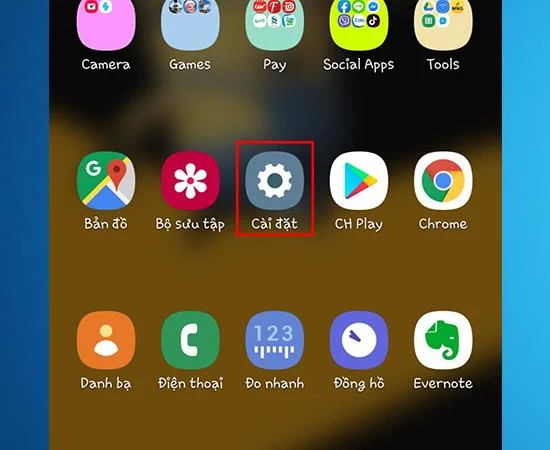
Step 1: You choose Install .
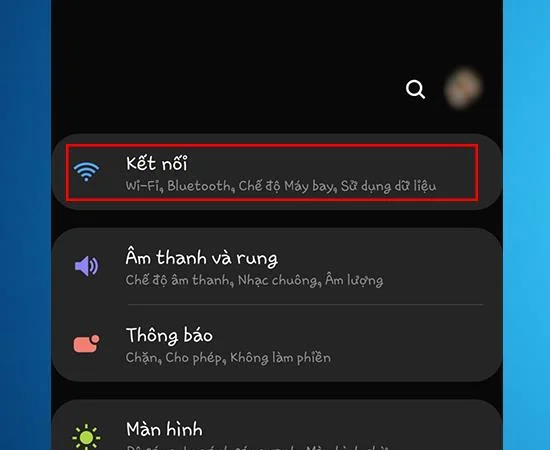
Step 2: Next, choose Connect .
![4 steps to install dual SIM mode on Samsung Galaxy Note 10 Plus]()
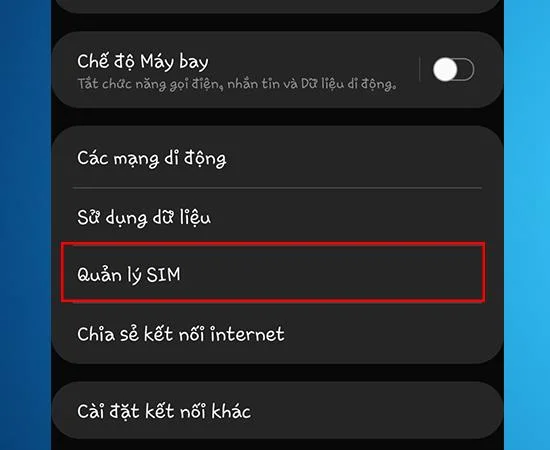
Step 3 : Next, you choose Manage SIM .
![4 steps to install dual SIM mode on Samsung Galaxy Note 10 Plus]()
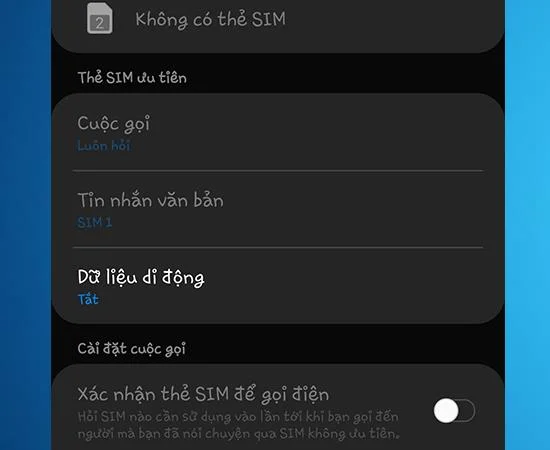
Step 4: Once in the SIM Management window , scroll down to the Preferred SIM card section and customize SIM calls and messages .
![4 steps to install dual SIM mode on Samsung Galaxy Note 10 Plus]()
So you've completed customizing the dual SIM mode already. Good luck!
Maybe you are interested:
- Instructions for setting up dual SIM mode
- Dual SIM mode setting on Samsung Galaxy J2 Prime phone
- Dual SIM mode setting on Vivo V7