Home
» Wiki
»
5 convenient ways to use Edge Panel on Samsung phones
5 convenient ways to use Edge Panel on Samsung phones
Most people think the Edge Panel on Samsung phones is just a gimmick, but it's actually useful. With just a swipe, you can quickly access apps, websites, and many useful features.
While adding app shortcuts to your home screen is convenient, you can only add so many shortcuts at once without cluttering up your screen. Plus, you still need to go to your home screen to access them.
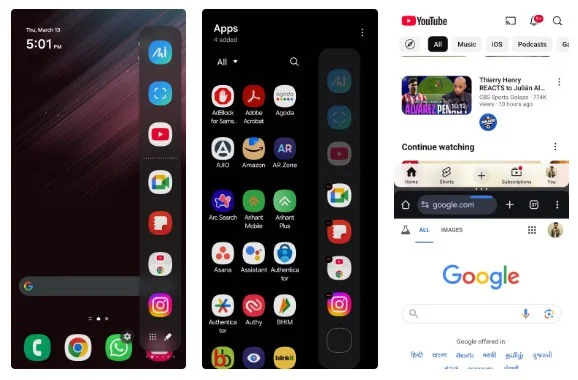
That’s why people like to add some of their favorite apps to the Edge Panel. That way, you can access them from almost any screen with just a swipe, whether you’re in another app or browsing the Settings menu.
Many people also like to add App Pairs to the Edge Panel, which lets you open two apps at once in split-screen mode. For example, App Pair for YouTube and Chrome is great for watching videos while browsing the web.
4. Perform quick actions like speed dialing and adding notes
The Edge Panel is also great for quickly accessing shortcuts like adding a calendar event, starting a timer, or creating a voice memo. This lets you streamline everyday tasks without having to switch between multiple apps.
Set up shortcuts to quickly add notes to the Samsung Notes app. No matter what app you're using, you can swipe open the Edge Panel and tap the "Type note" shortcut to jump straight to Samsung Notes and start writing.
My favorite way to use the Edge Panel, however, is to speed dial your important contacts. Instead of opening the Phone app, you can just swipe open the Edge Panel and tap on a contact's name to call them right away.
3. Smart Select for easy screenshot capture
While Samsung phones offer a variety of ways to take screenshots, sometimes you just need to capture and share a specific portion of your screen. The standard method requires you to take a full screenshot, open it in the Gallery app, and then crop it manually.
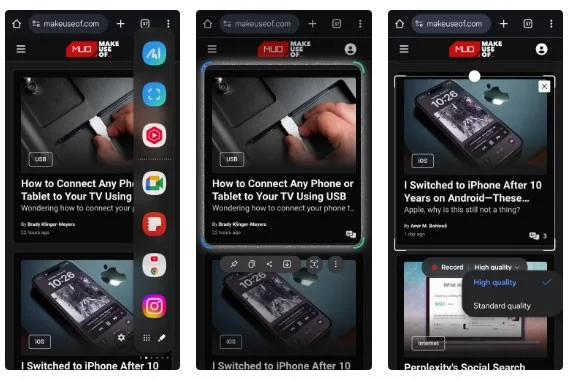
To avoid this, use Smart Select in the Edge Panel. It lets you instantly capture a specific part of the screen without any further editing. Plus, you can paste those screenshots directly from the clipboard into the Edge Panel.
Another great feature of Smart Select is the GIF recorder. This is a handy alternative to the full-screen recorder when you need to capture short clips and quickly share them.
2. Quick access to favorite websites
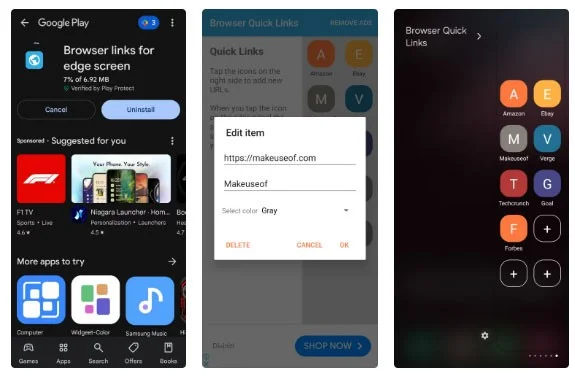
One of my favorite ways to use the Edge Panel on Samsung phones is to quickly access your most visited websites. Since this feature isn't available by default, use the "Browser links for Edge screen" app to enable it.
This feature lets you add your favorite websites directly to the Edge Panel. So instead of having to search through your browser bookmarks, you can access your frequently used websites instantly with a simple swipe.
Note : Samsung has discontinued Edge Panel downloads with One UI 7. However, if your phone is running One UI 6 or earlier, you can download it before the update and continue using it without any issues.
1. Doodle and sketch all the time
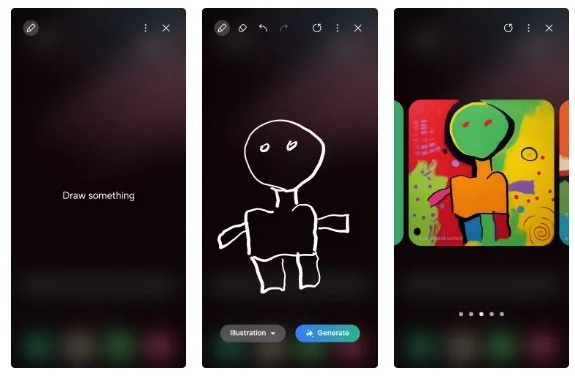
Many people enjoy doodling and sketching in their spare time. With the Edge Panel, you can instantly access the Drawing Assist shortcut and turn your phone into a digital sketchpad.
What makes this feature even more interesting is the Galaxy AI's Sketch-to-Image feature. Once you're done doodling, you can turn your rough sketches into a beautiful watercolor painting, an artistic illustration, a pencil sketch, pop art, or even a 3D cartoon. It's fun to see how the Galaxy AI turns simple sketches into reality.
The Edge Panel isn’t one of the most talked about features on Samsung phones, but once you start using it, you’ll wonder how you ever got by without it. If you haven’t tried it yet, hopefully these ideas will inspire you!