5 Misconceptions About Password Security

Passwords are the first line of defense against security threats. However, these outdated password misconceptions can compromise your security, which is why they need to be changed now.

Misconception 1: A strong password is enough for everything

If you're using the same password across multiple accounts, you're falling victim to one of the most damaging password security misconceptions. Unfortunately, a strong password isn't enough to keep you safe, and this lack of "variety" can cause more damage than you might realize.

5 Misconceptions About Password Security

Even the strongest password can be hacked by phishing , brute-force attacks , or keyloggers . If a malicious hacker compromises your login information on one website, the first thing they'll do is use that information to access other websites. Just like that, you've become a victim of cybercrime because you thought coming up with a new password was too much of a hassle.

You can avoid this fate by using different, strong, unique passwords for each account. You don’t have to remember them all (or use sticky notes), because you can keep track of your passwords with a password manager .

Misconception 2: Passwords are outdated

While new authentication technologies like passcodes may eliminate the overreliance on passwords in the future, it will still be several years before we see a complete paradigm shift.

First, everyone needs to be on board, from website providers to users. While biometrics do enhance security, many still see them as an invasion of privacy. As such, passwords aren’t going away anytime soon.

Misconception 3: You should change your password regularly.

If your passwords are already strong and unique, changing them every few months is counterproductive. In addition to making your life harder (since you don't get any tangible benefit from changing them), you may inadvertently create increasingly weaker passwords with each change, especially if you rely on memory.

5 Misconceptions About Password Security
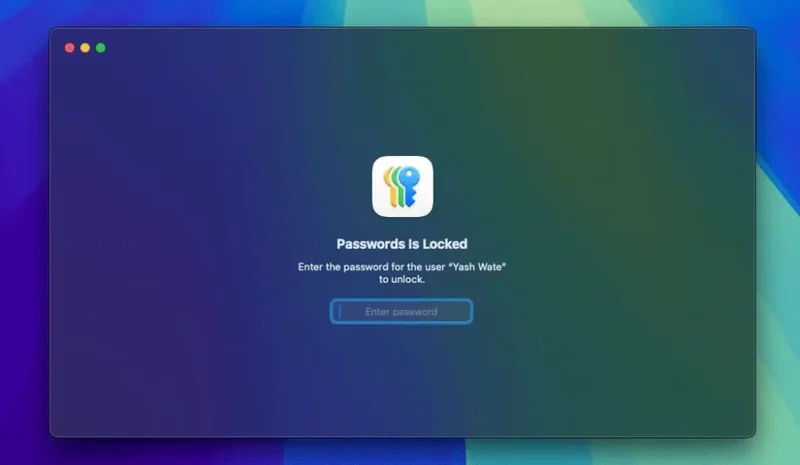
The Apple Passwords app on your Mac requires authentication.

However, in cases where you've been affected by a data breach, someone has tried to access your account, or you've used an unprotected public Wi-Fi network, you should change your password — just make sure it's as unique and strong as your old one.

Misconception 4: Multi-factor authentication is perfect

While it may seem like it's immune to hacking, multi-factor authentication (MFA) is relatively easy to bypass for skilled and persistent cybercriminals.

5 Misconceptions About Password Security

For example, they can send multiple authentication requests to a user until they gain access. Phishing has long been effective, with hackers posing as IT support to pressure you into providing your MFA code.

Ultimately, while MFA is certainly a good way to increase your overall security, it's not a foolproof technique that can eliminate every threat.

Misconception 5: Complex passwords are inherently more secure

Think a password with a bunch of random symbols and numbers is impenetrable? Think again!

Sadly, there's nothing you can do about this. A website or company may ask you to increase the complexity of your passwords by implementing specific rules, but they may store them in plain text without encryption, rendering the whole process pointless.

It is also a standard practice for cybercriminals to use certain rules to their advantage. For example, if a website has a minimum and maximum password length requirement, hackers will have a clear starting point and will try combinations that meet these requirements.

Length and complexity are effective defenses against brute-force attacks, but you should also consider the originality of your password. Hackers often use password spraying techniques to crack common passwords across multiple websites. Most security systems block these attacks, so if your password is original, you'll reduce your chances of falling victim to this blind cyberattack.
Leave a Comment

How to Fix Microsoft Teams Undefined Error (2026)

How to Fix Microsoft Teams Undefined Error (2026)

Struggling with Microsoft Teams 'Undefined Error' (2026)? Discover proven, step-by-step fixes like clearing cache, updating the app, and more. Get back to seamless collaboration fast!

How to Disable Microsoft Teams at Startup for Better PC Performance

How to Disable Microsoft Teams at Startup for Better PC Performance

Discover simple, step-by-step methods to disable Microsoft Teams at startup and unlock better PC performance. Faster boot times, less resource drain—perfect for Windows users seeking smooth operation.

How to Fix Microsoft Teams Network Error Offline

How to Fix Microsoft Teams Network Error Offline

Stuck with Microsoft Teams "Network Error" offline? Discover proven, step-by-step solutions to fix Microsoft Teams network error offline quickly. Get back online fast—no tech skills needed!

Solving Microsoft Teams Error 4oggx

Solving Microsoft Teams Error 4oggx

Struggling with Microsoft Teams Error 4oggx? Discover proven fixes to resolve sign-in failures, crashes, and connectivity issues fast. Get back to productive calls without frustration!

How to Fix Microsoft Teams Remove Account Data Error

How to Fix Microsoft Teams Remove Account Data Error

Encountering the frustrating Microsoft Teams "Remove Account" Data Error? Discover quick, reliable fixes like clearing cache, resetting the app, and more to get back to seamless collaboration without losing data. Updated with the latest solutions.

Troubleshooting Microsoft Teams Layout Error Sidebar

Troubleshooting Microsoft Teams Layout Error Sidebar

Tired of the frustrating Microsoft Teams "Layout Error" Sidebar? Follow our proven, step-by-step troubleshooting guide with the latest fixes to get your Teams sidebar working smoothly again. No tech skills needed!

Troubleshooting Microsoft Teams Offline Error in 2026

Troubleshooting Microsoft Teams Offline Error in 2026

Stuck with Microsoft Teams offline error in 2026? Discover proven troubleshooting steps, common causes, and quick fixes to restore your connection fast. No tech skills required!

How to Fix Microsoft Teams Error M Memory

How to Fix Microsoft Teams Error M Memory

Tired of Microsoft Teams crashing with "Error M" memory issues? Follow our step-by-step guide to fix Error M in Teams, clear cache, update software, and boost performance—no tech skills required!

Step-by-Step: Setting Up Microsoft Teams Town Hall Events

Step-by-Step: Setting Up Microsoft Teams Town Hall Events

Discover the easiest step-by-step guide to setting up Microsoft Teams Town Hall events. Host massive virtual gatherings effortlessly with pro tips for seamless execution. Perfect for leaders and organizers!

How to Fix Microsoft Teams Download Error for PC

How to Fix Microsoft Teams Download Error for PC

Struggling with Microsoft Teams "Download Error" on PC? Discover proven, step-by-step fixes to resolve download failed issues quickly. Get back to seamless collaboration in minutes—no tech skills needed!

Troubleshooting Microsoft Teams Error L License

Troubleshooting Microsoft Teams Error L License

Stuck with Microsoft Teams "Error L" License error? Follow this step-by-step troubleshooting guide to resolve licensing issues quickly, restore access, and boost productivity without IT hassle. Updated with latest fixes.

Troubleshooting Microsoft Teams Video Call Freezing

Troubleshooting Microsoft Teams Video Call Freezing

Tired of Microsoft Teams video call freezing mid-meeting? Follow this proven troubleshooting Microsoft Teams video call freezing guide with quick fixes, advanced tips, and real solutions to restore smooth video instantly.

How to Fix Microsoft Teams Download Failed Due to Unexpected Error

How to Fix Microsoft Teams Download Failed Due to Unexpected Error

Frustrated by Microsoft Teams 'Download Failed Due to Unexpected Error'? Discover proven, step-by-step solutions to fix this common issue quickly and get back to seamless collaboration. Updated with the latest fixes for peak performance.

Why Did My Microsoft Teams Recording Fail? Common Reasons

Why Did My Microsoft Teams Recording Fail? Common Reasons

Frustrated because your Microsoft Teams recording failed? Uncover the top common reasons like permissions issues, storage limits, and network glitches, plus step-by-step fixes to prevent future failures and record flawlessly every time.

Solving Microsoft Teams Error B Connection

Solving Microsoft Teams Error B Connection

Struggling with Microsoft Teams "Error B" connection? Discover step-by-step fixes for smooth connectivity. Clear cache, check networks, and more in this ultimate guide to resolving Error B instantly.