5 reasons why dishwashers dont clean properly and how to fix them

When you use the dishwasher but the dishes are not clean, there is a bad smell in the machine, it means your dishwasher is having problems. You can refer to the causes below to see what problems your dishwasher is having!

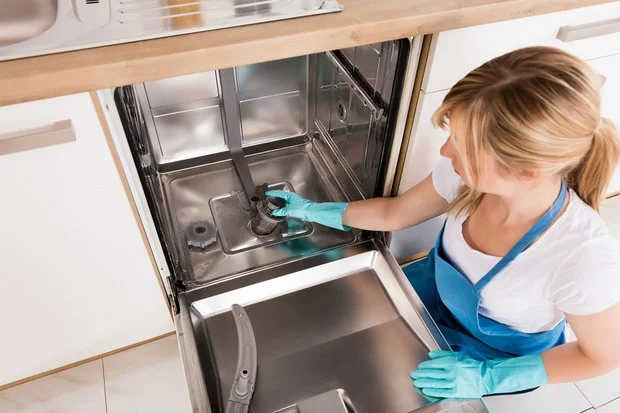
The machine's drain pipe is clogged.
5 reasons why dishwashers don't clean properly and how to fix them

Dishwashers only use water and detergent to rinse dishes at high pressure to remove dirt from dishes, but the machine cannot remove dirt that accumulates in the drain valve after each dishwashing cycle.

Although you have to scrape off all the food residue before putting the dishes in the dishwasher, it is still not possible to clean them completely. In addition, many people forget to remove the sticker when they buy dishes and put them in the dishwasher, causing the paper to come off, clogging the filter or stagnating in the drain.

Therefore, users need to regularly clean the drain valve and remove leftover food and dirt to keep the drain flowing well. You should clean the drain valve at least once a week.

Stuck sprinkler head

Dishwashers operate mainly based on the water jet. For some reason, food stuck on dishes sticks to the water jet system, causing the water jet to get stuck inside. This causes the water jet to weaken and is no longer strong enough to clean the stains, making the dishes unclean.

Check the water jets in the dishwasher if the dishwasher is not cleaning properly. The water jet system of the dishwasher is removable so it is easy to clean. You should clean this part regularly to keep the machine running effectively.

Not cleaning the dishwasher regularly

In addition to removing dirt from the drain and spray heads, you should also clean the dishwasher regularly to avoid it becoming a breeding ground for bacteria. You can put some vinegar or baking soda in the bottom rack, then start the machine without any dishes inside. In addition, you can buy a specialized dishwasher cleaning solution to clean the dishwasher.

Load the dishwasher too much or incorrectly.

5 reasons why dishwashers don't clean properly and how to fix them

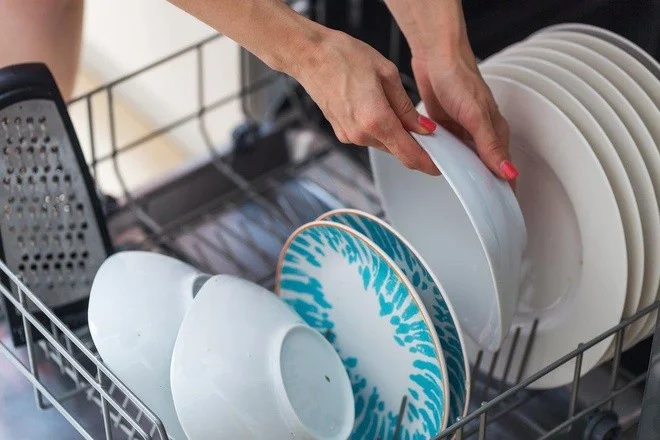
Many users overload the machine with too many dishes or do not stack the dishes properly. You should read the instructions carefully before using the machine to ensure effective operation.

You can refer to how to put dishes in the dishwasher .

Do not put away dishes immediately after washing.

When you finish washing the dishes but do not want to put them away right away, you should leave the dishwasher door open for about 20 minutes to let the steam escape. Closing the dishwasher door after washing will prevent the steam from escaping, causing it to accumulate on the dishes and possibly leave a bad smell.

So, if the dishes are still dirty after washing them in the dishwasher, it is likely that they are caused by the above reasons. If you are not sure, contact the repair center to fix this problem as soon as possible!

Leave a Comment

What Young Riders Should Know About Moving Their Motorcycles Across Cities

What Young Riders Should Know About Moving Their Motorcycles Across Cities

Long-distance travel can involve heavy traffic, changing weather conditions, and rider fatigue. If you are also dealing with the responsibilities of moving home, such as packing belongings or coordinating accommodation, a long ride may add unnecessary pressure to an already busy schedule.

Solving Microsoft Teams Shortcut Error Not Opening

Solving Microsoft Teams Shortcut Error Not Opening

Tired of Microsoft Teams shortcut error preventing you from opening the app? Follow our expert, step-by-step guide with the latest fixes for instant resolution. Works on Windows, Mac & web – no tech skills needed!

Solving Microsoft Teams Task Management Sync Error

Solving Microsoft Teams Task Management Sync Error

Tired of Microsoft Teams Task Management Sync Error halting your workflow? Follow our proven, step-by-step fixes to resolve sync issues fast and restore seamless task collaboration. No tech expertise needed!

Troubleshooting Microsoft Teams Wiki Error Formatting

Troubleshooting Microsoft Teams Wiki Error Formatting

Struggling with Microsoft Teams Wiki Error Formatting? This step-by-step guide reveals proven fixes for common wiki tab issues, ensuring smooth editing and collaboration in Teams. Get back to productive wikis fast!

How to Fix Microsoft Teams Installation Error for Linux

How to Fix Microsoft Teams Installation Error for Linux

Struggling with Microsoft Teams installation error on Linux? Discover step-by-step fixes for Ubuntu, Fedora & more. Resolve dependency issues, crashes, and errors quickly with our ultimate guide. Get Teams running smoothly today!

Solving Microsoft Teams Error Page Not Loading

Solving Microsoft Teams Error Page Not Loading

Struggling with Microsoft Teams "Error Page" not loading? Get step-by-step fixes for desktop, web, and mobile. Solve Microsoft Teams Error Page issues quickly and resume seamless teamwork today.

Solving Microsoft Teams Error Screenshot Issues

Solving Microsoft Teams Error Screenshot Issues

Tired of Microsoft Teams "Error Screenshot" blocking your workflow? Get proven, step-by-step solutions to resolve screenshot errors in Teams instantly and boost productivity. No tech skills needed!

How to Fix Microsoft Teams Error U User

How to Fix Microsoft Teams Error U User

Tired of Microsoft Teams "Error U" User blocking your chats? Get proven, step-by-step fixes to clear cache, reset, and restore seamless collaboration instantly.

Where are Microsoft Teams Registry Keys Located on Windows 11?

Where are Microsoft Teams Registry Keys Located on Windows 11?

Unlock the precise locations of Microsoft Teams registry keys on Windows 11. Step-by-step guide to find, access, and safely tweak them for optimal performance and troubleshooting. Essential for IT pros and Teams enthusiasts.

How to Fix Microsoft Teams Training Error Video Lag

How to Fix Microsoft Teams Training Error Video Lag

Tired of Microsoft Teams "Training Error" Video Lag ruining your meetings? Follow our step-by-step guide with the latest fixes for smooth video calls—no more frustration!