Home
» Wiki
»
5 Ways to View Deleted Posts on Reddit
5 Ways to View Deleted Posts on Reddit
When you’re browsing Reddit, finding a deleted post with tons of upvotes can be frustrating. Just a quick glance at the title and your curiosity will be piqued. Luckily, there are a variety of ways to view old deleted Reddit posts and comments so you can satisfy your curiosity.
In April 2023, Reddit introduced some significant changes to how developers interact with their Application Programming Interface (API), essentially slapping a price tag on their previously free API. Out of frustration with Reddit’s decision, several major subreddits were shut down as a form of community protest. This pricing change caused many third-party apps, including ones that let you view deleted Reddit threads, to shut down.
As a result, many of these apps may not work right now, and those that do will only fetch comments and threads published before the API change takes effect in June 2023. Don't despair, though. There are still ways to view deleted Reddit posts.
When you visit reveddit.com, you'll see just a single text field where you can enter your username, subreddit name, or a link to a topic.
When you specify a subreddit name, Reveddit will list all the deleted threads and comments posted in that subreddit. You can then browse through the results to find anything that catches your eye, or simply search for what you want using the other search options.
You can enter URLs for both specific posts and threads. Alternatively, you can simply replace “reddit” in the thread URL with “reveddit” and it will take you to the same Reveddit website.
Reveddit pulls data from the Pushshift archive and presents it in an interface that resembles the old Reddit. Pushshift is a social media tracking and data collection platform that has been hosting Reddit data since 2015.
If you want to see all the deleted comments on a post, you will have to wait a while as Reveddit loads the data. However, there is a quick way if you want to directly view a specific comment in a thread. You can specify a direct link to the thread containing the deleted comment, and Reveddit will fetch and load that thread from the archive.
The only downside is that Reveddit doesn't show deleted comments from users. You can only see deleted comments from subreddit moderators.
While Resavr doesn’t let you see deleted posts, it does let you see deleted comments on Reddit. Another limitation is that you can’t search for a specific thread using that thread’s link to see the deleted comment you’re looking for.
One of the benefits of this site is that the interface of resavr.com is quite simple. It lists recently deleted Reddit comments and is a great site for people who just want to kill time by reading deleted comments. It links back to the original Reddit thread so you can go ahead and read the entire post to understand the context behind it.
Use the Wayback Machine to View Deleted Reddit Posts
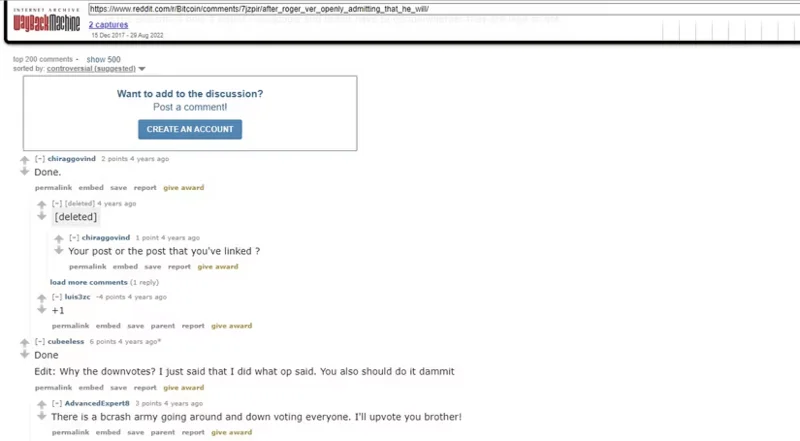
Also known as the Internet Archive, the Wayback Machine archives the entire Internet, including Reddit. If the tools mentioned above don't show you deleted Reddit content, you can visit the Wayback Machine in the hope that it might have archived the comment you were hoping to read.
To get started, go to web.archive.org and enter the URL of the Reddit post you want to view. First, make sure to clean up the URL by removing any unnecessary parameters, which follow.
The site will display recorded snapshots distributed on a calendar. If there is a relevant snapshot, you can click on the date the snapshot was recorded and view the site. However, if a user/moderator deletes a comment or thread before the Wayback Machine can archive it, it will show the comments as deleted.
Unddit search results show 14 deleted comments out of 397 comments
Unddit is a great way to show posts and comments that have been deleted by moderators and users. There are two ways to use Unddit’s features. First, you can add the Unddit link to your bookmarks bar, and click and drag that link when viewing a Reddit post to pull up deleted comments. Alternatively, you can manually replace undelete.pullpush.io with reddit.com in Reddit post links.
There are some workarounds to using Unddit in Firefox and Edge browsers, so make sure you don't have Strict Tracking Protection enabled if you're using Unddit with one of these browsers.
Finally, PushPull has an easy process for searching Reddit. The site allows you to search for a specific username or subreddit. It will pull up both current and deleted posts in an easy list view. You don’t have to fill out all the search boxes either.
While it’s nice to be able to select a date to pull, you can simply enter a username to pull all comments and posts without any additional filtering. However, if you’re looking for a specific post or comment and happen to know the time frame, this will help reduce the amount of scrolling and reading you have to do. You can also use a variety of search parameters to search Reddit efficiently .
Looking at deleted comments and posts on Reddit may seem counterintuitive at first, since someone deleted them for some reason. Tons of websites let you dig through data and recover deleted Reddit threads and comments. But if you’re curious about why a Reddit post or comment was deleted, these tools will help you solve the mystery.