Desk Decorating Ideas for a Spooky Office Cubicle

Create a spooky office cubicle with Halloween desk decor ideas that keep your workspace usable, tidy, and mindful of workplace safety.
Many people have signed up for Google One for years, and while they like the perks it includes, it’s not perfect. Google One would be even better if it had these extra perks and features.
Table of Contents
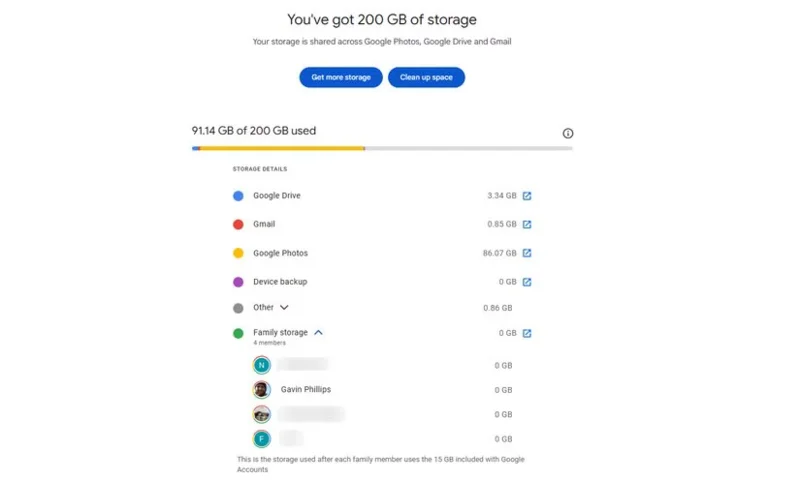
One major advantage of signing up for Google One is that you can share your storage with family members. You can include up to five family members, which is pretty generous. However, a major drawback is the lack of granular control over how storage is allocated. Currently, once you share your storage, each member can use as much as they want without restrictions, leading to uneven distribution and potential shortages.
A suitable multi-user storage management system will allow the family manager to set individual quotas for each member. This will ensure that no one person uses up all the space, leaving the others with little or no space.
The Google One storage dashboard will also help track usage and identify who is using the most data. It will also provide a breakdown of storage usage by file type without revealing the actual storage information. Such a feature would provide greater control and transparency, making Google One a more user-friendly and efficient solution for families.
Google One is a great way to get more storage on your Google account, beyond the free 15GB that every account gets. However, the extra storage is the only core benefit, although Google does have other add-on services that can improve the value of the subscription.
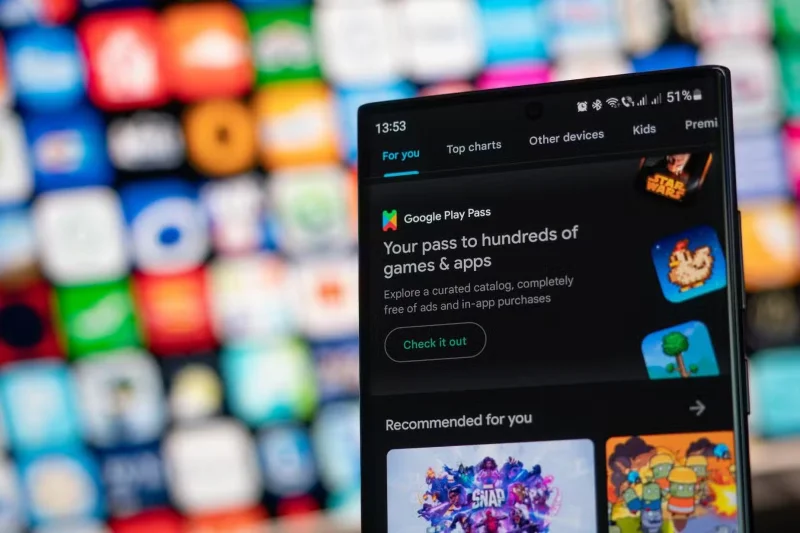
Long-time subscribers will want Google One to include Play Pass. If you’re not familiar, Google Play Pass is a subscription service that lets you download apps and games from the Google Play Store without ads or in-app purchases. It’s only $4.99 a month, which isn’t much, but it would be nice if Google included it as an added perk for Google One subscribers.
As a Google One subscriber who pays for storage, many still find it ridiculous to have to endure YouTube ads, so the free YouTube Premium Lite plan adds significant value to Google One.
This is especially beneficial for users who primarily use YouTube for casual viewing and don’t need all the features of YouTube Premium, which is why many people who dropped YouTube Premium joined Lite again when it launched. iPhone and Android device owners will find Google One similar to Apple’s similarly named service, Apple One.
Apple One bundles together multiple Apple services, making it more cost-effective than paying for each service individually. Likewise, it would be great if Google included free access to YouTube Premium Lite in Google One.
Currently, if you want both Google One and YouTube Music Premium, you have to pay for two separate subscriptions, which can get expensive. It would be great if Google One included ad-free access to YouTube Music, similar to YouTube Premium. That would be a great addition to the package and would make it more complete, especially for people who rely on Google services for storage and media.
For people who use third-party music streaming services, a bundled option—or even a small discount for Google One subscribers—could easily tempt them to ditch Spotify for good. This approach would also help Google compete with Apple One, which bundles iCloud storage with Apple Music. If Apple offered better cross-platform support for its services, more people could pay for Apple One and easily switch from Spotify to Apple Music.
In addition to being used as a photo and video backup service, Google Photos also offers professional photo printing services for an additional fee. However, it would be nice to be able to include free photo print credits with Google One as an added perk. This could include a limited number of free prints per month or discounts on premium photo books and canvas prints.
Such a feature would make Google One more appealing, especially to users who print photos frequently. Google One used to offer free shipping on some Google Photos prints, but the company is removing that perk in 2024. Still, this small but valuable perk would provide a tangible return on investment for subscribers, making the subscription more valuable than just a cloud storage service .
Google used to offer a free VPN as a perk when signing up for Google One until it shuts down the service in 2024. However, with competitors like Apple One offering Private Relay (a VPN-like service), it makes sense for Google to reintroduce its VPN feature to Google One.
A VPN for all Google One users would increase security, especially when using public Wi-Fi . Google already offers a free VPN service for Pixel 7 series phones and later, and Google One subscribers should expect the same service. Even a limited version—like one with a daily data limit or fewer location options—is still a valuable perk.
Many people pay for Google One primarily for the extra storage, having long since exhausted their free 15GB. However, Google has the opportunity to make the subscription more appealing by adding more features and perks, as discussed, to match or even surpass competing services like Apple One.
Create a spooky office cubicle with Halloween desk decor ideas that keep your workspace usable, tidy, and mindful of workplace safety.
Plan a recognizable Halloween 2026 look with pop culture costumes inspired by Spider-Man, Supergirl, Toy Story 5, Moana, Mario, and Wednesday.
Sort leftover Halloween candy safely, share or repurpose sealed treats, and choose food use or compost for pumpkins based on their condition.
Compare workplace Halloween costume choices by respect, dress code, mobility, and safety—and learn when a subtle accessory or a policy check is the better option.
Find a couples costume that fits your style, budget, and comfort level, from Addams Family classics to original inside-joke duos.
Need a last-minute high school Halloween costume? Compare 10 easy closet-based ideas by prep time, comfort, school-day practicality, and simple safety checks.
Use a simple 2026 Halloween decorating timeline for indoor décor, outdoor displays, and fresh pumpkins, with practical adjustments for weather and events.
Mix five vivid, approachable Halloween cocktails with measured recipes, simple prep tips, and an alcohol-free option for your party guests.
Find 15 office-friendly Halloween costume ideas for 2026, with practical checks for dress codes, respectful themes, comfort, and workplace safety.
Plan a fun elementary school Halloween party with easy crafts, games, inclusive treats, costume tips, and a sample 75-minute classroom schedule.








