Pop Culture Costume Ideas That Will Dominate Halloween 2026

Plan a recognizable Halloween 2026 look with pop culture costumes inspired by Spider-Man, Supergirl, Toy Story 5, Moana, Mario, and Wednesday.
You don't have to be a musician to write your own songs. There are plenty of free online song makers that help you create your own tunes.
These tools are divided into several categories. Some will let you create amazing creations with artificial intelligence. With other options, you will be the musician, working like a conductor changing each element to create the right melody. Each tool requires different skills, so experiment to find the one that suits you best.
1. MuseNet
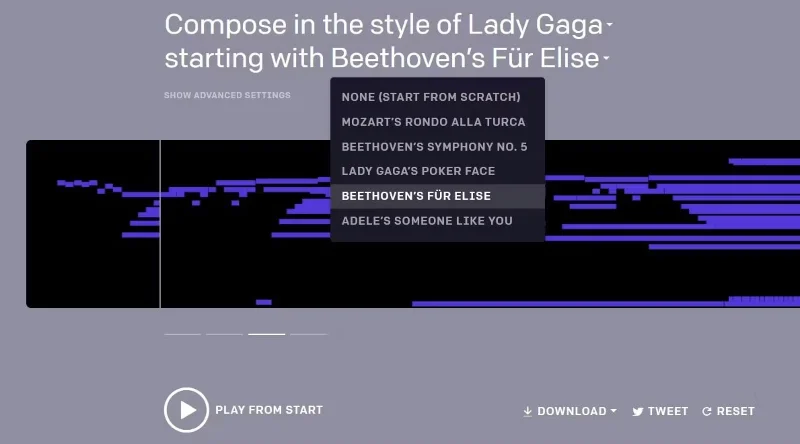
What if The Beatles played the Harry Potter soundtrack? Or Lady Gaga performed Beethoven's 5th Symphony? You can do it on MuseNet and control how it's done.
MuseNet is an OpenAI project where an artificial neural network generates a song based on how you set it up. The AI song composer’s database includes styles like The Beatles, Lady Gaga, Frank Sinatra, Mozart, Chopin, Beethoven, and more. Use the Advanced Settings instead of the simple settings if you really want to get creative. MuseNet allows for songs with up to 10 different instruments. You can give it a short piece of music to start with or start from scratch.
MuseNet works by using a neural network that has been trained on a dataset of MIDI files collected from a variety of online sources, including jazz, pop, African, Indian and Arabic music styles. The researchers behind the project say the system can pay attention to music over long periods of time, meaning it can understand the broader context of the melodies in a song, rather than just how they fit together in a short passage. With this data, the system is tasked with predicting the next note in a sequence.
First, you choose the style or artist you like. Then you choose the intro, followed by the instruments that will be used, which can range from piano, strings, wind instruments, drums, harp, guitar, and bass. Finally, you determine how close to the artist the sound will be created.
When the AI track is created, there will be 4 variations. Listen to all 4, pick the one you like, download it, and then create more songs. It's fun, you can try swapping and combining them as you like. You can download it as an MP3 , OGG , WAV or MIDI file to use in your projects.
MuseNet is available to try out now on OpenAI's website, where you can also listen to a selection of songs the team created and read about how the system works.
2. Melobyte
Most online music generators only process instrumental sounds. But not Melobyte. This ambitious AI app analyzes song lyrics and turns them into unique melodies.
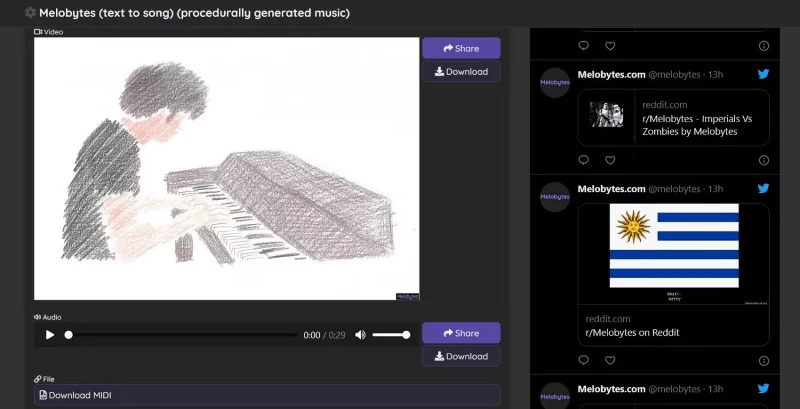
In the basic version of Melobytes, you can set the language of the lyrics for the tool to analyze along with the vocalist's pitch, tempo, time signature, and style, including male, female, duet, robot, and rapper. Add your own lyrics to the dialog and create an original song with your own words! Or use the app to find famous lyrics and create a robot-voiced cover.
If you don't like the first version the app generates, feel free to click that Melobytes button over and over again until you're happy with the result. Melobytes songs can be downloaded as MIDI files and saved for reuse as you see fit.
And if you like this AI-generated music, consider Melobytes Pro . The advanced version of the app is also free, but it lets you customize almost every aspect of the song, including duration, instruments, musical style, vocal type, and audio settings like reverb, echo, and distortion.
If you still want to experiment, Melobytes will also create a video to go with your song. So go from lyrics to music video with Melobytes, with the help of AI.
3. BeepBox
BeepBox is a great little tool for creating your own free music. You can use BeepBox as background music for video games or YouTube videos. You don't need to know anything about music; just experiment with the controls and get creative.
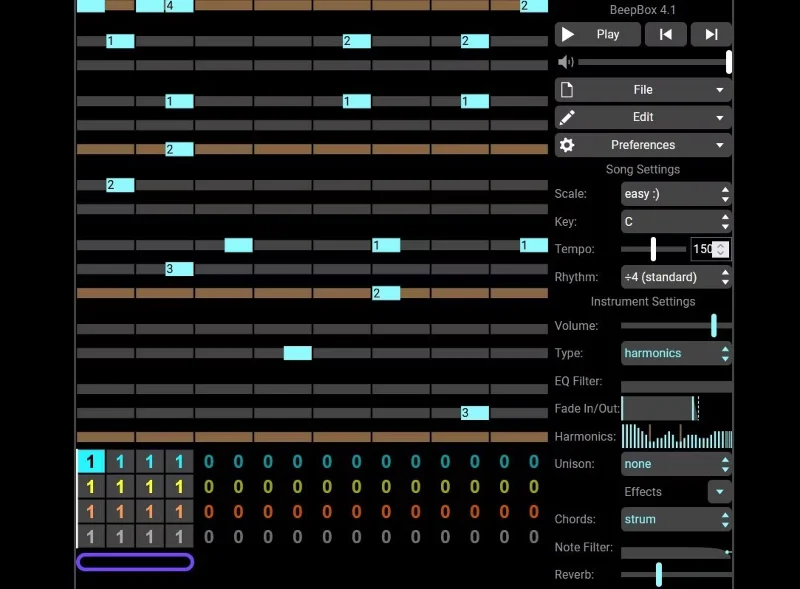
The app gives you four instrument channels, including guitars, trumpets, drums, vocals, and strings, brass, and percussion. Place an instrument in a channel, then tap different points on the virtual scale to create sounds from that channel. Finally, press Play to hear the full sound.
You can change the tempo, reverb, and rhythm at any time. BeepBox also lets you adjust how and when each channel plays through a simple, numbers-based interface. Feel free to experiment to get the sound you like, then download it as a free WAV, MP3, MID, JSON, and HTML file and use it as music for YouTube videos or video games.
All of this is just the basic interface of BeepBox. Once you have mastered this feature, move on to the deeper settings where you can see all the channels in one view, add piano scales, save and use presets, and more.
4. Typography
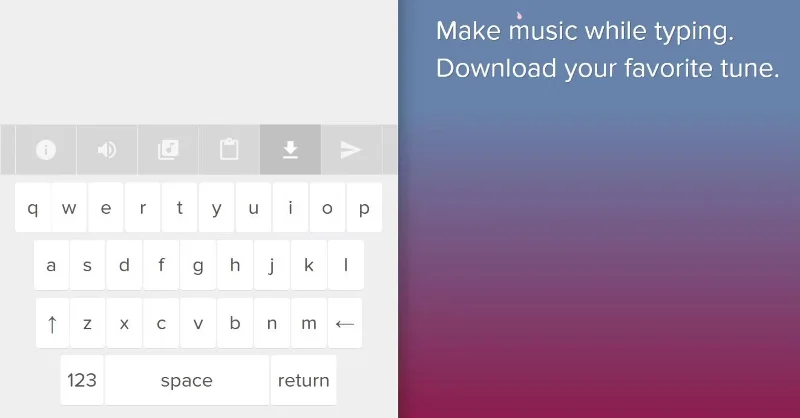
What would your name sound like if it were turned into a melody? Typatone turns your keyboard into an instrument and your typing into a song online for free. The idea is to map text to melody so you can create songs by typing.
Typatone used a study of how often certain letters are used in the English alphabet and mapped them to the most melodious notes on a standard piano. Type any letter or word into the app and the corresponding sound will be played. You can even copy-paste large chunks of text. What’s interesting is how Typatone uses AI to not only map sounds but also turn the string of letters into a harmonious melody.
You can turn anyone's name into a custom little tune for your notification sound or ringtone. Take someone's favorite book and turn it into a song for them. Or you can use Typatone to compose music while you walk around. The mobile-friendly site makes it easy to have an instrument with you at all times, so when a melody pops into your head, just tap it to make it happen.
5. Beepster
Beepster is a fun little music composition tool. You don't need any professional music knowledge to use it, just play around with the settings and see what you like.
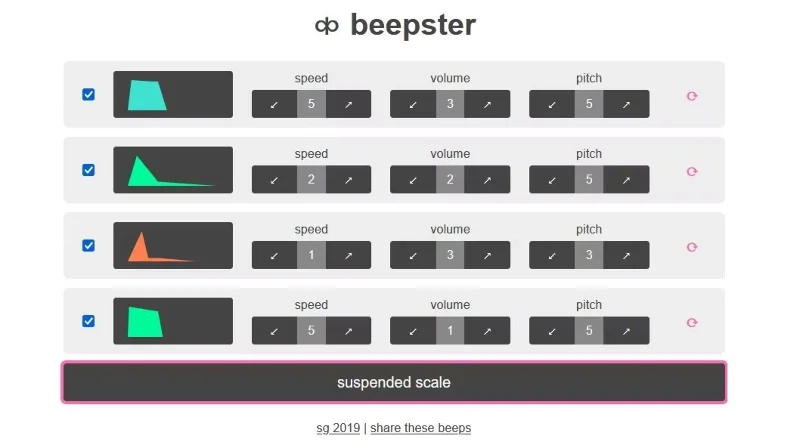
First, choose from the scales: major pentatonic, minor pentatonic, blues major, blues minor, and sus chords. You'll see four rows, each representing a track or voice. Clicking on the track image will change what plays.
You can adjust the speed, volume, and pitch for each track. And you can turn a track on or off. If you want to randomize all the settings in a track, click its circular arrow. Beepster also randomly changes the notes in each track it plays, which adds variety to the melody.
There’s no way to download the track, but you can share it as a link with others. Overall, this is a useful app for creating free music for yourself or enhancing online projects. If adding animated GIFs to Google Slides enhances a presentation, playing a fun tune can do the same.
6. ToneMatrix
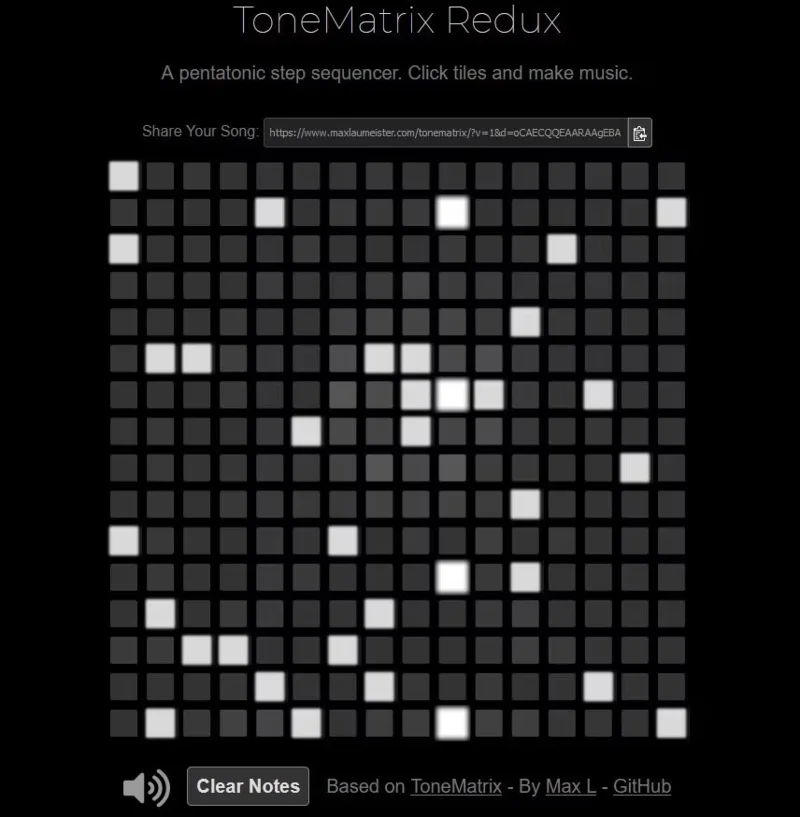
ToneMatrix is the simplest music generator, which makes it more appealing than other options. You don’t have to fiddle with a lot of settings here; all you have to do is click on the blocks in the matrix to create your own music.
Each block creates a tone. ToneMatrix will play the selected blocks in sequence, starting from left to right. There are 16 columns, and if you select more blocks in a column, the tone will be louder.
Experimenting with ToneMatrix is fun, and you can create a simple, soothing Lo-Fi track to play while studying or needing to concentrate. Unfortunately, you can't download tracks on ToneMatrix, but you can share your creations online.
Plan a recognizable Halloween 2026 look with pop culture costumes inspired by Spider-Man, Supergirl, Toy Story 5, Moana, Mario, and Wednesday.
Sort leftover Halloween candy safely, share or repurpose sealed treats, and choose food use or compost for pumpkins based on their condition.
Compare workplace Halloween costume choices by respect, dress code, mobility, and safety—and learn when a subtle accessory or a policy check is the better option.
Find a couples costume that fits your style, budget, and comfort level, from Addams Family classics to original inside-joke duos.
Need a last-minute high school Halloween costume? Compare 10 easy closet-based ideas by prep time, comfort, school-day practicality, and simple safety checks.
Use a simple 2026 Halloween decorating timeline for indoor décor, outdoor displays, and fresh pumpkins, with practical adjustments for weather and events.
Mix five vivid, approachable Halloween cocktails with measured recipes, simple prep tips, and an alcohol-free option for your party guests.
Find 15 office-friendly Halloween costume ideas for 2026, with practical checks for dress codes, respectful themes, comfort, and workplace safety.
Plan a fun elementary school Halloween party with easy crafts, games, inclusive treats, costume tips, and a sample 75-minute classroom schedule.
Compare realistic side hustles for 2026 by startup cost, fees, flexibility, and income control, with current tax and scam guidance from official sources.








