Desk Decorating Ideas for a Spooky Office Cubicle

Create a spooky office cubicle with Halloween desk decor ideas that keep your workspace usable, tidy, and mindful of workplace safety.
GPT-4o has been made publicly available for free. This means that anyone can access the GPT-4 artificial intelligence without having to pay. You may wonder why you should continue paying $20 a month when you can use an alternative tool for free.
Here are some reasons why you might want to keep ChatGPT Plus.
1. Add access to GPT-4o
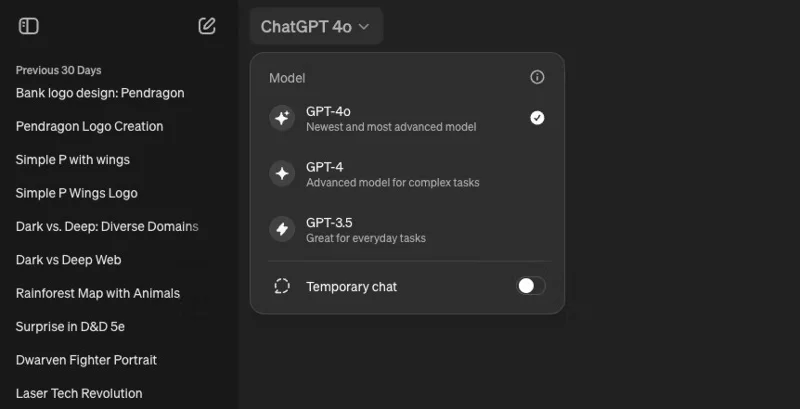
GPT-4o is OpenAI's latest flagship GPT model, which is claimed to be twice as fast as GPT-4 Turbo and 50% cheaper (using the API). However, free users do not get unlimited access to GPT-4o. OpenAI provides free users with "limited access to GPT-4o."
GPT-4o is currently the default model for ChatGPT, but free users will be reverted to GPT-3.5 when unavailable. As a free user, access to GPT-4o is not guaranteed and is subject to availability. The term "restricted access" implies limited use or reduced availability during peak times.
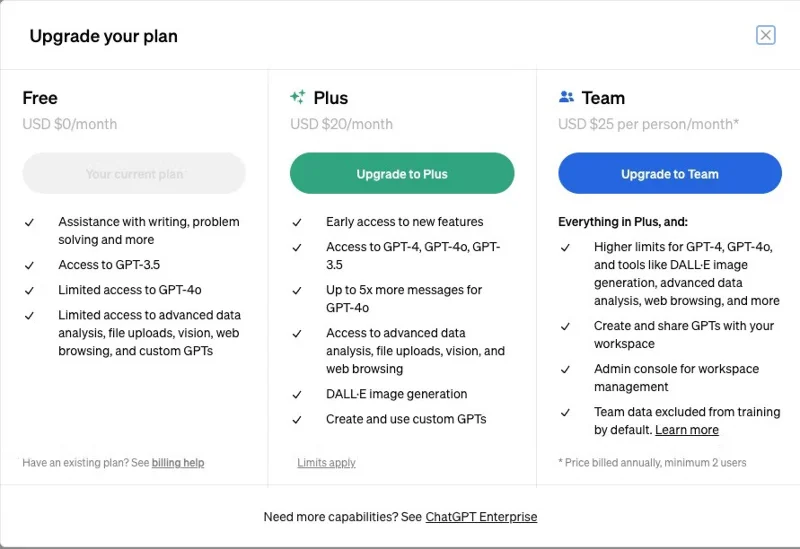
One thing is for sure, though: ChatGPT Plus users will receive up to 5 times more messages than GPT-4o. Plus, Plus users can send up to 80 messages every 3 hours. From that, it can be inferred that free users will receive around 16 messages per hour. Not bad, but quite low if you are a heavy user.
As ChatGPT becomes a mainstay for more businesses and individuals, usage and availability will likely decrease (temporarily) in the near future. Therefore, a Plus subscription will ensure usability in crowded situations.
2. Keep access to GPT-4 Turbo
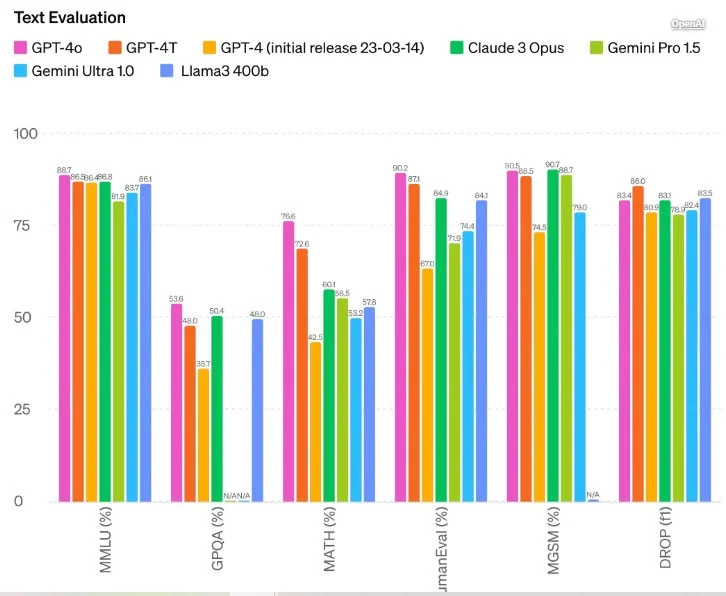
Benchmarks and tests show that GPT-4o may be fast, but GPT-4 Turbo seems to be more accurate in some categories. It's hard to confirm the criteria and how some of these tests were performed, but some users have reported better results from GPT-4 - especially on math and programming problems. Even OpenAI has acknowledged this, and according to text evaluation results, GPT-4T performs better on DROP (Discrete Reasoning Over Paragraphs) tests.
If some arbitrary testing doesn't convince you, consider the additional number of prompts GPT-4 will receive. OpenAI allows 40 messages every 3 hours on GPT-4T and 80 messages every 3 hours on GPT-4o, for a total of 120 messages that can be sent to GPT-4 in 3 hours.
3. Create your own custom GPT
OpenAI will allow free users to access the GPT store and use custom GPTs as part of the free plan. However, creating custom GPTs is not included.
A Plus subscription is required to create a custom GPT. Paying for it will allow you to build a custom GPT with your own data and documents, which you can then share with friends and colleagues or publish for free on the marketplace.
4. Create images with DALL-E
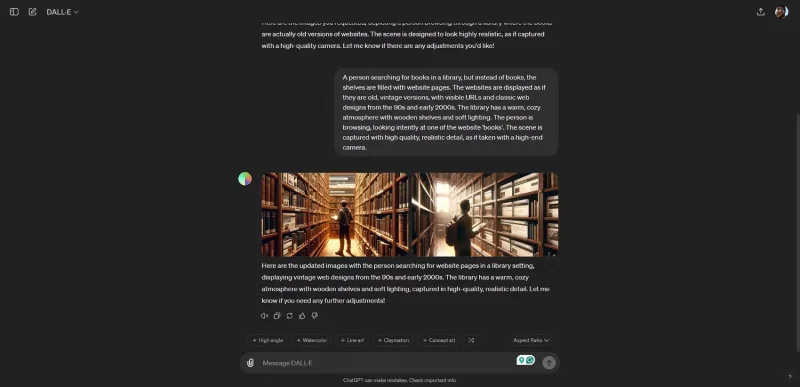
When OpenAI announced a bunch of features coming to the free tier of ChatGPT, the company didn’t mention direct access to its image-generating AI, DALL-E. With DALL-E, you can type in any prompt and the AI will attempt to create images from text. It’s pretty useful and one of the reasons to keep your Plus subscription. Even with access to GPT-4o, Free users can’t create images from text—all of DALL-E’s capabilities require a subscription.
5. Get early access to ChatGPT Voice Mode and the ChatGPT desktop app
OpenAI's GPT-4o demo made waves on the internet thanks to its realistic Voice Mode. Because GPT-4o can understand words and context so quickly, there's no typical lag while the AI is "thinking," resulting in a fluent conversation - just like a human. On top of that, you can essentially video call the AI while in Voice Mode and it will understand visual cues and objects it sees.
This new Voice Mode isn’t widely available yet, but Plus users will get it as an early access feature. If you want to use this technology before most people, you’ll need to keep your ChatGPT subscription.
Note : While OpenAI’s recent demo suggests that this feature will come to the Mac app, Voice Mode is currently only available through the ChatGPT smartphone app. Features like this are why many consider the ChatGPT iOS app to be better than the website.
OpenAI also showed off a ChatGPT desktop app in the demo. It’s definitely one of those early access features that paying users will enjoy, and it’s coming to macOS users for the first time. There are probably more cool features that offer great value propositions, and paying for Plus is the only way to be one of those people.
6. Full access to advanced data analytics, file uploads, and web browsing
Advanced data analysis, file uploads, and web browsing were once features reserved for OpenAI's paying customers. That's now changed, and all of these are available to free users with more restrictions, including fewer prompts, fewer file uploads, and lower-priority access to these services during peak hours.
For some people, this may discourage you from subscribing to Plus. However, it is necessary if you are a heavy ChatGPT user and rely on it for reading and analyzing documents and images. These are features that many people do not use regularly, but if you are in the minority, you may want to keep your Plus subscription.
Additionally, having full access to a web browser is extremely useful. ChatGPT has limited knowledge, and the web browser helps bridge that knowledge gap by allowing you to search the web for current information. If you use ChatGPT for tasks that require current information, you may be disappointed with the free plan.
Honestly, all the reasons to subscribe to ChatGPT Plus depend on how much you use AI. If you use it a lot, you'll find yourself hitting the limit regularly. A ChatGPT Plus subscription might be worth it if you can afford it and don't mind experimenting with new OpenAI features.
Create a spooky office cubicle with Halloween desk decor ideas that keep your workspace usable, tidy, and mindful of workplace safety.
Plan a recognizable Halloween 2026 look with pop culture costumes inspired by Spider-Man, Supergirl, Toy Story 5, Moana, Mario, and Wednesday.
Sort leftover Halloween candy safely, share or repurpose sealed treats, and choose food use or compost for pumpkins based on their condition.
Compare workplace Halloween costume choices by respect, dress code, mobility, and safety—and learn when a subtle accessory or a policy check is the better option.
Find a couples costume that fits your style, budget, and comfort level, from Addams Family classics to original inside-joke duos.
Need a last-minute high school Halloween costume? Compare 10 easy closet-based ideas by prep time, comfort, school-day practicality, and simple safety checks.
Use a simple 2026 Halloween decorating timeline for indoor décor, outdoor displays, and fresh pumpkins, with practical adjustments for weather and events.
Mix five vivid, approachable Halloween cocktails with measured recipes, simple prep tips, and an alcohol-free option for your party guests.
Find 15 office-friendly Halloween costume ideas for 2026, with practical checks for dress codes, respectful themes, comfort, and workplace safety.
Plan a fun elementary school Halloween party with easy crafts, games, inclusive treats, costume tips, and a sample 75-minute classroom schedule.








