Desk Decorating Ideas for a Spooky Office Cubicle

Create a spooky office cubicle with Halloween desk decor ideas that keep your workspace usable, tidy, and mindful of workplace safety.
How do you check if your device charger is safe to use? Buying products approved by the manufacturer is one way to ensure safety. However, the high price tag for something as simple as a USB Lightning cable can be discouraging.
But counterfeit chargers can be dangerous; even life-threatening. Poor-quality chargers can give you an electric shock or start a fire. So what can you do to minimize the risk?
Note : The following steps are just a guide. The article cannot guarantee that any charger you buy is genuine, and even genuine chargers can be damaged.
Table of Contents

You don’t necessarily have to buy an official charger directly from your smartphone manufacturer. However, it is essential that you buy the right charger for the right device. Even if you are tempted by a cheap charger, you must ensure that your device is listed as compatible with that charger and power cable.
If you are unsure, check the product description. This will tell you which devices it supports. Using a charger with too high or too low a voltage can damage your smartphone.
You may not realize the damage has occurred - using the wrong charger can cause immediate performance issues or significantly shorten the life of your device.
How can you check if you have the right adapter for your device? Just look at what charger came with it!
This is another way counterfeiters cut costs. They come separately. If you order online, the product will arrive with packaging and instructions. However, many people ignore these.
You might dismiss this as not really needing to read the manual to know how to turn on your device, but authentic packaging is a sign that you’ve purchased from a reputable company.
Even with packaging, look out for design quirks. You won't find super-squiggly text and broken logos on authentic items.
Why are manuals and packaging important? Because that’s where you’ll usually find quality control marks. These are signs that the product has been tested to meet safety regulations. They vary greatly depending on where you live and where the manufacturer is located. In the US, for example, you’ll see the Federal Communications Commission (FCC) mark. Canadians should look for the Canadian Standards Association (CSA) symbol. And anyone in Europe should look for the CE mark.
But you can't rely on these alone. They can be easily faked. You can find high resolution examples by doing a Google search.
Instead, make sure the product comes with additional safety instructions regarding use, power source, and final disposal. Some scammers skip adding warnings because they know that customers are more likely to look for quality control symbols.
This may seem excessive, but it's better to take the time to thoroughly inspect your charger, to avoid causing a fire.
Luckily, you don't need to use a ruler to measure the length of the pins: Just plug the charger in! Don't plug in the cable or device you want to charge yet.
If the prongs are too long, there will be a gap between the charger and the wall. If the prongs are too far apart or too close together, the charger will not fit properly. Another possibility is that the charger's prongs are too short, which is harder to tell. However, you can compare them to the prongs on a product that you know is genuine and works well.
Another sign of a fake is the condition of the pins. They should be free of blemishes or a shiny finish. Pins should be matte and solid in color, meaning they usually have a black or white case and silver (or sometimes gold) metal. The pins should definitely be scratch-free.
Counterfeit chargers are cheaply made to maximize profits. Of course, such shoddy workmanship means you don’t get all the necessary components in a genuine charger. Some defective chargers don’t even have a fuse inside.
Genuine chargers will be heavier than counterfeit chargers. You can check this simply by holding one charger and comparing it to another charger that you know is genuine. Chargers typically weigh between 56 and 113g. The minimum weight is around 40g. If you are unsure, use a scale.
Cables can also be counterfeit. They can also be damaged by overuse. Be wary of frayed cables – that is, exposed wires. Know when to throw out a damaged cable. If you can see the wires underneath the plastic, be cautious and buy a new cable as soon as possible.
Most notably, you should be on the lookout for frayed cables—that is, exposed wires. You need to know when to throw out damaged cables. But let’s be real: We all wrap our cables around something else. You can wrap them around your charger. But there is a way to wrap your cables without breaking them. If you can see the wires underneath the plastic, be careful and buy a new cable as soon as you can.
How can you tell if a cable is fake? Some are shorter than average: Apple's Lightning cable is 1 meter long, but others, like Samsung's USB-C cable, are around 1.5 meters long.
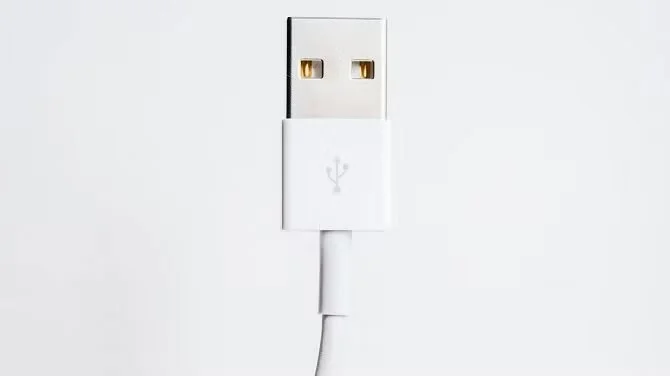
Poor quality cables will have loose or misaligned components in the USB connector. Just like the charger, the cable should come in the original packaging.
This last point applies to your charger, its cable, and your devices. Liquids can damage electrical devices, so keep them away from water. Even sweat buildup can affect your phone. Fortunately, there are ways to save a wet phone . Many of these solutions will also work on your charger, but it’s important to be gentle.
You’ll need to be patient to completely dry out the charger, and even then, you can’t be sure it’s safe to use. So the safer option is to buy a new charger. It’s better to buy a new charger than to risk electrocution (or worse).
Of course, the ideal answer is to prevent your charger from getting wet in the first place.
Do not use any electronic item that you think might be counterfeit.
This is definitely the most important thing here. You could be risking your smartphone, your home, and your life. Next, go to the retailer you bought from. They need to know if there are any counterfeits being sold on their platform. If it was a third party or auction site, contact the person you bought from, and if they don’t do anything, report it to the main retailer.
Some people actively detect fakes. But others think they are worth the risk because they are cheap. But don't do it! You will regret buying fakes!
Create a spooky office cubicle with Halloween desk decor ideas that keep your workspace usable, tidy, and mindful of workplace safety.
Plan a recognizable Halloween 2026 look with pop culture costumes inspired by Spider-Man, Supergirl, Toy Story 5, Moana, Mario, and Wednesday.
Sort leftover Halloween candy safely, share or repurpose sealed treats, and choose food use or compost for pumpkins based on their condition.
Compare workplace Halloween costume choices by respect, dress code, mobility, and safety—and learn when a subtle accessory or a policy check is the better option.
Find a couples costume that fits your style, budget, and comfort level, from Addams Family classics to original inside-joke duos.
Need a last-minute high school Halloween costume? Compare 10 easy closet-based ideas by prep time, comfort, school-day practicality, and simple safety checks.
Use a simple 2026 Halloween decorating timeline for indoor décor, outdoor displays, and fresh pumpkins, with practical adjustments for weather and events.
Mix five vivid, approachable Halloween cocktails with measured recipes, simple prep tips, and an alcohol-free option for your party guests.
Find 15 office-friendly Halloween costume ideas for 2026, with practical checks for dress codes, respectful themes, comfort, and workplace safety.
Plan a fun elementary school Halloween party with easy crafts, games, inclusive treats, costume tips, and a sample 75-minute classroom schedule.








