Home
» Wiki
»
9 Hidden Samsung Camera Features You Should Be Using
9 Hidden Samsung Camera Features You Should Be Using
The camera on your Samsung phone is a lot more powerful than you think. Samsung has some great features hidden under the hood. If you just point and shoot, you're missing out.
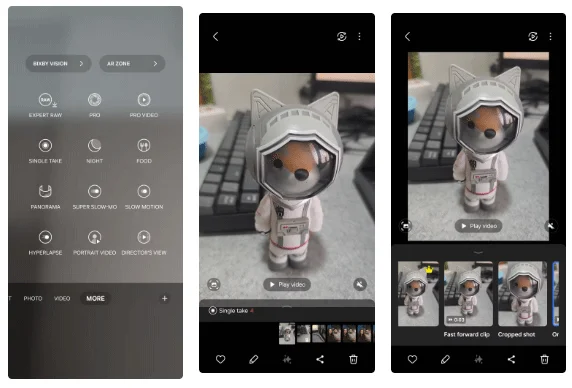
1. Single Take Mode
Samsung Camera’s Single Take mode is a great option for anyone struggling to get the perfect shot. Instead of just taking a single photo, the feature records a short video of between three and 10 seconds. It then uses AI to analyze the scene and automatically create the best shots, slow-motion clips, boomerangs, and filtered photos.
This feature can be useful for action shots, group photos, or random moments when you want variety without having to retake multiple photos.
2. Scene Optimizer
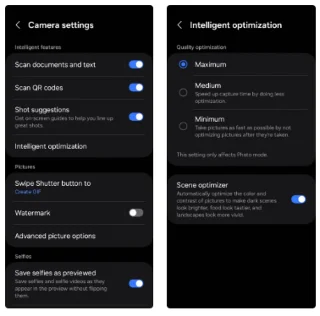
While the Samsung Camera app automatically enhances every photo you take, enabling Scene Optimizer can take it a step further. It recognizes the subject or scene in the frame and adjusts the color, contrast, and lighting to create a perfectly balanced photo.
You can go to Samsung Camera Settings > Intelligent optimization to enable Scene Optimizer and try it out for yourself. Conversely, if you want your photos to look less processed, you can turn it off.
3. Shot Suggestions
No matter how good your Samsung phone's camera hardware is, your photos can still be mediocre if you don't pay attention to your angles and framing. That's where Shot Suggestions comes in. It analyzes your scene in real time and provides on-screen guidance to help you frame your shot like a pro.
4. GIF recording tool
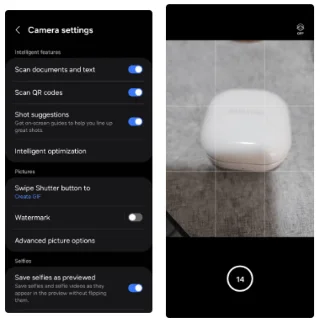
While Samsung Galaxy phones make it easy to create GIFs from photos and videos, you can also record directly using the Camera app. To do this, go to Camera Settings > Swipe Shutter button and select Create GIF .
Then, simply swipe down and hold the shutter button to start capturing a GIF. This feature is perfect for quickly capturing short, looping animations without needing to install a separate app to create GIFs.
5. Voice commands to take photos and record videos
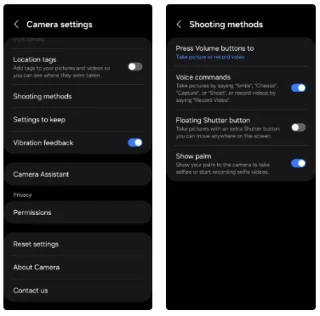
You can enable this feature by going to Camera Settings > Shooting methods and turning on Voice commands . Once enabled, you can take a photo just by saying phrases like “Smile,” “Cheese,” “Capture,” or “Shoot.” To record a video, just say “Record video.”
6. Enable the floating shutter button
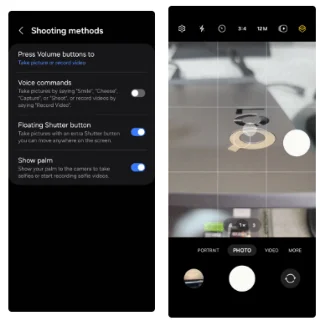
If you are someone who is reluctant to use voice commands and prefers manual interaction, you can enable the floating shutter button. This feature is quite useful for users of large Samsung phones where reaching the default shutter button can be difficult.
This way, you won't have to stretch your fingers uncomfortably or risk dropping your phone when taking selfies or shooting from awkward angles.
7. Director's View
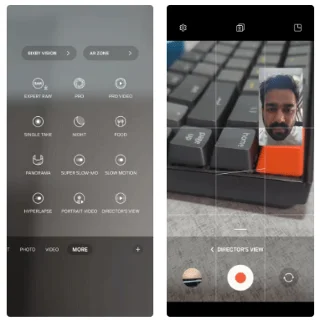
To enable Director's View, open the Camera app and navigate to More > Director's View . You can then choose between a picture-in-picture or split-screen layout depending on how you want to shoot your video. Additionally, the Samsung Camera app gives you the option to save both camera feeds as separate video files, in case you want to edit the footage separately.
8. Watermark
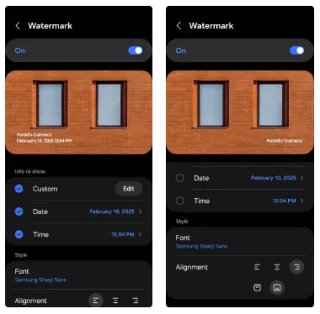
Adding a watermark to your photos is a great way to reinforce your branding and prevent unauthorized use. However, instead of manually applying a watermark to each photo, you can enable the Watermark feature in Samsung Camera Settings and automate the process for all your photos.
9. Quick Tap Shutter
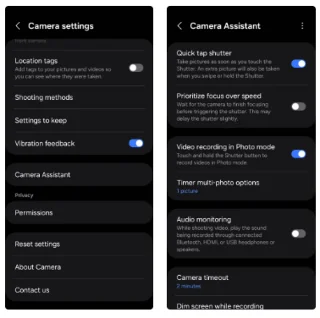
Samsung’s Good Lock Camera Assistant module unlocks a number of powerful features that aren’t available by default, including auto HDR, photo softening, and advanced timer options. One of its most underrated features is Quick Tap Shutter, which is designed to dramatically reduce shutter lag.
Once you install the Camera Assistant module, you can go to Camera Settings > Camera Assistant and turn on the Quick Tap Shutter toggle .
The Camera app on your Samsung phone offers much more than just simple photo-taking, so don't hesitate to experiment and see how these tools can enhance your photography skills!