Traveling is fun, but it often comes with its own set of challenges and inconveniences. To enjoy a comfortable and stress-free travel experience, here are some essential tech gadgets that you can easily pack in your carry-on luggage.
One of the most important items in your travel kit is a reliable power bank. Running out of battery on your phone or tablet while traveling in a foreign city is a common scenario.
A power bank with at least 10,000mAh is ideal. It can charge a standard smartphone two to three times before needing to be recharged. Some models have fast charging capabilities and multiple ports, so you can charge your phone, headphones, and other electronics.
If you have weight restrictions on your trip, a lightweight power bank like Nitecore’s NB10000 is ideal. You’ll also want to skip buying a power bank with wireless charging capabilities. Not only do they charge your devices slowly, but wireless connections waste more power than regular wired connections. Of course, there’s nothing wrong with having a power bank. Just don’t use the wireless charging feature when you travel.
8. Noise-canceling headphones or earbuds
Traveling often means dealing with noisy airports, crowded planes, or busy city streets. A good pair of noise-cancelling headphones or earbuds that use ANC (Active Noise Cancellation) technology can create a quiet space in a noisy environment.
You can use them not only to enjoy music or podcasts but also to relieve stress. The noise-canceling feature helps you concentrate while working or sleep better on flights. Whether you are a frequent flyer or just need some quiet time, these products are worth it.
Many people prefer earbuds because they’re small, lightweight, and versatile. However, there are cases where noise-cancelling headphones are a better choice. For example, you might find them more comfortable, like a larger soundstage, or want to rest assured that you won’t lose them if you decide to sleep. They’re also much more noticeable—a less obtrusive way to signal that you’re not in the mood for conversation, which can be incredibly helpful when you’re feeling exhausted at the moment.
7. Baggage tracking device (e.g., Apple AirTag)
There’s nothing more stressful than losing your luggage. Thankfully, technology has made it easy to find lost bags. Placing a tracking device in your luggage or backpack can give you peace of mind during transit when the risk of your luggage going missing is high. In addition to security, a tracking device can also give you peace of mind when checking your luggage, making your trip less stressful.
6. USB or external SSD
Digital files often take up more space than we expect, especially when traveling for work or preserving memories through photos. Bring a USB or external SSD to store all your photos and videos, along with a small library of online downloads, in case your accommodation has a slow internet connection.
Many people often prefer to carry an external SSD over a USB drive because of its faster data transfer speeds and larger storage capacity. However, USB drives can also be useful when you don't need a backup, just want to store documents and photos.
5. Electronic scale
Airlines have strict baggage weight limits; exceeding these limits can result in high fees. A portable electronic scale can help you avoid surprises at the airport.
Even cheap scales are accurate enough to provide useful readings. Weigh your luggage before you leave to make sure it’s within airline limits and avoid any hassle. A small scale can also be a lifesaver when you’re packing extra souvenirs back home.
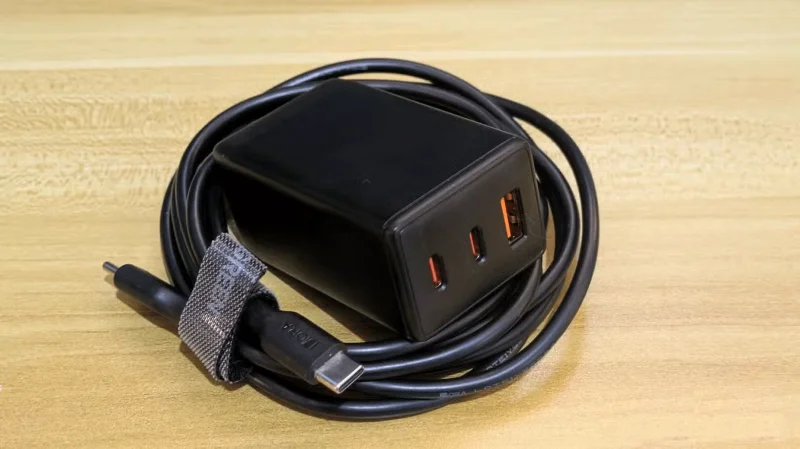
4. GaN charger with 2m USB-C cable
Efficiently charging multiple devices is key while traveling. The GaN (Gallium Nitride) charger is compact yet powerful, capable of fast charging phones, tablets, and even laptops.
Pair it with a 6-foot USB-C cable for added versatility, especially in hotel rooms where outlets are often awkwardly located. This setup lets you charge multiple devices overnight and start your day without worry. This Anker Nano GaN charger is portable and lightweight, while the larger Anker 737 GaN charger has multiple charging ports.
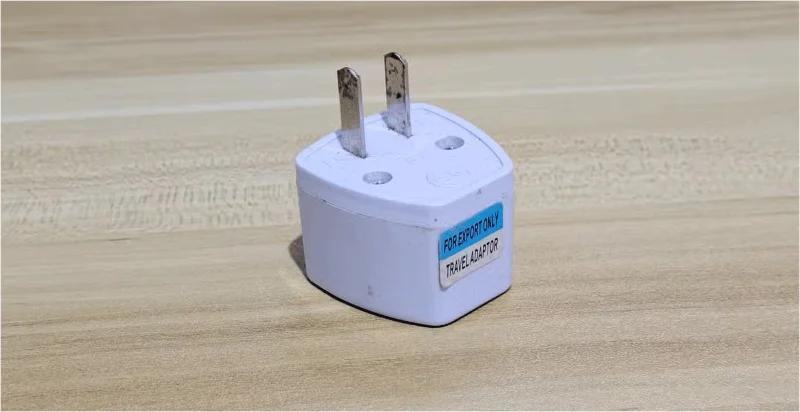
3. Travel adapter
International travel requires dealing with a variety of plugs. A travel adapter ensures you can charge your devices no matter where you are. Some of the best models also include USB ports, allowing you to power multiple gadgets at once.
A travel adapter is a good idea simply because it is small and lightweight. Of course, if you are bringing a lot of tech on your trip, it is better to buy a more sturdy travel adapter with USB ports and extension cords.
2. Handheld electric fan
Whether you're exploring a tropical destination or standing in a long line, a portable electric fan can help keep you comfortable. Fans are especially useful on summer trips or in stuffy environments like crowded trains.
These fans are lightweight, rechargeable, and often have adjustable speeds. It's a simple gadget, but it makes a big difference when you want to cool down.
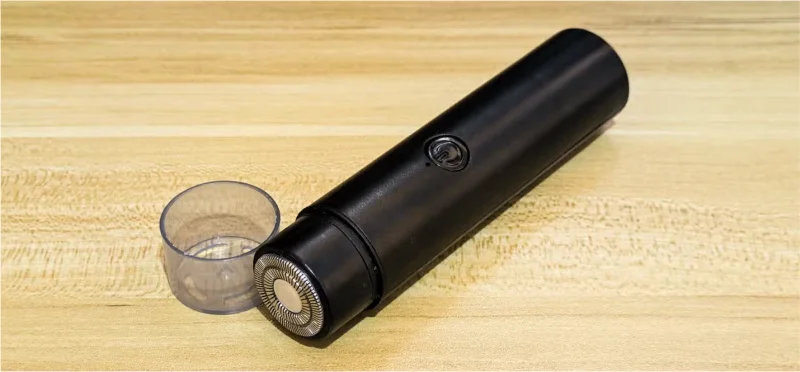
1. Electric razor
Maintaining a grooming routine while traveling can be a challenge, but an electric razor makes things easier. A compact, travel-friendly model can easily fit in a pocket and doesn't require shaving cream or water.
Look for a rechargeable razor with a long battery life. It's convenient, saves time, and helps you stay groomed throughout your trip. It's a practical item to add to any packing list.
Traveling doesn't have to be stressful. With these gadgets in your bag, you'll feel more prepared for whatever your trip brings. Whether it's being charged, organized, or comfortable, these tools make all the difference. Try them out and you'll wonder how you ever traveled without them!