Pop Culture Costume Ideas That Will Dominate Halloween 2026

Plan a recognizable Halloween 2026 look with pop culture costumes inspired by Spider-Man, Supergirl, Toy Story 5, Moana, Mario, and Wednesday.
If physical warfare is fought with armies, digital warfare is won with infected botnet devices. The more infected devices in a botnet, the more powerful the attacks. A recent campaign set a record for the most powerful DDoS attack in history, generating 5.6 Tbps of data in a single session.
Cloudflare Puts Up an Incredible Fight Against Record-Breaking DDoS Attack
The announcement comes from cybersecurity company Cloudflare, which provides website owners with protection against DDoS attacks and defenses against everyday attacks. Chances are, if you've ever clicked on the "Are you human?" CAPTCHA test, Cloudflare is the company that provided it.
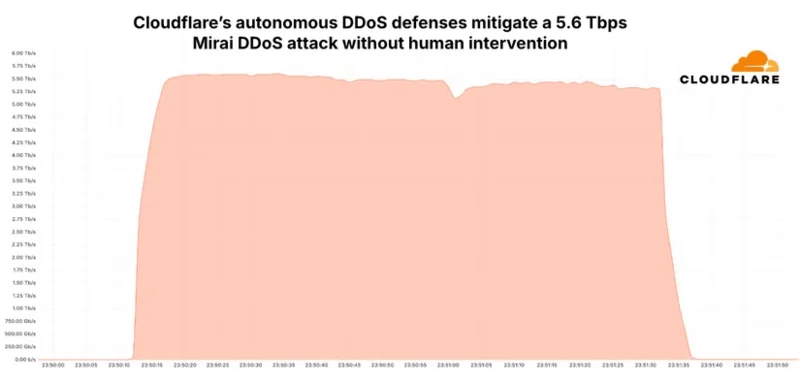
In a blog post by Cloudflare, the cybersecurity company analyzed the most intense DDoS attack in recorded history:
On October 29, a 5.6 Tbps UDP DDoS attack launched by a Mirai variant botnet targeted a customer of Cloudflare Magic Transit, an Internet Service Provider (ISP) in East Asia. The attack lasted just 80 seconds and originated from over 13,000 IoT devices. Detection and mitigation were fully automated thanks to Cloudflare’s distributed defense systems. It did not require human intervention, did not trigger any alerts, and did not cause any performance degradation. Systems continued to operate as normal.
It’s good to have companies like Cloudflare there to protect websites, as botnet operators have been ramping up their activity recently. Cloudflare reports that it began seeing a spike in DDoS attacks in Q3 2024, and by Q4 2024, the company saw an 1,885% quarter-over-quarter increase in attacks using more than 1Tbps of traffic.
The strength of a botnet is determined by the number of devices it has taken control of, so now is the perfect time to make sure cybercriminals don’t include your gadgets in the next big attack. Check out how to detect and mitigate botnet attacks for more information, and if you have a lot of smart devices, be sure to learn about IoT botnets too!
Plan a recognizable Halloween 2026 look with pop culture costumes inspired by Spider-Man, Supergirl, Toy Story 5, Moana, Mario, and Wednesday.
Sort leftover Halloween candy safely, share or repurpose sealed treats, and choose food use or compost for pumpkins based on their condition.
Compare workplace Halloween costume choices by respect, dress code, mobility, and safety—and learn when a subtle accessory or a policy check is the better option.
Find a couples costume that fits your style, budget, and comfort level, from Addams Family classics to original inside-joke duos.
Need a last-minute high school Halloween costume? Compare 10 easy closet-based ideas by prep time, comfort, school-day practicality, and simple safety checks.
Use a simple 2026 Halloween decorating timeline for indoor décor, outdoor displays, and fresh pumpkins, with practical adjustments for weather and events.
Mix five vivid, approachable Halloween cocktails with measured recipes, simple prep tips, and an alcohol-free option for your party guests.
Find 15 office-friendly Halloween costume ideas for 2026, with practical checks for dress codes, respectful themes, comfort, and workplace safety.
Plan a fun elementary school Halloween party with easy crafts, games, inclusive treats, costume tips, and a sample 75-minute classroom schedule.
Compare realistic side hustles for 2026 by startup cost, fees, flexibility, and income control, with current tax and scam guidance from official sources.








