Desk Decorating Ideas for a Spooky Office Cubicle

Create a spooky office cubicle with Halloween desk decor ideas that keep your workspace usable, tidy, and mindful of workplace safety.
Have you ever copied a link or snippet into your notes, only to forget where it came from? Microsoft's new Sticky Notes app has a simple but brilliant solution that other apps should learn from: Automatic source tracking. This little feature makes note-taking so much better.
How does Microsoft Sticky Notes' source tracking feature work?
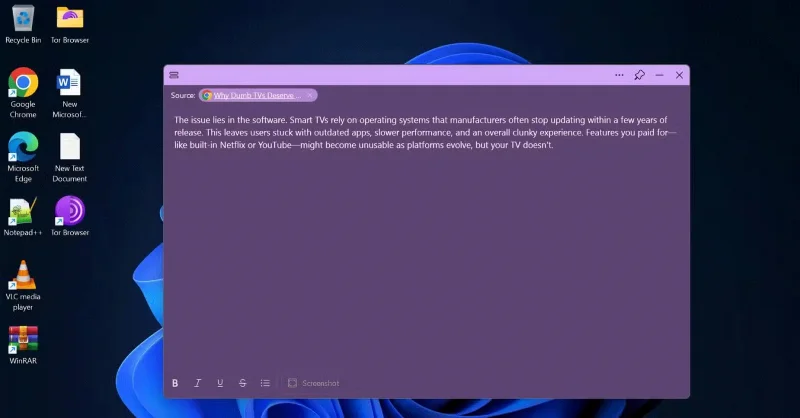
Whenever you copy text from a web page and paste it into Sticky Notes, the app automatically includes a hyperlink to the source in the Source field on the note. This means you can always trace your notes back to their source, whether it’s an article, blog post, or research page.
But it doesn’t stop at text. If you take a screenshot of a web page or an app window with Sticky Notes, the app will also capture the source, embedding a clickable link next to the image. This makes it easy to return to the original content with just one click, saving you time and making it easy to organize your notes.
What makes this feature so effective is how seamlessly it integrates into the app. Without any extra steps, Sticky Notes links your notes to their context, giving you an easy way to keep track of your references. It's a small addition that solves a big problem for note-takers.
Why does every note taking app need this feature?
Source tracking may seem like a small feature at first glance, but its potential applications make it an indispensable note-taking tool for students and professionals alike. Without it, even the most carefully curated notes can become lost in their original context. When conducting research, jotting down ideas, or gathering inspiration, knowing where your information comes from is crucial—and that’s exactly what this feature does.
By automatically adding source links, Sticky Notes eliminates the frustration of trying to retrace your steps. Imagine saving an excerpt from an insightful article or jotting down ideas in a meeting, only to realize later that you can't remember where the information came from. With source tracking, those worries disappear.
This feature is especially valuable for students, researchers, and professionals who need to quickly reference multiple sources. It also promotes better information management, ensuring you always have the big picture when reviewing your notes. It’s a level of functionality that makes you wonder why every note-taking app hasn’t adopted this feature yet.
Adopting source tracking isn’t just a nice feature for note-taking apps, it’s a step toward setting a new standard. As users demand smarter, more connected tools, features like source tracking aren’t just an improvement; they’re an expectation. Sticky Notes has set the standard, and it’s time for other tools to follow suit.
Create a spooky office cubicle with Halloween desk decor ideas that keep your workspace usable, tidy, and mindful of workplace safety.
Plan a recognizable Halloween 2026 look with pop culture costumes inspired by Spider-Man, Supergirl, Toy Story 5, Moana, Mario, and Wednesday.
Sort leftover Halloween candy safely, share or repurpose sealed treats, and choose food use or compost for pumpkins based on their condition.
Compare workplace Halloween costume choices by respect, dress code, mobility, and safety—and learn when a subtle accessory or a policy check is the better option.
Find a couples costume that fits your style, budget, and comfort level, from Addams Family classics to original inside-joke duos.
Need a last-minute high school Halloween costume? Compare 10 easy closet-based ideas by prep time, comfort, school-day practicality, and simple safety checks.
Use a simple 2026 Halloween decorating timeline for indoor décor, outdoor displays, and fresh pumpkins, with practical adjustments for weather and events.
Mix five vivid, approachable Halloween cocktails with measured recipes, simple prep tips, and an alcohol-free option for your party guests.
Find 15 office-friendly Halloween costume ideas for 2026, with practical checks for dress codes, respectful themes, comfort, and workplace safety.
Plan a fun elementary school Halloween party with easy crafts, games, inclusive treats, costume tips, and a sample 75-minute classroom schedule.








