A senior commander secretly installed Starlink on a warship to surf social media

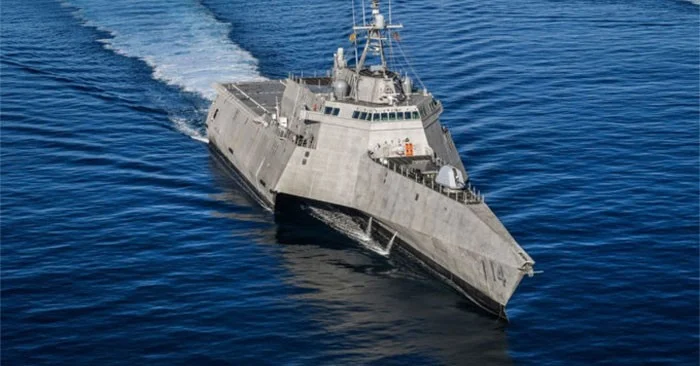
Grisel Marrero, a senior commander of the littoral combat ship USS Manchester, US Navy was demoted after installing Starlink satellite internet on the warship to access social networks.

The incident occurred in August or September 2023, but some of the information was only released over the weekend.
A senior commander secretly installed Starlink on a warship to surf social media
USS Manchester. Photo: Dvidshub

Investigators say that due to the need to maintain bandwidth for military operations and to protect against cyber threats, Internet access on warships is limited. So she and several others paid $2,800 for the Starlink satellite Internet connection system in April 2023, then deployed it on the USS Manchester to have Internet access to access social media, send messages home, check sports scores and watch movies. The Internet is not shared with the sailors.

She even purchased a wireless signal booster during a stop at Pearl Harbor, Hawaii, to cover the entire ship’s area. To pay the monthly Starlink bill of $1,000, the crew also used a debit card from the Senior Chiefs Association of America.

Marrero named the network Stinky and renamed it after a printer to hide it. She even blocked a suspicious comment from reaching her commanding officer's suggestion box.

In March, at a US court-martial, Marrero was demoted from commander to officer for shirking duty and lying to his superiors.

Leave a Comment

Solving Microsoft Teams Password Error Recovery

Solving Microsoft Teams Password Error Recovery

Tired of Microsoft Teams password error blocking your work? Master solving Microsoft Teams "Password Error" recovery with proven, step-by-step fixes. Regain access fast and frustration-free!

Troubleshooting Microsoft Teams Installation Errors on Windows 11

Troubleshooting Microsoft Teams Installation Errors on Windows 11

Struggling with Microsoft Teams installation errors on Windows 11? Get step-by-step fixes for common issues like 0x80070005, 80070422, and more. Quick, effective troubleshooting to get you back to collaborating seamlessly.

Troubleshooting Microsoft Teams Screen Error Black Screen

Troubleshooting Microsoft Teams Screen Error Black Screen

Tired of Microsoft Teams "Screen Error" black screen ruining your meetings? Discover proven, step-by-step troubleshooting fixes for Teams black screen issues, screen sharing errors, and more. Get back to seamless collaboration fast!

How to Fix Microsoft Teams Update Error Loop

How to Fix Microsoft Teams Update Error Loop

Frustrated with the endless Microsoft Teams Update Error loop? Discover step-by-step fixes to resolve stuck updates, clear cache, reinstall, and more. Get back to seamless collaboration fast!

How to Fix Microsoft Teams Download Error on Phone

How to Fix Microsoft Teams Download Error on Phone

Encountering Microsoft Teams "Download Error" on your phone? Get instant fixes for Android & iOS. Clear cache, update apps, and more—back to chatting in minutes without frustration!

Solving Microsoft Teams VOIP Connection Error

Solving Microsoft Teams VOIP Connection Error

Struggling with Microsoft Teams VOIP connection error? Discover step-by-step fixes to solve Microsoft Teams VOIP connection error instantly. Network tweaks, cache clears, and more for seamless video calls.

Solving Microsoft Teams Unexpected Error on Startup

Solving Microsoft Teams Unexpected Error on Startup

Tired of the frustrating Microsoft Teams 'Unexpected Error' on startup? Discover step-by-step fixes, from clearing cache to advanced resets, to get Teams running smoothly again. Quick, reliable solutions for Windows and Mac users.

How to Fix Microsoft Teams Download Error Unexpected

How to Fix Microsoft Teams Download Error Unexpected

Tired of Microsoft Teams "Download Error" Unexpected blocking your workflow? Follow our expert, step-by-step guide with quick fixes and advanced tips to resolve it instantly. No reinstall needed!

Causes of oil heater noise, oil leakage and no heating when in use

Causes of oil heater noise, oil leakage and no heating when in use

Oil heaters make noise, leak oil, and do not heat up. These are all problems that arise when using a heater. So what are the causes of these problems? Read our article below!

How to Assign Participants to Breakout Rooms in Microsoft Teams

How to Assign Participants to Breakout Rooms in Microsoft Teams

Master how to assign participants to breakout rooms in Microsoft Teams with this step-by-step guide. Boost meeting engagement, automate assignments, and troubleshoot like a pro for seamless virtual collaboration.

How to Fix Microsoft Teams Giá Error Pricing Update

How to Fix Microsoft Teams Giá Error Pricing Update

Struggling with Microsoft Teams "Price Error" after the latest pricing update? Discover step-by-step fixes to resolve it quickly, restore seamless collaboration, and avoid subscription headaches. Updated with the newest solutions.

Solving Microsoft Teams Background Error Transparency

Solving Microsoft Teams Background Error Transparency

Struggling with Microsoft Teams Background Error Transparency? Discover proven step-by-step fixes for blurry, glitchy virtual backgrounds. Restore perfect transparency in Teams meetings effortlessly. Updated with the latest solutions.

How to Fix Microsoft Teams Đăng nhập Error (Login)

How to Fix Microsoft Teams Đăng nhập Error (Login)

Struggling with Microsoft Teams "Đăng nhập" login error? Discover step-by-step fixes for smooth sign-in. Clear cache, update app, and more – no tech skills needed! Works on Windows, Mac, and web.

Solving Microsoft Teams Web Error 503 Service Unavailable

Solving Microsoft Teams Web Error 503 Service Unavailable

Tired of Microsoft Teams Web Error 503 Service Unavailable blocking your meetings? Discover quick, step-by-step fixes to resolve the 503 error fast – no tech skills needed! Clear cache, check status, and get back to collaborating seamlessly.

Troubleshooting Microsoft Teams Update Error 0x80070002

Troubleshooting Microsoft Teams Update Error 0x80070002

Stuck with Microsoft Teams Update Error 0x80070002? Discover proven troubleshooting steps to resolve this frustrating issue quickly and get your Teams app updated seamlessly for uninterrupted collaboration.









