Desk Decorating Ideas for a Spooky Office Cubicle

Create a spooky office cubicle with Halloween desk decor ideas that keep your workspace usable, tidy, and mindful of workplace safety.
Adobe Premiere Pro video editor gets enhanced features for smarter editing along with advanced tools for motion design in more places.
Premiere Pro Enhanced
Adobe announced on January 22, ahead of the 2025 Sundance Film Festival, that it would be bringing new AI-powered features to Premiere Pro (beta) . Adobe’s video editing tool hasn’t been shy about introducing new features, following the 2024 announcement of Premiere Pro’s upcoming Generative AI video tool, powered by Adobe Firefly.
Along with a number of workflow-enhancing features in Premiere Pro, Adobe is also adding innovative tools to After Effects and Frame.io to empower future filmmakers.
Frame.io is Adobe’s file management system, originally built with a focus on video footage but now also used for images and documents. New features include Frame.io camera-to-cloud support, allowing filmmakers and content creators to shoot footage and send footage from their cameras directly to their Frame.io library.
After Effects users get improvements in the form of improved caching and HDR support.
Smart search by keyword
When editing a video, you’ll likely be faced with a ton of raw video footage files, trimmed clips, different angles, and other files that you may have brought into the editing process. It can be difficult to find the file you need when there are so many files to search through.
If you work in a team or are temporarily working with new people, there may be differences in how files are stored or named, making logical searching nearly impossible.
Premiere Pro’s search and media intelligence panel lets you search for footage and files using keywords. These keywords can not only be related to the file title—which seems too obvious to be a feature worth mentioning—but they can also be searched from the metadata of the video footage. That’s what smart search is all about.
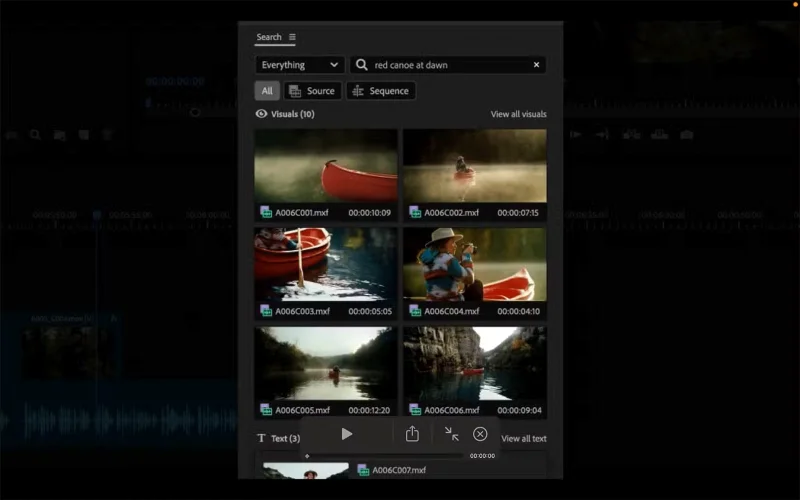
You can search for video files by location name, description of what's in the video — for example, "girl with dog" — date and time, dialogue, and even camera angle.
This search tool will save you time and frustration, and could shave minutes or even hours off your editing workflow. It’s much easier to describe the footage you’re looking for than to try to remember the time, date, or location it was shot. This will streamline workflows for larger teams, allowing everyone to work as efficiently as possible. The AI tools Adobe is announcing are exciting, even if they’re still in beta right now.
AI-powered subtitle translation
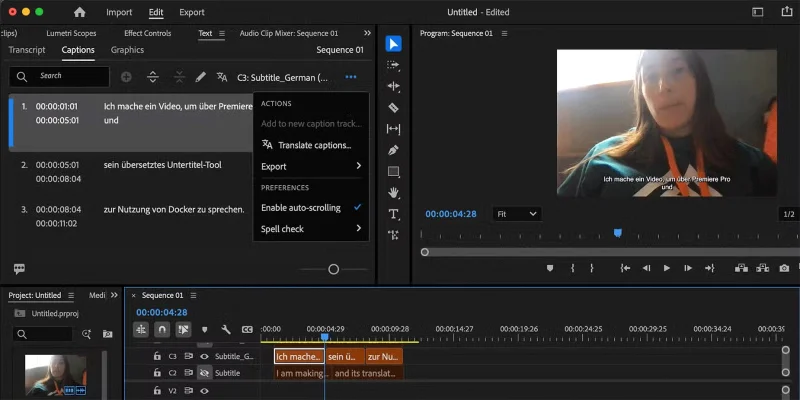
The second major feature of Premiere Pro's updated tools is an AI-powered subtitle translator. Premiere Pro can translate subtitles into up to 17 different languages, allowing you and your team to save time on manual translation and apply nuanced language differences.
Not only are subtitles important for reaching and connecting with your audience, but with the global growth of video content, translated subtitles allow you to reach more viewers, regardless of borders. Using subtitles allows your video content to remain authentic, compared to the more common dubbing or AI model replacement.
Together, all of Adobe’s additional motion features can improve collaborative workflows for teams of filmmakers, video editors, and motion designers. Premiere Pro’s AI caption translation and intelligent search are available in Premiere Pro (Beta). Adobe Creative Cloud users can download Adobe beta apps from Creative Cloud.
Create a spooky office cubicle with Halloween desk decor ideas that keep your workspace usable, tidy, and mindful of workplace safety.
Plan a recognizable Halloween 2026 look with pop culture costumes inspired by Spider-Man, Supergirl, Toy Story 5, Moana, Mario, and Wednesday.
Sort leftover Halloween candy safely, share or repurpose sealed treats, and choose food use or compost for pumpkins based on their condition.
Compare workplace Halloween costume choices by respect, dress code, mobility, and safety—and learn when a subtle accessory or a policy check is the better option.
Find a couples costume that fits your style, budget, and comfort level, from Addams Family classics to original inside-joke duos.
Need a last-minute high school Halloween costume? Compare 10 easy closet-based ideas by prep time, comfort, school-day practicality, and simple safety checks.
Use a simple 2026 Halloween decorating timeline for indoor décor, outdoor displays, and fresh pumpkins, with practical adjustments for weather and events.
Mix five vivid, approachable Halloween cocktails with measured recipes, simple prep tips, and an alcohol-free option for your party guests.
Find 15 office-friendly Halloween costume ideas for 2026, with practical checks for dress codes, respectful themes, comfort, and workplace safety.
Plan a fun elementary school Halloween party with easy crafts, games, inclusive treats, costume tips, and a sample 75-minute classroom schedule.








