Alibaba Launches AI Model That Can Read Human Emotions
Chinese e-commerce giant Alibaba has continued to make headlines by launching a new AI model that it claims is capable of reading human emotions.
Alibaba has just officially announced its latest reasoning model, and it looks like DeepSeek and OpenAI have something to worry about — if Alibaba’s “hype” is to be believed. The model is open source, so anyone can access it and experiment with it for free.
Called QwQ-32b (Quan-with-Questions), Alibaba's new AI model runs on significantly fewer parameters than almost all major language models today, meaning it requires fewer resources. Alibaba claims QwQ-32b performs at the same level as DeepSeek or OpenAI's o1-mini.
The DeepSeek-R1 large language model (LLM) made waves when it was launched in early February, challenging the gold standard set by ChatGPT, but at a much lower cost. With QwQ-32b, it seems Alibaba wants to push that limit even further.
Technically, DeepSeek-R1 requires 671 billion parameters to run, with 37 billion parameters enabled. Alibaba's QwQ-32b, meanwhile, requires just 32 billion parameters. These numbers may seem abstract to many, but they make a huge difference in computing power: while DeepSeek-R1 requires 1600GB of VRAM to run, QwQ-32b only needs 24GB of VRAM. In most cases, this would require a graphics card like the Nvidia H100 or equivalent, but even the gaming-grade RTX 4090 has 24GB of VRAM. The latest RTX 5090 bumps that up to 32GB.
Some have even suggested that, despite having only 32 billion parameters, QwQ-32B still performs on par with or surpasses R1 in areas such as mathematics, programming, and general problem solving. Alibaba also said that QwQ-32B outperforms OpenAI's o1-mini, which is built with 100 billion parameters. QwQ-32B is available on Hugging Face, the world's largest open-source AI model community.
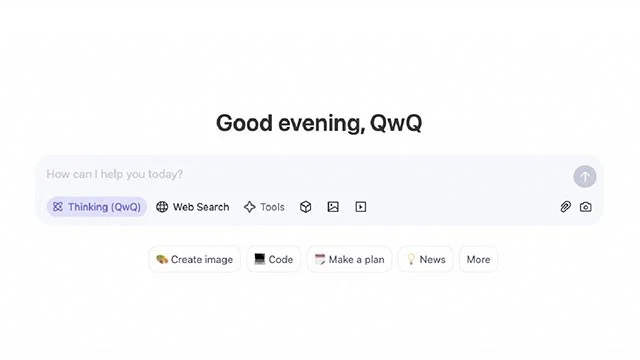
Alibaba's QwQ-32b is available under the Apache 2.0 license, which means companies and researchers can freely use it. More importantly, we can try it out via Alibaba's Qwen Chat. Like DeepSeek, QwQ-32b has some limitations in terms of topic restrictions. For example, when asked about political issues, Qwen Chat will give a message that this is an inappropriate topic. But there are also some advantages that are immediately obvious.
QwQ-32b seems to give quite detailed answers even to quick and simple questions. This can be good, but in a way it is quite annoying because it provides a lot of unnecessary information that you did not ask for. One plus is that QwQ-32b can show the entire reasoning process, similar to ChatGPT's Deep Thinking feature — but not as deep.
Whether Alibaba's claims will come true remains to be seen, but it looks like ChatGPT and DeepSeek now have a worthy new competitor.

Chinese e-commerce giant Alibaba has continued to make headlines by launching a new AI model that it claims is capable of reading human emotions.
Chinese technology group Alibaba has just announced a new AI model called QVQ-Max of the Qwen series, marking a breakthrough in the field of multimedia AI.
Oil heaters make noise, leak oil, and do not heat up. These are all problems that arise when using a heater. So what are the causes of these problems? Read our article below!
Master how to assign participants to breakout rooms in Microsoft Teams with this step-by-step guide. Boost meeting engagement, automate assignments, and troubleshoot like a pro for seamless virtual collaboration.
Struggling with Microsoft Teams "Price Error" after the latest pricing update? Discover step-by-step fixes to resolve it quickly, restore seamless collaboration, and avoid subscription headaches. Updated with the newest solutions.
Struggling with Microsoft Teams Background Error Transparency? Discover proven step-by-step fixes for blurry, glitchy virtual backgrounds. Restore perfect transparency in Teams meetings effortlessly. Updated with the latest solutions.
Struggling with Microsoft Teams "Đăng nhập" login error? Discover step-by-step fixes for smooth sign-in. Clear cache, update app, and more – no tech skills needed! Works on Windows, Mac, and web.
Tired of Microsoft Teams Web Error 503 Service Unavailable blocking your meetings? Discover quick, step-by-step fixes to resolve the 503 error fast – no tech skills needed! Clear cache, check status, and get back to collaborating seamlessly.
Stuck with Microsoft Teams Update Error 0x80070002? Discover proven troubleshooting steps to resolve this frustrating issue quickly and get your Teams app updated seamlessly for uninterrupted collaboration.
Tired of Microsoft Teams Error AADSTS50020 blocking your sign-in? Discover step-by-step fixes for user account conflicts, backed by the latest Azure AD solutions. Get back to work fast!
Tired of Microsoft Teams microphone error with no sound? Discover quick, step-by-step fixes for Teams mic not working on Windows, Mac, and more. Restore crystal-clear audio in minutes!
Tired of the Microsoft Teams "Task Management" Error disrupting your workflow? Discover proven fixes like clearing cache, updating Teams, and troubleshooting permissions to get back to seamless collaboration in minutes. Updated with the latest solutions.
Frustrated by the Microsoft Teams 'How to Teams' Help Error? Discover proven, step-by-step solutions to fix it quickly and restore smooth help access. Latest 2026 updates included for seamless teamwork.
Struggling with Microsoft Teams "Room Error" Syncing? This ultimate guide provides step-by-step fixes for Microsoft Teams Room Error Syncing issues, ensuring seamless meetings and quick resolutions. Updated with the latest tips.
Master troubleshooting Microsoft Teams Workflows Power Automate issues with step-by-step fixes for common errors. Get your automations running smoothly – no more frustration! Proven solutions for triggers, permissions, and more.
Struggling with Microsoft Teams "Restart Error" in 2026? Discover proven, step-by-step fixes to resolve the endless restart loop quickly. Clear cache, reset app, and more for seamless collaboration. Get back online fast!
Master how to create breakout rooms in Microsoft Teams before a meeting with this easy guide. Pre-assign participants, boost collaboration, and elevate your virtual sessions effortlessly.








